Poor SaaS vendor offboarding can lead to major security risks and financial losses. Missed steps, like leaving orphaned accounts or unrevoked API keys, expose sensitive data and drive up costs. For example, 60% of data breaches in 2023 involved third-party vendors, and businesses lost an average of $17.4 million per insider threat.
To avoid these issues, here's a quick summary of the key steps:
- Review Contracts: Check termination clauses, data handling terms, and notice periods.
- Assign Roles: Use a clear RACI matrix to divide tasks across IT, Legal, Finance, and Procurement.
- Revoke Access: Disable accounts, rotate API keys, and monitor for lingering access.
- Secure Data: Back up critical files, verify deletion, and request Certificates of Destruction.
- Settle Finances: Cancel subscriptions, recover unused licenses, and reconcile invoices.
Automation tools like Okta, Torii, and SaaS Management Platforms can streamline these processes, saving time and reducing errors. Following a structured approach ensures security, compliance, and cost savings.
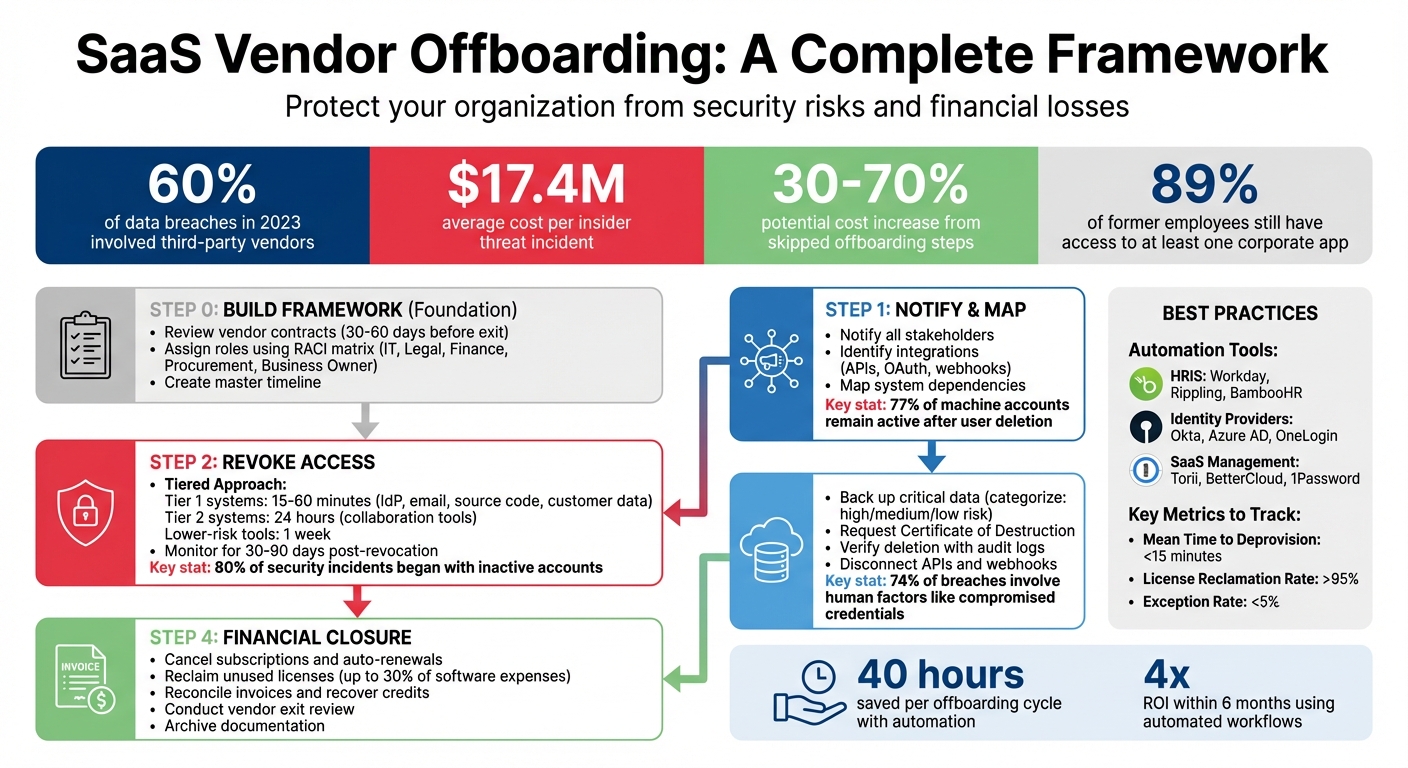
SaaS Vendor Offboarding Process: 4 Essential Steps
Vendor Exit Strategies and Plans: Managing the Offboarding Process Safely and Effectively
sbb-itb-e3aed85
Building an Offboarding Framework
A structured offboarding process ensures you avoid lingering SaaS accounts, exposed data, or unexpected billing. This framework revolves around two key aspects: reviewing vendor contracts and assigning clear internal responsibilities.
Reviewing Vendor Agreements
Start by auditing your SaaS contracts 30 to 60 days before your planned exit. This timeline gives you enough room to manage notice periods, transfer data, and settle financial matters without last-minute stress. Pay close attention to these contract details:
- Termination Clauses: These outline the required notice period (commonly 30, 60, or 90 days) and whether early termination comes with penalties. Missing an auto-renewal window could lock you into an unwanted extended commitment.
- Data Handling Provisions: Determine if the vendor is obligated to return your data, the format of the transfer, and how long they will retain your data post-termination.
- Surviving Obligations: Some terms, like non-disclosure agreements, confidentiality clauses, or audit rights, may remain enforceable even after the contract ends.
For example, in 2021, Lexington Medical Center faced a costly breach of archived patient data. Although their contract had ended, they were still responsible for notifying affected individuals and covering credit monitoring costs because the data hadn't been properly purged.
"Termination clauses define how and when you can exit the contract. This is your escape hatch if the vendor's performance declines, your needs change, or you find a better alternative." When searching for a replacement, consulting a SaaS software directory can help identify more suitable vendors. – Terms.law
Always request a written certificate of destruction that includes the deletion method and completion date - verbal assurances won't cut it. Additionally, during the contract period, test the functionality of transferred administrative credentials to avoid surprises later.
Once contracts are reviewed, the next step is setting up clear internal roles to enforce these safeguards.
Assigning Internal Roles and Responsibilities
After reviewing contracts, clearly defined responsibilities ensure a smooth offboarding process. Effective coordination involves teams like IT, Legal, Finance, Procurement, and the business owner who uses the tool daily.
A RACI matrix can help clarify roles by identifying who is Responsible, Accountable, Consulted, and Informed for each task. For instance, IT Security might handle revoking SSO access, Legal could review termination clauses, Finance would reconcile invoices using open-source billing tools, and Procurement can update vendor records. Create detailed playbooks for each role, assign specific individuals, and review these plans quarterly.
"Offboarding chaos starts when no one knows who owns each task. The fix begins with a role-based policy that lists people, not departments." – Chris Shuptrine, Torii
Develop a master timeline to align the schedules of different teams. For example, Legal might need 60 days to review contracts, while IT may only need five days to revoke access. Automating workflows - like marking a vendor as "inactive" in your system - can help ensure deadlines are met.
| Team | Primary Responsibility | Primary Task |
|---|---|---|
| IT / Security | Access Control | Revoke access and monitor logins |
| Legal | Compliance & Risk | Review clauses, issue notice, and verify IP |
| Finance | Financial Closure | Reconcile invoices, cancel renewals, recover credits |
| Procurement | Vendor Management | Update vendor records and deactivate vendor in ERP |
| Business Owner | Continuity | Manage knowledge transfer and document configurations |
Step 1: Notify Stakeholders and Map Dependencies
The first step in a smooth offboarding process is to notify all relevant stakeholders and map out system dependencies. Missing even one key contact or integration can lead to serious disruptions, so it's essential to be thorough from the start.
Communicating with Stakeholders
Start by identifying everyone who needs to be informed. Typical stakeholders include:
- IT and Security: Responsible for revoking access and securing systems.
- Finance: Handles stopping payments and reconciling any outstanding invoices.
- Procurement: Manages contract closures and vendor agreements.
- Legal: Ensures termination notices comply with contractual obligations.
- The Business Owner: Oversees the vendor relationship and its impact on the organization.
- End Users: Those whose workflows might be affected by the offboarding process.
To streamline communication, use your contract records to find the "Internal Relationship Owner." Check your SaaS inventory to identify which departments are linked to the vendor, and review identity provider sign-in logs to pinpoint active user groups.
Appoint one person to coordinate communications to prevent overlaps or conflicting messages. Hold a meeting with all departments to align on a timeline. For example, Legal might need up to 60 days to review obligations, while IT could revoke access in just five days. When sending the formal termination notice, follow the method specified in the contract. Be specific - set a clear termination date rather than using vague terms like "end of quarter." Also, assign a single point of contact for all vendor-related communication to avoid confusion.
Once stakeholders are informed, shift your attention to identifying technical integrations that could be affected.
Identifying Integrations and Dependencies
Technical dependencies often make offboarding more complicated. Beyond deactivating user accounts, you'll need to document all integrations, such as:
- API keys
- OAuth connections (e.g., Salesforce, Google Workspace)
- Webhooks
- Scheduled data syncs
Surprisingly, up to 77% of machine accounts, including API tokens, remain active after user accounts are deleted. This can create vulnerabilities if not addressed.
Talk to the Business Owner and key users to uncover any undocumented "shadow" integrations. Check code repositories for hardcoded API keys or tokens that might need updating. Additionally, review downstream dependencies like automated reports, workflows in tools like Zapier or Workato, and embedded applications that rely on the vendor's service. This step is critical - nearly 60% of data breaches in 2023 were tied to third-party vendors.
To wrap up this phase, create a network diagram to map out all system connections. This visual representation will help you identify potential points of disruption and address them before completing the offboarding process.
Step 2: Revoke Access and Secure Systems
Once you've mapped dependencies and informed stakeholders, the next step is to immediately revoke access. This action is crucial - studies show that 80% of investigated security incidents began with inactive accounts still lingering in an identity store. A striking example of this is the Marriott breach in 2020, where data for 5.2 million guests was exposed because credentials for two franchise workers remained active months after their departure.
Removing User Accounts and API Keys
Start by disabling accounts in your Identity Provider (IdP), like Okta, Azure AD, or Google Workspace. This step cuts off access across all integrated applications. However, don’t stop there - explicitly revoke OAuth tokens, API keys, and active browser sessions. Otherwise, "ghost" access might persist, even after resetting passwords.
Use a tiered approach to prioritize risk when revoking access:
- Tier 1 systems (e.g., IdP, email, source code repositories like GitHub, customer data systems like Salesforce, and financial platforms): Revoke access within 15 to 60 minutes.
- Tier 2 systems (e.g., collaboration tools, project management apps): Handle within 24 hours.
- Lower-risk tools (e.g., training portals): Complete this process within one week.
Don’t forget to clear MFA tokens, such as Duo push notifications, Google Authenticator codes, or FIDO2 keys. Rotate any shared credentials the vendor had access to, whether stored in password managers or shared through tools like Slack. Review automation platforms like Zapier or Workato for workflows involving the vendor and disable them. Additionally, scan code repositories for any hardcoded API keys or tokens and rotate them immediately.
Once all access points are revoked, verify system security to ensure the offboarding process is airtight. These steps work hand-in-hand with earlier tasks like stakeholder notifications and dependency mapping.
Protecting System Security
Double-check access removal by attempting to log in as the former user using a private browser window. This ensures their credentials no longer work. Within 48 hours, confirm reduced license counts and verify there are no active sessions lingering in the system.
Set up monitoring for a "quiet period" lasting 30 to 90 days. During this time, closely review logs for failed login attempts, unexpected API activity, or unusual data flows to external endpoints. This is especially important because insider threats can be incredibly costly, with incidents averaging $17.4 million per breach. For instance, the Geisinger breach in 2024 - affecting over one million patients - was tied to a former employee of Nuance Communications who retained unauthorized access to patient data. Use SIEM tools to flag suspicious activities, such as large file downloads or irregular access patterns, during this monitoring period.
"48% of IT teams worry that missing offboarding steps will make their organization vulnerable" - BetterCloud 2025 State of SaaS Report
Step 3: Retrieve and Manage Data
Once you've secured access points, the next priority is to extract and safeguard critical data before ending the vendor relationship. It's worth noting that 74% of data breaches involve human factors, such as compromised credentials from former employees. Plus, incidents involving third parties cost about 40% more to address than internal breaches. Here's how to securely back up your data and confirm its permanent deletion.
Backing Up Critical Data
Start by organizing your data into three categories:
- High-risk: Includes sensitive information like customer data, financial records, and source code.
- Medium-risk: Covers internal documents and project files.
- Low-risk: Includes less critical items like marketing calendars and training resources.
This classification helps you prioritize what to retrieve and where to focus your efforts.
Don't assume your vendor's retention policies automatically protect your data. Stuart Burns, a virtualization expert, explains:
"Many users and smaller companies believe that SaaS data is automatically backed up and protected by default. In reality, ensuring SaaS data security and recoverability requires a proactive approach".
To stay in control, use third-party backup tools to create independent copies of your data. For cloud platforms like Google Drive or OneDrive, take advantage of ownership transfer tools to reassign files to a designated manager or secure archive account, avoiding the risk of orphaned data. Similarly, export communication histories from platforms like Slack or Microsoft Teams, including private messages and channels, to encrypted storage. Use structured formats like JSON or CSV for records, PST or EML for emails, and SQL dumps for databases to ensure compatibility with future systems.
Before finalizing your exports, test the backups. Run sample exports and load the data into a staging environment or alternative tool to check for errors like mismatched fields, broken timestamps, or missing attachments. Encrypt backups while at rest and create immutable copies to meet legal and audit requirements. Keep detailed records of every backup action, including timestamps and executor IDs, to maintain a clear chain of custody.
Verifying Data Destruction Protocols
After successfully backing up your data, the next step is to confirm that all company data has been permanently deleted. A verbal assurance isn't enough - request a written Certificate of Destruction (CoD) that details the data removed, the deletion date, and the systems or databases cleared.
Demand a signed attestation or legal notice from the vendor, confirming compliance with the agreed-upon deletion schedule. This should also cover any third-party subprocessors or cloud storage providers the vendor used. Keep in mind that nearly 60% of data breaches in 2023 were tied to third-party vendors. Additionally, review system logs and audit trails to confirm when accounts were deactivated and data access was terminated.
Once you’ve received confirmation, conduct a final security review. Look for any remaining integrations, API connections, or data flows between your systems and the former vendor. Disconnect APIs, webhooks, and plugins to prevent unauthorized syncing or operational disruptions. Monitor your systems for 30 to 90 days after offboarding for unusual activity, such as failed login attempts or unexpected API calls from the former vendor.
| Verification Method | Evidence Provided |
|---|---|
| Certificate of Destruction | Written record of systems, dates, and data types |
| Vendor Attestation | Signed letter or legal notice of compliance |
| Audit Log Export | Immutable timestamps of deactivation events |
| Subprocessor Confirmation | Multi-party deletion certificates |
If the vendor relationship involves litigation or other high-risk issues, apply a "Legal Hold" to archived data. This prevents accidental purging or deletion, ensuring necessary records are preserved while completing the offboarding process. These steps are essential to maintaining data security and staying compliant during the offboarding process.
Step 4: Complete Financial and Administrative Tasks
After handling data security and access revocation, the next step in offboarding is to wrap up financial and administrative matters. Skipping these steps can lead to increased costs - sometimes by as much as 30–70%.
Canceling Subscriptions and Reclaiming Licenses
Start by reviewing the termination clauses in your contracts to identify notice periods, which typically range from 30 to 90 days. Send a formal termination notice as required and disable auto-renewal immediately to avoid unexpected charges.
Next, reconcile invoices, prepaid credits, and refunds for unused licenses. Unused licenses can account for nearly 30% of software expenses. Use SSO logs from systems like Okta, Azure AD, or Google Workspace to pinpoint accounts with no activity over the past 30 to 90 days [26,27]. For example, in February 2025, companies using SaaS management tools reclaimed 15,000 seats across 400 applications, saving approximately $4.3 million annually.
If some users aren’t taking advantage of premium features, consider downgrading their subscriptions. For instance, switching users from Microsoft 365 E5 to E3 plans can cut costs by up to 42%. Inform your finance team to halt payments, cancel open purchase orders in your ERP system, and mark supplier profiles as "inactive." Also, review corporate card transactions for unauthorized signups or charges that may have bypassed your primary identity management system.
Keep an eye on your systems for 30 to 90 days post-offboarding to catch any unexpected billing or API activity that might signal incomplete processes. Companies that implement systematic license cancellation have reported a 15–25% drop in SaaS spending within the first quarter.
These actions set the stage for a smooth vendor exit review.
Conducting Vendor Exit Reviews
Once financial and subscription-related tasks are finalized, conduct a vendor exit review to evaluate performance and document any lessons learned. This involves a short meeting with stakeholders from IT, Finance, and Legal to determine whether the vendor met its SLAs and KPIs. Record the reasons behind the termination, whether they involve performance issues, compliance breaches, or strategic changes - non-performance and compliance breaches account for over 40% of vendor offboarding cases.
Take note of any challenges encountered during offboarding to refine internal playbooks for future use. As ConductorOne emphasizes:
"If you can't find it two years from now, it might as well not exist".
Centralize all critical documents - termination notices, data destruction certificates, financial settlements, and asset return confirmations - in a searchable system with proper retention policies. This is vital for protecting your organization during audits or legal disputes. For instance, Morgan Stanley paid $60 million in fines in 2022, five years after an incident involving inadequate vendor oversight during data center decommissioning. Similarly, AT&T faced a $13 million penalty after a former cloud provider mishandled 8.9 million customer records due to improper data destruction.
| Financial Checklist Item | Action Required |
|---|---|
| Outstanding Invoices | Verify charges against service delivery before making final payments |
| Prepaid Credits | Request refunds for unused balances |
| Auto-Renewals | Cancel recurring billing immediately |
| Unused Licenses | Negotiate refunds for partially used annual seats |
| Early Termination Fees | Confirm penalties and ensure calculations are accurate |
Finally, review your contract for any "survival clauses" - such as audit rights or indemnification - that may remain active even after the termination. Addressing these details ensures a thorough and clean exit while minimizing potential liabilities.
Best Practices for SaaS Offboarding
Managing SaaS vendor offboarding effectively goes beyond just ticking boxes on a checklist. It requires a thoughtful approach that incorporates automation, performance tracking, and ongoing improvements. Without these, organizations risk overlooking critical steps, leaving security vulnerabilities or wasting money on unused licenses.
Using Automation Tools
With enterprises managing an average of 106 SaaS applications, manual offboarding isn’t just time-consuming - it’s nearly impossible to execute flawlessly. Automation tools step in to ensure accuracy and timeliness, minimizing human error.
HRIS platforms like Workday, Rippling, BambooHR, and HiBob serve as the central hub to kick off automated offboarding when an employee’s status changes to "terminated" or "inactive". Identity providers such as Okta, Microsoft Entra ID, and OneLogin simplify access control, enabling IT teams to instantly revoke SSO tokens and suspend sessions. For apps without SSO, SaaS Management Platforms like Torii, BetterCloud, Auvik, and 1Password SaaS Manager use API integrations to handle account deprovisioning automatically.
These tools are game-changers. Gian Luca D'Intino-Conte, Director of IT at Lunchbox, shared:
"With Torii, I've saved over 40 hours – a whole work-week's worth of time - just in offboarding tasks."
Bernard Isibor, Global Manager of IT Ops & Infrastructure at Elastic, echoed this sentiment:
"From onboarding to offboarding, SaaS Manager automates the user lifecycle, which makes my life so much easier."
For seamless deprovisioning, SCIM protocols ensure consistent programmatic user removal across vendors. Data management tools like the Google Workspace Admin SDK or Microsoft Graph API can transfer file ownership automatically before accounts are deleted. Organizations using these automated workflows often see a 4x return on investment within six months.
Beyond saving time, automation helps reclaim up to 25% of unused licenses and flags rogue apps by scanning corporate card charges and CASB logs. Once automation is in place, the next step is to measure its impact and refine the process.
Tracking Metrics and Improving Processes
Even with automation, you can’t improve what you don’t measure. Establishing clear KPIs helps identify bottlenecks and optimize offboarding workflows. Start with these core metrics:
- Mean Time to Deprovision (MTTD): This measures the time from an HR status change to the final SaaS logout. Aim for under 15 minutes.
- License Reclamation Rate: Track the percentage of licenses recovered within 24 hours, with a goal of over 95%.
- Exception Rate: Monitor terminations requiring manual intervention, keeping this below 5%.
Financial tracking is equally important. By comparing reclaimed licenses with vendor invoices, companies often uncover unnecessary expenses, sometimes paying 5% to 8% more than needed. Regularly calculating the savings from automated license recovery highlights the tangible benefits of these tools.
Post-offboarding reviews are another vital step. After each cycle, assess delays, API issues, or security alerts. High-risk termination drills can also expose vulnerabilities. These simulations, targeting a deprovisioning time of under five minutes, help prevent inactive accounts from becoming security risks. Alarmingly, 80% of investigated security incidents stem from accounts that weren’t properly deactivated, and 89% of former employees still have access to at least one corporate app.
To drive accountability, set a Service Level Objective (SLO), such as revoking all SaaS access within 15 minutes of termination. Display this metric on a dashboard accessible to HR, IT, and Finance teams. This level of visibility encourages collaboration and ensures continuous improvement.
| Metric | Description | Target Goal |
|---|---|---|
| Mean Time to Deprovision (MTTD) | Time from HR status change to final SaaS logout | < 15 minutes |
| License Reclamation Rate | Percentage of licenses recovered and reassigned within 24 hours | > 95% |
| Exception Rate | Share of terminations requiring manual intervention | < 5% |
| Automation Coverage | Percentage of cloud apps covered by automated processes | 100% for Tier 1 apps |
| Cost Savings | Total dollars reclaimed from dormant seats per quarter | Varies by org size |
Conclusion
SaaS vendor offboarding is a critical step in safeguarding against security breaches, compliance violations, and unexpected expenses. The stats speak for themselves: 60% of data breaches involve third-party vendors, and the costs to fix these issues can be 40% higher. Clearly, offboarding is just as important as onboarding.
To execute this effectively, collaboration across departments is non-negotiable. IT teams must revoke access, Procurement should terminate contracts, Finance handles final payments, and Legal ensures compliance. Without this teamwork, organizations risk leaving behind vulnerabilities like active API keys, service accounts, or shared credentials.
Planning and automation are the cornerstones of a smooth offboarding process. Start preparing early to allow time for data migration and coordination among stakeholders. Automation tools can make a huge difference, often cutting deprovisioning times to under five minutes. While automation simplifies the process, regular evaluations - such as tracking reclaimed licenses, conducting retrospectives, and performing quarterly audits - are essential for maintaining security and controlling costs.
As one industry expert puts it:
"A structured vendor offboarding checklist is not optional but essential... this oversight can expose businesses to costly data leaks, compliance failures, and workflow disruptions"
Each offboarding cycle is a chance to enhance your security measures, cut unnecessary costs, and improve your processes for future transitions. Use the steps outlined earlier to make these practices a standard part of your operations.
FAQs
What should I offboard first to reduce risk fastest?
To reduce risks during SaaS vendor offboarding, the first step is to revoke access and disable accounts associated with the vendor or employee. This includes actions such as revoking licenses, disabling identities, and deactivating accounts right away. These measures help close any potential security gaps and block unauthorized access, ensuring there are no leftover permissions that could be misused. Addressing access removal promptly is key to minimizing security risks from the start.
How do I find and disable hidden API keys and integrations?
If API keys are hidden in your code, the first step is figuring out where they’re stored. Avoid hardcoding them directly into your codebase - it’s a risky practice. Instead, use environment variables or secret management tools to store them securely.
Here are a few key practices to follow:
- Scan Your Code Regularly: Use tools to check for exposed API keys in your repositories. This helps catch any accidental leaks early.
- Revoke Compromised Keys: If you find a key that’s been exposed, revoke it immediately to prevent unauthorized access.
- Monitor API Usage: Keep an eye on how your API keys are being used. Unusual activity could indicate a security issue.
- Rotate Keys Frequently: Regularly updating your keys reduces the risk of long-term exposure.
- Audit Integrations: Review all third-party integrations to ensure they’re managing your API keys properly and securely.
By staying proactive with these steps, you can maintain better control over your API keys and reduce potential vulnerabilities.
What proof should I get that the vendor deleted our data?
To ensure your data has been securely deleted, ask the vendor for formal confirmation or documentation. This could include audit logs, deletion certificates, or confirmation emails that clearly state the data has been permanently removed. Keeping this proof on hand is important for maintaining compliance and can be invaluable during audits or security assessments.