A Learning Management System (LMS) is critical for remote teams to streamline training, improve onboarding, and enhance productivity. However, 63% of companies report dissatisfaction with their LMS within two years due to poor alignment with their needs. Choosing the right platform can save time, resources, and frustration. Here’s what you need to know:
Key Takeaways:
- Core Features to Prioritize: Mobile access, collaboration tools, and personalized learning paths are essential for remote teams.
- Technical Needs: Analytics, HR integrations, and scalability ensure long-term success.
- Hidden Costs: Watch for expenses like implementation fees, content migration, and storage overages.
- Vendor Support: Test responsiveness and ensure setup assistance is included.
Quick Checklist:
- Mobile Access: Does it work offline and across devices?
- Collaboration: Are there tools for team interaction like forums or video conferencing?
- Personalization: Does it tailor content to learners’ roles and skill levels?
- Analytics: Are there real-time dashboards and progress tracking?
- Integrations: Does it sync with HR and communication tools?
- Pricing: Are all costs, including hidden fees, clear?
A structured evaluation process can reduce implementation time by 40% and improve user satisfaction by 78%. The right LMS will simplify remote training, improve engagement, and minimize administrative effort. Read on for a detailed breakdown of features, pricing models, and platform comparisons.
Core Features to Evaluate
When tackling the challenges of remote work, it's crucial to zero in on features that promote mobility, connectivity, and tailored learning experiences. Not all platforms deliver the same outcomes, and those differences can significantly influence how effectively your team learns. Focus on three key areas: mobile access, collaboration tools, and personalized learning paths. These features directly address the unique hurdles remote teams encounter every day.
Mobile Access and Device Compatibility
An LMS needs to function effortlessly across all devices - smartphones, tablets, and desktops. Whether someone is completing a module on their iPhone during a commute or reviewing materials on a laptop at home, the interface should be responsive and easy to navigate.
Offline functionality is particularly important for employees in areas with spotty internet access. This allows users to download content, complete it offline, and sync their progress once reconnected. Barbara Robinson from Weather Solve highlighted this necessity:
"When training happens in places like wind-blown scaffolding or a Chilean ridge at 14,000 feet… an LMS must work offline and sync when reconnected".
Cross-device syncing is another must-have. It ensures that learners can switch devices without losing their place. Accessibility features - like adjustable playback speeds, closed captions, and compatibility with screen readers (WCAG 2.1) - make content usable for everyone, regardless of their device.
When evaluating platforms, ask to see the learner's mobile view during demos - not just the admin dashboard. This will help you assess how easy it is for users to enroll and navigate. For contractors or gig workers, lightweight logins or single sign-on (SSO) options can simplify access and reduce friction.
Once mobile functionality is covered, the next step is to explore how the platform fosters team interaction through collaboration tools.
Collaboration and Social Learning Tools
Remote work can feel isolating, but collaborative features can transform learning into a shared experience. Tools like discussion boards, threaded forums, and integrated video conferencing allow teams to connect and exchange knowledge in real time, reducing feelings of isolation.
For example, in 2025, DataNumen introduced an LMS with threaded discussion forums that included timestamp referencing. CEO Alan Chen shared how a junior developer posted a technical question, and within hours, three colleagues responded with different solutions and code snippets. This boosted team productivity and encouraged deeper learning. Peer-to-peer interactions like these are far more engaging than simply consuming static content.
Gamification features - such as leaderboards, badges, and points - can tap into competitive instincts, improve knowledge retention, and increase participation in compliance training by as much as 65%. Peer reviews and feedback loops also help keep learners engaged and motivated to complete their courses.
For global teams, built-in video conferencing tools are invaluable. In June 2025, Nature Sparkle launched the "GemConnect" LMS feature, which included integrated video conferencing. Yoad Bet Yosef explained how this allowed specialists from different continents to practice techniques together, creating a 24-hour knowledge exchange between Australian and North American teams.
To streamline workflows, connect your LMS with tools like Slack, Microsoft Teams, or Zoom. Companies that integrate these tools often report a 60% reduction in administrative workload.
Personalized Learning Paths
Beyond mobile access and collaboration, personalization is essential for effective remote training. A one-size-fits-all approach doesn’t work for teams with diverse roles and skill levels. Modern LMS platforms use AI to tailor content based on individual behavior and performance, which can boost learner engagement by 40% and completion rates by 28%.
Adaptive learning pathways adjust course difficulty in real time, ensuring employees don’t waste time on material they already know. Pre-assessments help identify existing knowledge, allowing the LMS to skip redundant content and focus on areas that need improvement. Role-based mapping further customizes learning paths based on specific job functions or required skills.
Automated enrollment rules can assign learners to appropriate paths based on factors like their hire date, department, or role changes. This reduces manual administrative work and ensures everyone gets the training they need. Flexible content delivery options - such as asynchronous self-paced modules, microlearning (5–10 minute lessons), and blended learning models - cater to different preferences and schedules.
Using LMS analytics and quizzes, you can conduct a skills gap analysis to identify exactly where employees need improvement before assigning learning paths. To ensure structured growth, apply the SMART framework (Specific, Measurable, Achievable, Relevant, Time-bound) when defining learning objectives.
sbb-itb-e3aed85
Technical and Operational Requirements
Once you've nailed down the core features of your LMS, it's time to focus on the technical details that keep it running efficiently. These operational factors - analytics, integrations, and scalability - play a key role in ensuring the platform can grow with your business and deliver consistent results.
Analytics and Reporting Features
A solid LMS should offer visual dashboards that provide real-time insights into course completions, learner progress, and time spent on modules. These tools make it easier to spot trends and refine your training materials, especially with features like drill-down filters and question-level analytics.
Engagement metrics are another must-have. They track things like active users, login frequency, and the points where learners drop off. For teams spread across multiple time zones, focusing on deadlines and milestones is often more practical than tracking real-time attendance.
Manager views are a game changer, offering direct updates on training progress without needing constant input from HR or IT. Predictive analytics, powered by AI, can even flag employees who might need extra support before they fall behind. As eLearning Industry points out:
"If you can visualize progress in real time, you can make smarter training investments".
Organizations that prioritize structured evaluation processes report 78% higher satisfaction rates with their LMS platforms. Regularly reviewing item analysis reports can help you fine-tune quiz questions, while integrating external reporting tools allows for deeper organizational insights.
Once your analytics are in place, the next step is ensuring seamless communication between your LMS and your existing systems.
Integration with HR and Communication Systems
Your LMS should work hand-in-hand with your HR and communication tools. For example, automated provisioning through platforms like BambooHR, Workday, or ADP can save 15–20 hours per month by automatically creating user accounts and enrolling new hires.
Single Sign-On (SSO) simplifies access by letting employees use their existing credentials through providers like Okta, Azure AD, or Google Workspace. Bi-directional data sync ensures training results are shared with HR systems for payroll, performance reviews, and compliance audits. Plus, RESTful APIs and webhooks enable custom workflows, such as sending an email to a manager the moment an employee completes a course.
When evaluating integrations, check if they’re native or require third-party tools like Zapier, which can add extra costs. Also, confirm whether API access is included or comes with additional fees, often tied to higher-tier plans. During your trial, test automated enrollment by syncing a small group of users from your HRIS to ensure everything works smoothly.
With integrations sorted, you’ll want to explore customization and scalability options to meet the needs of a growing workforce.
Customization and Scalability Options
Customizing your LMS ensures it aligns with your brand and operational needs. White-labeling lets you tweak the UI for consistent branding, while custom user roles allow you to define access levels for specific groups, like regional managers or external partners, beyond the standard learner/admin setup.
For companies training external partners or clients, a multi-tenant architecture enables you to create separate, branded sub-portals within the same system. Global teams, on the other hand, benefit from multilingual interfaces and support for right-to-left (RTL) languages - features that have been shown to boost completion rates by 45% in non-primary language markets.
A cloud-based SaaS platform offers instant scalability, letting you add users or content modules without overhauling your IT setup. When planning for growth, clarify whether the vendor charges per registered user or only for active users to avoid unexpected costs.
Finally, load testing is essential to ensure the LMS can handle peak usage as your team expands. Test customization features with a small group to confirm the interface is intuitive and meets your needs.
Vendor and Pricing Assessment
Once you've confirmed that your LMS meets all technical and operational needs, it's time to evaluate SaaS solutions for vendor support and pricing. These aspects play a key role in ensuring your LMS is a dependable, long-term investment that delivers value.
Vendor Support and Setup Process
The quality of vendor support can make or break your LMS implementation. Most vendors provide support through email, chat, or phone, but their response times vary depending on their Service Level Agreements (SLAs). It's important to ensure their support hours align with your team’s schedule to avoid unnecessary delays.
Look for vendors that offer more than just basic support. Features like guided setup, legacy data migration, and administrator training can simplify the onboarding process. Many vendors also provide resources for change management, such as communication templates and launch campaigns, which can help encourage adoption across dispersed teams. As eLearning Industry notes:
"An LMS is a long-term investment, typically 3–5 years or more. Choose a vendor that acts as a strategic partner, not just a software provider."
During your trial period, test the vendor's responsiveness by submitting a technical query through their help center. This is a good way to gauge their support quality. Also, confirm whether premium support or consulting services come with additional charges.
Once you've assessed the support, turn your attention to pricing to ensure the solution fits your budget over the long term.
Pricing Models and Hidden Costs
Understanding how LMS pricing works can save you from unexpected expenses. Commonly, LMS platforms use a per-user pricing model, with costs ranging from $3 to $15 per registered user per month or $5 to $20 per active user per month. While this model is suitable for medium-sized teams, it can become expensive as your user base grows. For larger organizations with a stable number of users, flat-rate subscriptions - typically between $3,000 and $250,000+ annually - offer unlimited access and predictable costs.
Be aware of hidden costs, which can significantly inflate your budget. For instance, implementation fees can range from $1,000 for small businesses to over $150,000 for large enterprises, often adding 20% to 50% to the first-year subscription cost. Additional charges might include:
- Content migration: $1,000–$10,000
- Integration setup: $500–$2,000 per tool
- Storage overages: $100–$200 per 10GB
As The Workademy highlights:
"Most companies budget $5,000–10,000/year for an LMS but end up paying $12,000–18,000 once hidden costs are included."
To avoid surprises, request a three-year total cost of ownership (TCO) breakdown from each vendor. This should account for growth, setup fees, and typical price increases (usually 5% to 10% annually). Ask whether implementation, migration, or integration fees can be bundled at no extra cost if you commit to a multi-year contract.
LMS Platform Comparison
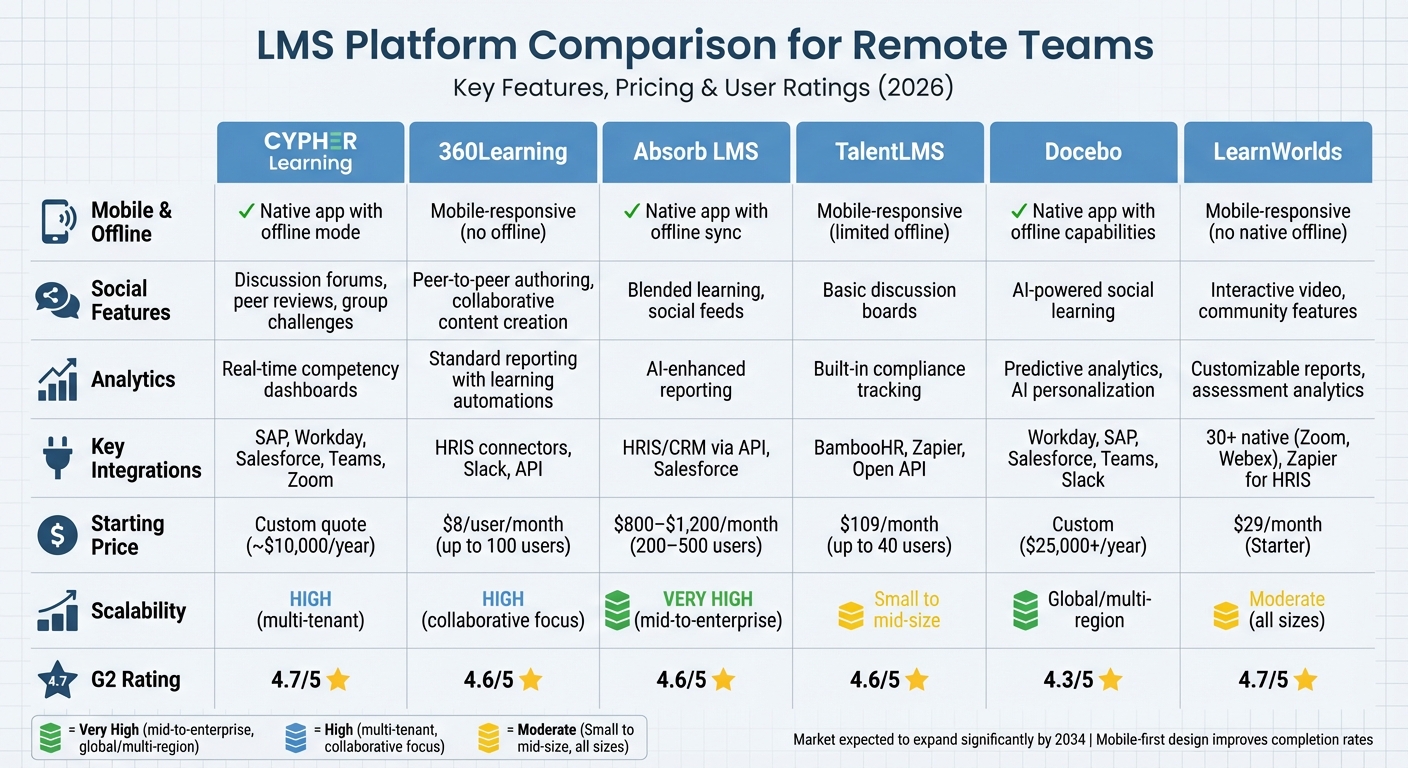
LMS Platform Comparison for Remote Teams: Features, Pricing and Ratings
When choosing an LMS platform, it’s essential to match your organization’s size, technical needs, and growth plans with the right solution. The LMS market is expected to expand significantly by 2034, and features like mobile-first design and self-paced modules are proven to improve completion rates.
Here’s a detailed comparison of six leading LMS platforms, focusing on features that matter most for remote and hybrid teams. Pricing reflects 2026 rates in USD, and scalability ratings show how well each platform can grow with your organization.
Platform Comparison Table
| Platform | Mobile App & Offline | Social Features | Analytics | Key Integrations | Starting Price | Scalability | G2 Rating |
|---|---|---|---|---|---|---|---|
| CYPHER Learning | Native app with offline mode | Discussion forums, peer reviews, group challenges | Real-time competency dashboards | SAP, Workday, Salesforce, communication tools like Teams and Zoom | Custom quote (~$10,000/year) | High (multi-tenant) | 4.7/5 |
| 360Learning | Mobile-responsive; no offline mode | Peer-to-peer authoring, collaborative content creation | Standard reporting with learning automations | Standard HRIS connectors, Slack, API | $8/user/month (up to 100 users) | High (collaborative focus) | 4.6/5 |
| Absorb LMS | Native app with offline sync | Blended learning, social feeds | AI-enhanced reporting | HRIS/CRM via API, Salesforce | $800–$1,200/month (200–500 users) | Very high (mid-to-enterprise) | 4.6/5 |
| TalentLMS | Mobile-responsive; limited offline | Basic discussion boards | Built-in compliance tracking | BambooHR, Zapier, Open API | $109/month (up to 40 users) | Small to mid-size | 4.6/5 |
| Docebo | Native app with offline capabilities | AI-powered social learning | Predictive analytics, AI personalization | Workday, SAP, Salesforce, Teams, Slack | Custom ($25,000+/year) | Global/multi-region | 4.3/5 |
| LearnWorlds | Mobile-responsive; no native offline | Interactive video, community features | Customizable reports, assessment analytics | 30+ native (Zoom, Webex), Zapier for HRIS | $29/month (Starter) | Moderate (all sizes) | 4.7/5 |
Highlights of Each Platform
CYPHER Learning is a top choice for remote and global teams that require offline access. Its real-time dashboards make it easy for managers to track skills development across distributed teams, which is especially useful in regions with unreliable internet.
360Learning excels in environments where collaboration is key. It allows subject matter experts to create and update content directly. For example, Michelin used it in 2026 to train 120,000 employees globally with just two platform managers, thanks to its learning automation features.
Absorb LMS is tailored for mid-to-enterprise organizations. It supports blended learning and offers customizable portals for internal and external training, making it ideal for businesses needing separate branded experiences.
TalentLMS is perfect for small businesses, offering a free tier for up to five users and quick deployment (average setup time: 1.5 months). While its basic tiers have limited integrations and email-only support, it includes AI-powered course creation to simplify content development.
Docebo is designed for large enterprises, offering AI-driven personalization and deep HRIS/CRM integrations. It ties learning data to business metrics like compliance and sales performance. However, its advanced features come with a steeper learning curve and higher costs.
LearnWorlds focuses on interactive content creation, making it a great fit for organizations looking to build engaging training materials. For instance, Wagamama used it in 2025 to migrate 50 training courses for 350 employees, cutting costs by eliminating localized sessions. However, it lacks xAPI support and has a learning curve for design-heavy tasks.
Complete Checklist
This checklist brings together the key evaluation criteria from earlier sections, making it easier to assess LMS platforms tailored for remote teams.
Checklist Summary Table
The table below serves as a quick-reference guide to streamline your LMS evaluation process. Share it with your team or use it during vendor demos and trials to ensure you're considering all critical factors.
| Criterion | Key Questions to Ask | Must-Have Features | Red Flags |
|---|---|---|---|
| User Experience | Is the interface intuitive for non-tech users? | Clean dashboard, minimal clicks to content, progress indicators | Cluttered UI; requires extensive training |
| Mobile Access | Can users learn without an internet connection? | Responsive design, offline sync, mobile app | Poor mobile experience compared to desktop |
| Content Management | How easily can we update live courses? | Drag-and-drop builder, SCORM/xAPI support, version control | Proprietary formats; no versioning |
| Reporting | Can we correlate training with performance? | Real-time dashboards, custom report builder, data export (CSV/API) | Manual reporting; no raw data export |
| Integration | Does it connect to our existing communication tools? | Native Slack/Teams/Zoom integrations, SSO (SAML/Okta), HRIS sync | No SSO support; separate login credentials |
| Security | Where is our data hosted and is it encrypted? | SOC 2 Type II, GDPR compliance, RBAC, data encryption at rest | No audit trails; unclear data retention policy |
| Scalability | What happens to performance if we 10x our users? | Global CDN, multi-tenancy support, automated user provisioning | Hard user/course limits; performance issues |
Final Recommendations
With these criteria in hand, here are actionable steps to finalize your LMS decision for remote teams:
Pilot the LMS with real users, not just admins. Testing with a representative sample of your learners ensures you uncover usability challenges early. Research shows that organizations using structured evaluation processes achieve 78% higher user satisfaction rates.
Evaluate total costs over three years. Beyond the monthly subscription, account for implementation fees (ranging from $5,000 to $50,000), training, content migration, and integration costs. This helps avoid financial surprises later.
Run a four-week pilot program. Dedicate Week 1 to setting up the system, Week 2 to creating a sample course, Week 3 to testing with actual remote employees, and Week 4 to finalizing your decision. Comprehensive testing can reduce implementation time by 40% on average.
Prioritize features that meet your remote teams’ needs. Focus on essentials like mobile access, asynchronous learning, and simple tracking. Avoid platforms that offer excessive features your team won’t use.
Use a weighted scoring system for vendor comparison. Assign higher scores to critical needs like compliance tracking or mobile functionality. This method ensures fairness and makes it easier to justify your final choice to stakeholders.
FAQs
Which LMS features matter most for remote teams?
When it comes to remote teams, certain LMS (Learning Management System) features can make all the difference in keeping training effective and engaging. Here are some key features to look for:
- Mobile access and offline capabilities: Learners can access training materials anytime, anywhere - even without an internet connection. This flexibility is crucial for remote teams spread across different locations and time zones.
- Social learning tools: Features like discussion boards, chat options, and collaborative spaces encourage team interaction and knowledge-sharing, even when team members are miles apart.
- Personalized learning paths: Tailored experiences help address individual learning needs, ensuring that everyone gets the most relevant and useful content.
- Integration with existing tools: Seamless compatibility with software like project management platforms or communication tools streamlines workflows, making it easier for teams to stay organized.
- Analytics and tracking: Detailed insights into progress and performance help managers identify skill gaps and measure the effectiveness of training programs.
- Reliable performance across devices: Whether on a laptop, tablet, or smartphone, the LMS should work smoothly to ensure uninterrupted learning.
These features are essential for keeping remote teams connected, engaged, and continuously learning - no matter where they are.
What hidden LMS costs should I budget for?
When budgeting for an LMS, it's important to consider hidden costs that go beyond the basic licensing or subscription fees. These can include:
- Implementation fees: Setting up the system often comes with additional charges.
- User minimums: Some platforms require a minimum number of users, which can impact costs.
- Training: Educating your team on how to use the LMS might require extra investment.
- Content migration: Moving existing content to the new platform can be both time-consuming and costly.
- Integration: Features like single sign-on (SSO) or other system connections may carry additional fees.
- Support and maintenance: Ongoing technical support and system upkeep are often not included in base pricing.
- Customization: Tailoring the platform to meet your specific needs can add to the expense.
- Optional add-ons: Additional features or tools might be enticing but come with their own costs.
These expenses can add up quickly, so it's critical to factor them into your planning to get a clear picture of the total investment.
How do I run an LMS pilot before buying?
To successfully run an LMS pilot, start by setting clear objectives and identifying measurable success criteria - think user adoption rates or how intuitive the platform feels. Choose a representative group of learners to participate, ensuring they reflect the diversity of your organization. During the pilot, keep a close eye on system performance and actively collect feedback from participants.
Once the pilot wraps up, compare the results against your predefined criteria. This step helps determine if the LMS aligns with your organization's needs. Taking this approach minimizes risks and confirms whether the system delivers the expected value before fully rolling it out.