Cloud-based and on-premise 3D imaging solutions each have distinct advantages and challenges. Your choice depends on factors like cost, scalability, performance, and data control. Here's a quick breakdown:
- Cloud-Based 3D Imaging: Offers flexibility, remote access, and vendor-managed maintenance with a subscription-based cost model. Ideal for organizations needing scalability and remote collaboration. However, it relies on internet connectivity and involves recurring fees.
- On-Premise 3D Imaging: Provides faster local performance and full control over data, making it suitable for facilities with strict compliance needs or high imaging volumes. It requires significant upfront investment and ongoing internal maintenance.
Quick Comparison
| Feature | Cloud-Based 3D Imaging | On-Premise 3D Imaging |
|---|---|---|
| Cost Model | OpEx (subscription-based) | CapEx (upfront investment) |
| Scalability | Instant, elastic expansion | Limited, hardware-dependent |
| Remote Access | Browser-based, no VPN needed | VPN required |
| Performance | Internet-dependent | High-speed LAN |
| IT Maintenance | Managed by vendor | Internal IT team required |
| Compliance | Vendor certifications needed | Full internal control |
For distributed teams or growing data needs, cloud solutions shine. For high-volume or compliance-heavy facilities, on-premise systems may be better. Hybrid setups combine the best of both models.
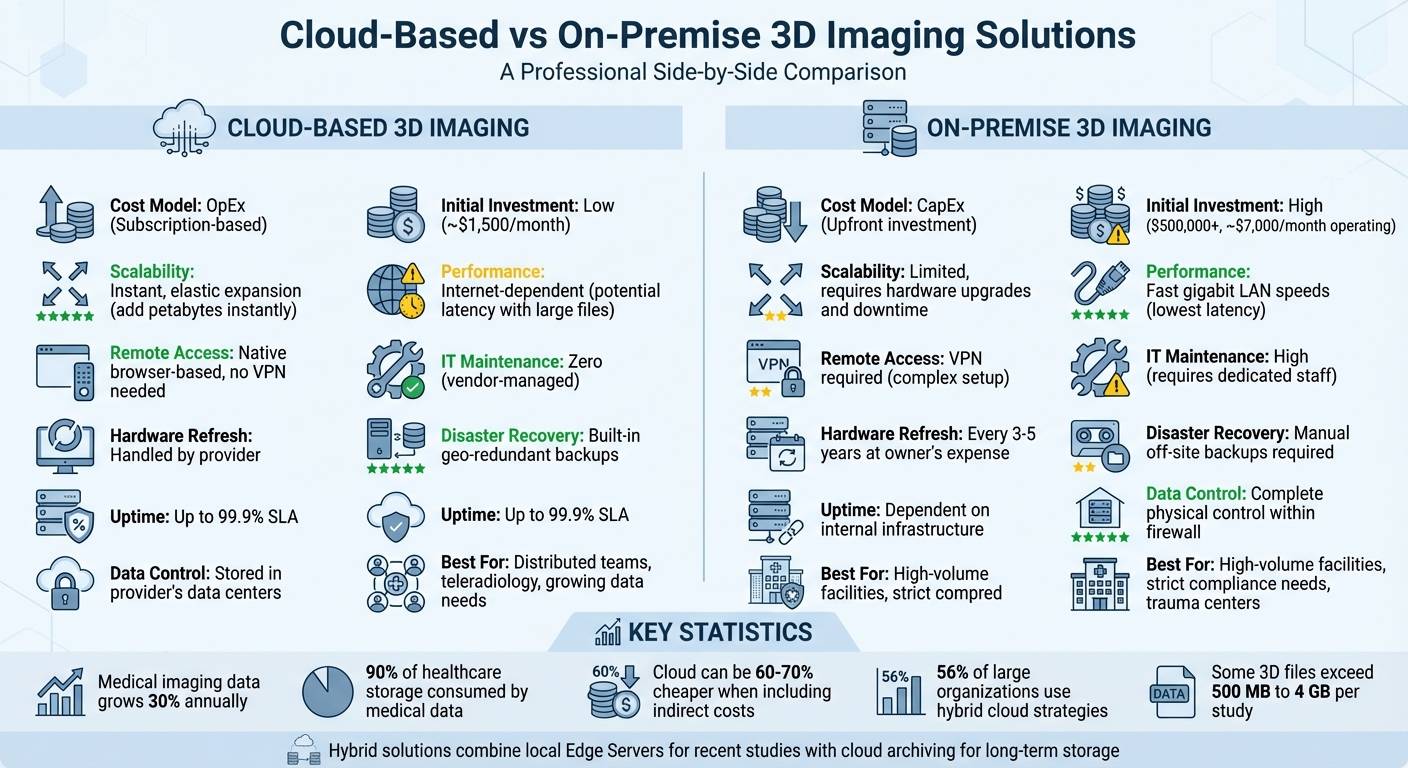
Cloud vs On-Premise 3D Imaging Solutions Comparison
Cloud-Based 3D Imaging: Benefits and Drawbacks
Benefits of Cloud-Based 3D Imaging
Cloud platforms provide virtually unlimited scalability, allowing healthcare providers to add petabytes of storage instantly when imaging demands surge. This is particularly important as medical imaging data grows by about 30% annually, with 90% of healthcare storage already consumed by medical data.
With web-based viewers, radiologists can easily collaborate from anywhere. High-resolution 3D images can be accessed through a browser without the need for VPNs, simplifying remote workflows.
The cost model shifts from large upfront investments in hardware (CapEx) to more predictable subscription-based operational costs (OpEx). This eliminates the need for expensive hardware upgrades and transfers IT maintenance responsibilities to cloud vendors.
"Cloud providers (like AWS, Azure, or Google Cloud) invest billions in security - far more than any single hospital can afford." - Andra Bria, Medicai
Modern cloud solutions also excel in disaster recovery. They utilize geo-redundant data centers and "object lock" technology, which ensures immutable backups to safeguard against ransomware attacks. Leading providers of cloud-based PACS (Picture Archiving and Communication Systems) offer up to 99.9% uptime, ensuring reliable access to medical imaging data.
Drawbacks of Cloud-Based 3D Imaging
One major challenge is internet dependency. If connectivity issues arise, access to imaging data can be interrupted, potentially affecting clinical operations unless there is a local cache or failover system in place. Additionally, large 3D files - some exceeding 500 MB or even 4 GB for studies like Breast Tomosynthesis - can cause delays on slower connections, frustrating users and slowing down diagnostics.
Another concern is the recurring operational costs. Unlike the one-time expense of on-premise hardware, cloud systems require ongoing subscription fees. While these costs are often offset by savings on electricity, cooling, server space, and IT salaries, healthcare organizations must plan for continuous payments.
Compliance requirements can also complicate adoption. Providers need to ensure their cloud vendors comply with strict data residency rules and hold certifications like SOC 2 Type II and HIPAA. A Business Associate Agreement (BAA) is essential to shift compliance responsibilities appropriately. Additionally, facilities must confirm that their internet bandwidth can support the high-volume data transfers needed for 3D imaging.
Comparison Table: Cloud-Based 3D Imaging Attributes
| Attribute | Cloud-Based 3D Imaging |
|---|---|
| Cost Model | OpEx (predictable monthly/annual subscription) |
| Scalability | Elastic; add petabytes instantly |
| Remote Access | Native browser-based access from anywhere |
| IT Maintenance | Vendor-managed updates and patches |
| Latency | Internet-dependent; potential buffering with large files |
| Disaster Recovery | Built-in geo-redundant backups |
| Uptime Guarantee | Up to 99.9% |
| Compliance | Requires vendor BAA and SOC 2/HIPAA certification |
Next, we’ll explore the pros and cons of on-premise 3D imaging systems.
sbb-itb-e3aed85
On‑Prem vs Cloud Infrastructure: Which one is better?
On-Premise 3D Imaging: Benefits and Drawbacks
When comparing cloud-based and on-premise systems, on-premise 3D imaging stands out with its own set of strengths and challenges.
Benefits of On-Premise 3D Imaging
One of the key advantages of on-premise systems is the speed of file access. With high-speed LAN connections, you can retrieve files almost instantly, without relying on external internet connections that may cause delays.
Another major benefit is data sovereignty. By keeping all imaging data within your organization's firewall, you can comply with strict data residency regulations and provide an extra layer of protection for sensitive information.
"On-premises imaging systems rely on servers and hardware located within your practice... making it fully accessible via local networks rather than the internet." – Adams Brown Technology Specialists
On-premise setups also allow for complete control over hardware and software configurations. This means you can customize your infrastructure to meet specific clinical workflows and in-house technology requirements. Plus, since you're not competing for internet bandwidth, system performance remains consistent and predictable.
However, these benefits come with some notable challenges.
Drawbacks of On-Premise 3D Imaging
While on-premise systems offer unmatched control and speed, they require a significant financial and operational commitment. The upfront investment (CapEx) can exceed $500,000, and ongoing maintenance costs - typically 18% to 22% of the original license cost per year - add to the expense. Additionally, hardware updates are necessary over time to keep the system running smoothly.
Scalability is another sticking point. With imaging data growing at an annual rate of about 30%, on-premise systems can struggle to keep up. Expanding storage often means purchasing new physical servers, which can result in downtime and increased capital costs - commonly referred to as hitting a "storage cliff."
"Expanding your storage capacity often means buying more hardware, which can lead to additional costs and downtime." – Adams Brown Technology Specialists
On-premise systems also place the full burden of security and disaster recovery on the organization. This includes maintaining an IT team to handle updates, security patches, and HIPAA-compliant backups. Physical risks, such as theft, fire, or ransomware attacks, add another layer of concern. Additionally, remote access requires complex VPN configurations, which can slow performance and complicate workflows.
Comparison Table: On-Premise 3D Imaging Attributes
| Attribute | On-Premise 3D Imaging |
|---|---|
| Cost Model | High upfront CapEx (often exceeding $500,000) |
| Scalability | Limited; requires physical hardware upgrades and downtime |
| Remote Access | Typically requires VPN; setup can be complex |
| IT Maintenance | Fully internal; requires dedicated staff |
| Latency | Lowest latency due to LAN speeds |
| Disaster Recovery | Manual local and off-site backup strategies required |
| Uptime Guarantee | Dependent on internal infrastructure and redundancy |
| Compliance | Security and HIPAA compliance are the organization’s responsibility |
Cloud vs. On-Premise: Direct Comparison
This section breaks down the key differences between cloud and on-premise solutions, focusing on cost, scalability, performance, and security.
Cost Comparison: TCO and Operating Models
On-premise systems come with hefty upfront costs (CapEx), while cloud solutions operate on a subscription-based model (OpEx). For example, implementing cloud-based 3D imaging involves minimal initial expenses, covering implementation and data migration. On the other hand, on-premise systems require substantial investments in hardware, software licenses, and facility infrastructure like cooling systems and power setups. A Dell PowerEdge server costs about $14,300, whereas an equivalent AWS instance runs around $11,200 annually.
"The cloud model can be 60–70% cheaper when indirect costs such as downtime, depreciation, and over-capacity are added." – AllianceTek Inc.
Recurring costs also differ significantly. On-premise systems need regular hardware upgrades (every 3–5 years), electricity, cooling, and IT staff. These can total approximately $7,000 per month, compared to a cloud solution's all-inclusive $1,500 monthly cost. However, for large, stable workloads, on-premise systems may become more economical after five or more years.
Both models come with additional expenses. Cloud users might face data egress fees and support charges, while on-premise setups must account for physical space, power, and specialized staff. These cost structures also influence scalability, particularly as data demands grow.
Scalability: Handling Growing Data Volumes
Cloud platforms excel in scalability, letting organizations instantly add storage as needed - no hardware upgrades required. This flexibility is especially useful for handling surges in 3D imaging data, such as breast tomosynthesis or cardiac CINE loops. In contrast, on-premise systems face physical limits. Expanding capacity means purchasing new drives and servers, which can result in downtime.
"If you grow faster than expected, you face an expensive 'forklift upgrade' to add more drive bays." – Andrei Bria, Medicai
Cloud models eliminate the guesswork of forecasting storage needs, allowing pay-as-you-go adjustments. Hybrid setups, which combine local edge servers for caching with cloud archives for long-term storage, can offer a middle ground for high-volume facilities. Scalability challenges directly impact workflow and overall system performance.
Performance and Workflow Efficiency
Cloud-based systems improve workflows with zero-footprint viewers, enabling radiologists to access imaging cases from any browser without needing complex VPN setups. On-premise systems, however, provide faster speeds through gigabit LAN connections, allowing large 3D files to open almost instantly. Cloud performance depends on internet bandwidth, which can lead to delays when downloading large files.
"Pure cloud systems are bound by the laws of physics. If your facility has poor internet bandwidth, downloading a 500MB study can result in buffering/latency." – Medicai Decision Guide
Hybrid architectures can bridge this gap by combining local LAN-speed access with cloud-based remote capabilities. Cloud platforms also often guarantee up to 99.9% uptime, minimizing the impact of hardware-related downtime. Ultimately, the choice between cloud and on-premise directly affects workflow efficiency and system reliability.
Security and Compliance
Security is a key differentiator. On-premise systems keep data within your organization's firewall, which can help meet strict data residency rules. However, major cloud providers often invest heavily in advanced security measures, such as immutable "object lock" backups, offering a level of protection that many organizations cannot match.
"Cloud PACS delivers stronger data security and uptime than on-premise servers." – RamSoft
For U.S. healthcare organizations, HIPAA compliance is non-negotiable. On-premise systems place the burden of security, disaster recovery, and compliance entirely on the organization. Cloud platforms, meanwhile, provide built-in disaster recovery with geo-redundant data centers and continuous security updates. If data sovereignty is a concern, organizations may need to consider on-premise or hybrid solutions to ensure sensitive medical data remains within specific jurisdictions.
Comparison Table: Cloud vs. On-Premise
| Feature | Cloud-Based 3D Imaging | On-Premise 3D Imaging |
|---|---|---|
| Cost Model | OpEx (Subscription/Usage-based) | CapEx (Upfront Investment) |
| Initial Investment | Low (Implementation/Migration) | High (~$14,300+ for hardware etc.) |
| Monthly Operating Cost | ~$1,500 all-inclusive | ~$7,000 (Hardware, IT Staff, etc.) |
| Scalability | Instant, elastic expansion | Limited; requires hardware upgrades |
| Performance (LAN) | Internet-dependent; potential latency | Fast; gigabit LAN speeds |
| Remote Access | Native; zero-footprint browser viewer | VPN required; complex setup |
| IT Maintenance | Zero; vendor-managed updates | High; requires dedicated staff |
| Hardware Refresh | Handled by provider | Every 3–5 years at owner's expense |
| Disaster Recovery | Built-in; geo-redundant | Manual; off-site backups required |
| Uptime Guarantee | Up to 99.9% SLA | Dependent on internal infrastructure |
| Security Investment | Enterprise-grade; immutable backups | Organization's responsibility |
| Data Sovereignty | Stored in provider's data centers | Complete physical control |
How to Choose the Right Solution
Assessing Your Organization's Requirements
Before selecting a deployment model, it's crucial to align the choice with your organization's specific needs. Start by examining your current infrastructure and anticipating future demands. For example, facilities handling large 3D files must account for rapid storage growth. Also, take a close look at your internet bandwidth - opting for a fully cloud-based model can be challenging if your connectivity is unstable. This is particularly true for rural facilities, where buffering and delays during diagnostic processes can disrupt workflows. In such cases, a hybrid or on-premise setup with local caching may be a better fit.
Financial considerations are equally important. Calculate the Total Cost of Ownership (TCO) over a 5- to 10-year period. Cloud solutions often appear cost-effective in the first few years due to minimal upfront expenses. However, long-term subscription fees can become significant, especially for facilities with large, stable workloads. On the other hand, on-premise systems require a higher initial investment but may prove more cost-efficient over time, particularly for larger facilities.
When to Choose Cloud or On-Premise
Cloud-based solutions are ideal for outpatient clinics, teleradiology practices, and health systems with multiple locations that need seamless remote collaboration. Features like zero-footprint browser viewers allow radiologists to access imaging cases securely from any authorized device, eliminating the need for complex VPN setups.
On-premise systems, however, are better suited for large hospitals with high imaging volumes and stable workloads. For example, trauma centers often need 3D scans to load instantly over a local network, making on-premise solutions a natural choice. Additionally, facilities with strict data residency requirements - such as government entities or defense contractors - may prioritize on-premise deployments to maintain full physical control over their data.
For many high-volume hospitals, hybrid architectures are becoming a preferred option. These setups use local "Edge Servers" for rapid access to recent studies at LAN speeds while leveraging cloud storage for long-term archiving and disaster recovery.
"Healthcare IT is no longer an exclusive club, nor can it continue to operate in a bubble and expect to recruit the best and brightest talent." – Michael Saad, CIO, US Academic Medical Center
Once you've mapped out your requirements, you can begin exploring solutions that align with your operational and financial goals.
Using SaaS Directories for Solution Discovery
With so many vendors and deployment options available, finding the right 3D imaging platform can feel overwhelming. To simplify the process, visit All SaaS Software Directory (https://saassoftware.org). This resource consolidates vendor details and provides centralized technical and compliance information, making it easier to compare your options and make an informed decision.
Conclusion
Deciding between cloud-based and on-premise 3D imaging solutions comes down to matching the technology to your organization's specific requirements. Cloud-based systems shine when it comes to scalability and accessibility, making them a great fit for distributed teams, teleradiology practices, or organizations with limited IT resources. They remove the hassle of hardware upkeep and offer predictable monthly costs through an operating expenditure (OpEx) model. However, they do depend on reliable internet connections and come with ongoing subscription fees.
On-premise systems, by contrast, give you full control over your data and deliver top-notch performance on local networks. This makes them an excellent choice for high-volume trauma centers handling large 3D files or facilities bound by strict data residency laws. That said, they require a significant upfront investment, including the cost of hardware replacements every 3 to 5 years. For organizations with steady, predictable workloads, this approach can result in a lower total cost of ownership over time.
Interestingly, 56% of large organizations now use hybrid cloud strategies. By storing recent "hot" studies on local Edge Servers while archiving older data in the cloud, facilities can enjoy the speed of local network access where it’s most needed, while still leveraging the cloud for scalable storage and disaster recovery.
Before making a final decision, it’s critical to conduct a 5-year total cost of ownership (TCO) analysis. Be sure to include hidden costs like electricity, cooling, IT salaries, data egress fees, internet reliability, growth potential, and compliance requirements. The best solution will always depend on your organization's operational needs, not on market trends or hype.
To explore a curated list of cloud-based and on-premise 3D imaging platforms, check out the All SaaS Software Directory at https://saassoftware.org for options tailored to your deployment needs.
FAQs
What internet speed is needed for cloud 3D imaging?
For cloud-based 3D imaging, it's recommended to have an internet speed of at least 10 Mbps for both upload and download. This ensures smooth performance, reliable operation, and minimizes delays during data transfers.
How do we estimate 5-year TCO for cloud vs. on-prem?
Estimating the 5-year total cost of ownership (TCO) for cloud versus on-premises solutions means breaking down and analyzing two key types of expenses:
- CapEx (Capital Expenditures) for on-premises setups, which include upfront costs like hardware purchases, software licenses, and staffing for maintenance and support.
- OpEx (Operational Expenditures) for cloud services, covering ongoing costs such as compute power, storage, and pay-as-you-go fees.
To make sense of these costs, specialized calculators are available. These tools take into account factors like hardware depreciation, licensing agreements, and the specific demands of your workloads. They also highlight the differences between the cloud’s flexible, usage-based pricing model and the upfront investments and recurring costs tied to on-premises infrastructure.
When does a hybrid setup make the most sense?
A hybrid setup works well for organizations aiming to combine the strengths of cloud-based and on-premise solutions. It provides a mix of flexibility, cost management, and improved security. This approach is particularly useful for businesses dealing with strict data regulations or expanding imaging requirements. With a hybrid model, sensitive data stays on-premise for better control, while cloud resources manage less critical tasks. This ensures scalability and effective disaster recovery without depending entirely on cloud infrastructure.