In 2026, video hosting isn't just about uploading content - it's about tracking viewer engagement and connecting it to business outcomes like lead generation and sales. Platforms now focus on advanced analytics like heatmaps, CRM integrations, and per-user tracking to help businesses measure ROI and target engaged viewers.
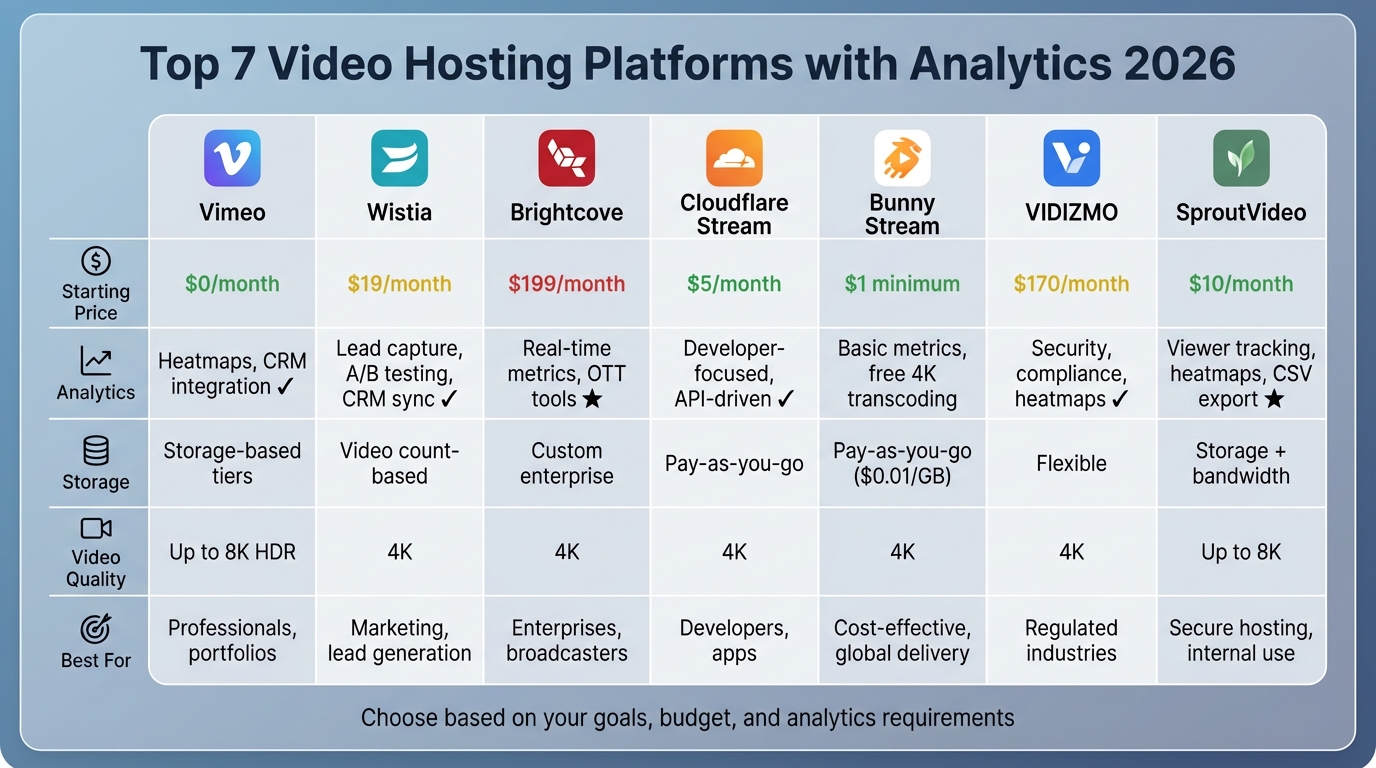
Here’s a quick look at the top 7 video hosting platforms designed to help businesses achieve measurable results:
- Vimeo: Best for high-quality video and creative professionals. Offers plans starting at $0/month, with advanced analytics like heatmaps and CRM integration on higher tiers.
- Wistia: Focused on marketing and lead generation. Pricing starts at $19/month, with features like lead capture forms, A/B testing, and CRM sync.
- Brightcove: Enterprise-level platform with custom pricing. Excels in real-time analytics, OTT tools, and large-scale streaming.
- Cloudflare Stream: Developer-friendly, API-driven platform. Starts at $5/month with pay-as-you-go pricing for storage and delivery.
- Bunny Stream: Affordable, pay-as-you-go pricing. Charges $0.01/GB for storage and bandwidth, with free 4K transcoding.
- VIDIZMO EnterpriseTube: Designed for secure, compliant use in industries like healthcare and government. Starts at $170/month.
- SproutVideo: Secure and straightforward. Plans start at $10/month, offering features like viewer tracking, heatmaps, and 8K support.
Quick Comparison
| Platform | Starting Price | Analytics Features | Storage Model | 4K/8K Support | Best For |
|---|---|---|---|---|---|
| Vimeo | $0/month | Heatmaps, CRM integration | Storage-based tiers | Up to 8K HDR | Professionals, portfolios |
| Wistia | $19/month | Lead capture, A/B testing, CRM sync | Video count-based | 4K | Marketing, lead generation |
| Brightcove | $199/month | Real-time metrics, OTT tools | Custom enterprise | 4K | Enterprises, broadcasters |
| Cloudflare Stream | $5/month | Developer-focused, API-driven | Pay-as-you-go | 4K | Developers, apps |
| Bunny Stream | $1 minimum | Basic metrics, free 4K transcoding | Pay-as-you-go | 4K | Cost-effective, global delivery |
| VIDIZMO | $170/month | Security, compliance, heatmaps | Flexible | 4K | Regulated industries |
| SproutVideo | $10/month | Viewer tracking, heatmaps, CSV export | Storage + bandwidth | Up to 8K | Secure hosting, internal use |
Each platform caters to specific needs, whether it's marketing, enterprise streaming, or developer tools. Choose based on your goals, budget, and analytics requirements.
Video Hosting Platforms Comparison 2026: Pricing, Analytics & Features
Best Video Hosting Platforms for Business 2025
sbb-itb-e3aed85
1. Vimeo
Vimeo has evolved from a platform for filmmakers to a robust business video solution, now handling a staggering 100 billion monthly views. It offers top-tier video quality - supporting formats like 4K, 8K, HDR, and Dolby Vision - combined with advanced analytics that track everything from viewer engagement to CRM-linked lead data.
Its pricing structure reflects its extensive features, catering to a range of users from individuals to enterprises.
Pricing (in USD)
Vimeo offers plans ranging from free to enterprise-level, with annual subscriptions saving 20–40% compared to monthly rates.
- Free Plan: $0/month, includes 1GB of storage, basic view counts, and a limit of two uploads per month, with Vimeo branding.
- Starter Plan: $13/month (billed annually), provides 100GB of storage, engagement metrics, and custom URLs.
- Standard Plan: $26/month (billed annually), designed for small businesses, includes 2TB of storage, custom CTAs, lead capture forms, and full branding control.
- Advanced Plan: $76/month (billed annually), offers 7TB of storage, live event analytics, webinar tools, and more.
- Enterprise Plan: Custom pricing, featuring unlimited seats, expanded storage, Analytics API access, and SSO.
Analytics Depth
Vimeo's analytics capabilities scale with the pricing tiers.
- Free Plan: Basic view counts.
- Starter Plan: Adds breakdowns by geography, device, and browser.
- Standard Plan: Introduces heat maps to track second-by-second viewer drop-offs and interactions with CTAs, cards, and email forms.
- Advanced Plan: Includes live event metrics like peak concurrent viewers and stream health monitoring.
- Enterprise Plan: Offers team-level reporting, training video completion rates, and API access for integration with tools like Tableau or PowerBI.
One standout example of Vimeo's analytics in action comes from Starbucks, which used the platform to train 350,000 employees worldwide. They achieved a 90% completion rate, demonstrating exceptional engagement:
"To see a 90% completion rate means [partners] aren't dropping off until the very end."
Storage Limits
Vimeo has transitioned from weekly upload limits to lifetime storage caps, which vary by plan:
- Free Plan: 1GB total storage.
- Starter Plan: 100GB.
- Standard Plan: 2TB, with a 2TB monthly bandwidth limit.
- Advanced Plan: 7TB, also with a 2TB monthly bandwidth limit.
Free plans are best for testing, as even a single 4K video can quickly consume the 1GB limit. For heavy users, exceeding the bandwidth cap on Standard and Advanced plans may result in overage charges.
Customization Options
Vimeo offers extensive customization features, starting with the Starter Plan, which includes player adjustments like color changes and custom URLs. The Standard Plan removes Vimeo branding and allows for custom logos, CTAs, and integrated lead capture forms. The Advanced Plan adds branded event emails for webinars, while Enterprise Plans provide full white-labeling, custom domains, and zero Vimeo branding. Additionally, domain-level privacy (available from the Starter Plan onward) ensures videos can only be viewed on approved websites.
Best Use Cases
Vimeo is perfect for businesses that value polished branding and presentation over viral reach. Creative agencies and filmmakers appreciate its ad-free player and high-resolution capabilities for showcasing portfolios. Corporate teams use it for internal training, benefiting from its detailed analytics. Marketing teams leverage its lead capture and CRM tools to connect video engagement with sales metrics. The Advanced Plan is ideal for those needing interactive webinars or simulcasting, while enterprise users can take advantage of white-labeling and API integrations.
2. Wistia
Wistia is a marketing video platform designed to turn video views into tangible leads and sales. With 440,000 customers in 2026, each video is crafted to deliver measurable results. The platform integrates seamlessly with CRMs like HubSpot, Marketo, and Pardot, making it a powerful tool for businesses looking to tie video performance directly to their sales pipeline[29,31].
In 2025, Scarlett Bush, Director of Operations at Explainly, shared how Wistia's searchable video galleries and lead capture features led to a 17% increase in leads and a 116.67% boost in sales conversions[32,35].
Pricing (in USD)
Wistia's pricing is based on the number of videos uploaded, not total storage capacity. Plans range from free options to enterprise-level solutions, with annual billing offering approximately 20% savings over monthly rates.
- Free Plan: $0/month, includes 10 videos, 200 GB bandwidth, and basic analytics.
- Plus Plan: $19/month (billed annually), offers 20 videos and lead capture tools.
- Pro Plan: $79/month (billed annually), supports 50 videos, 1 TB bandwidth, 3+ users, heatmaps, and A/B testing.
- Advanced Plan: $319/month (billed annually), includes 250 videos, 1 TB bandwidth, 5+ users, and marketing automation integrations.
- Premium Plan: Custom pricing, featuring unlimited videos, over 2 TB bandwidth, 10+ seats, and SSO.
Additional seats cost $20/month, and cancellations or downgrades are non-refundable[36,37].
Analytics Depth
Wistia's analytics capabilities vary by plan. The Free and Plus plans provide basic view counts and engagement metrics. The Pro plan steps it up with second-by-second heatmaps, showing exactly where viewers watch, rewatch, or drop off. It also includes A/B testing to compare thumbnails and video versions for better performance insights[29,30].
The Advanced plan adds marketing automation integrations, syncing viewer data with CRMs to trigger workflows. It also offers webinar analytics, tracking registration, attendance, chat activity, and drop-off points[29,31].
"Wistia's analytics give us deep insights into our customer journey... a detailed look at how they interact with each video, down to the specific sections they rewind or skip."
This insight from M. Tre Gonzalez, Director of Growth at OnCourse Systems for Education, highlights the platform's value.
Wistia also measures conversion performance for in-video CTAs, annotation links, and "Turnstile" email capture forms. Traffic performance is tracked using UTM codes, offering granular data on embed locations.
Storage Limits
Wistia's storage model focuses on the number of videos uploaded rather than total storage capacity. Each video can be up to 26 GB, with MP4 files using the h.264 codec and bitrates between 5,000 and 10,000 kbps recommended for optimal performance[32,36].
Bandwidth limits vary by plan. The Free plan includes 200 GB per month, while the Pro and Advanced plans allow 1 TB. Additional videos on the Pro plan cost about $2 per video per month[31,34].
4K Support
Wistia supports 4K video playback with adaptive bitrate streaming, ensuring the best quality for the viewer's internet connection. It can handle UltraHD uploads up to 8K at 60fps, and its lightweight video player - loading in under 50kB - avoids penalties from Core Web Vitals[30,31,35].
Customization Options
Wistia offers extensive branding controls across all paid plans. You can customize player colors, upload custom thumbnails, and adjust player controls to align with your brand identity[31,41]. Starting with the Plus plan, Wistia branding is removed, and features like "Turnstile" email collection forms and in-video CTAs become available. The Pro and Advanced plans take it further with branded "Channels" - Netflix-style video galleries hosted on your domain, free of third-party ads.
One G2 reviewer, Matt B., praised these options:
"Everything from the player to the turnstiles, links, colors, etc … It allows us to make our videos appear very professional and custom to the branding of our website and app."
Advanced plans also support branded webinar experiences, including custom registration pages and event interfaces[31,32].
These customization features make Wistia a versatile tool for businesses aiming to deliver a polished and branded video experience.
Best Use Cases
Wistia is an excellent choice for B2B marketing teams and SaaS companies that want to connect video engagement with sales outcomes. It’s particularly effective for product demos, where tracking viewer behavior can guide sales follow-ups, and for gated content strategies that incorporate email capture forms directly into videos. Corporate training teams also benefit from its detailed completion analytics and chapter-based long-form content options[41,42].
By combining detailed analytics with flexible customization, Wistia helps businesses turn viewer engagement into measurable results.
Unlike platforms focused on viral reach, Wistia prioritizes on-site conversion and lead generation. Its ad-free player ensures viewers stay focused, minimizing distractions[31,34].
With 97% of G2 reviewers giving it 4 or 5 stars, Wistia is widely praised for its analytics and ease of use. However, its per-video pricing model can be costly for teams managing large video libraries[35,31].
3. Brightcove
Brightcove is a high-level video platform tailored for businesses and organizations that need reliable, large-scale video streaming. With over 2,500 companies relying on it and around 10 million videos streamed monthly worldwide, Brightcove is built for operations where video performance directly impacts measurable outcomes. It has also been recognized with two Technology and Engineering Emmy Awards for its contributions to the field.
Brightcove organizes its services into three main categories: Marketing Studio for lead generation and CRM-integrated campaigns, Communications Studio for internal communications and training, and Media Studio for broadcasters looking to monetize content through AVOD, SVOD, and TVOD models.
Pricing (in USD)
Brightcove’s pricing is customized based on factors like video volume, team size, and required features, so you'll need to contact their sales team for a specific quote. However, some pricing tiers are publicly available through reviews:
- Starter Plan: About $199/month ($2,400/year), includes 50 to 200 videos, 100,000 video plays, and supports 2 to 5 users.
- Professional Plan: Approximately $500/month ($6,000/year), offering unlimited video uploads, over 100,000 plays, and support for up to 10 users.
- Enterprise and Media Plans: Custom pricing is available for broadcasters needing unlimited storage, bandwidth, and advanced monetization tools.
Brightcove’s pricing leans toward enterprise needs, often requiring a five-figure annual investment, but its analytics and features are frequently highlighted as standout benefits by users.
Analytics Depth
Brightcove provides advanced analytics that go well beyond basic metrics. The "Trending Now" report delivers real-time insights on concurrent viewers over the past hour, while performance reports cover video views, traffic sources, device types, and operating systems. The platform also analyzes viewer behavior, offering "Engagement" and "Attention" scores alongside heatmaps that pinpoint where viewers lose interest in a video.
For more detailed insights, Brightcove tracks individual viewers (when identifiable), noting their last view date, total videos watched, and total watch time. Premium analytics options include Quality of Experience (QoE) analytics, Ad Insights, and Subscriber Insights to monitor churn and monetization effectiveness.
"And if a company comes in cheaper, Brightcove has always beat their competition's pricing. So while I have had moments of frustration with Brightcove, they always make it right and do it quickly."
This quote from Jared C., Sr Director of Ad Operations and Analytics, underscores Brightcove's commitment to delivering value and addressing customer concerns promptly.
Storage Limits
Storage capacity depends on the plan you choose. The Starter Plan allows for 50–200 videos, while Professional and Enterprise Plans offer unlimited video uploads. This flexibility makes Brightcove a good fit for businesses with growing video libraries that need scalable solutions.
4K Support
Brightcove supports high-definition and 4K/HDR video playback, ensuring top-tier visual quality. Each upload is processed into at least six renditions, guaranteeing smooth playback across various devices. The platform uses context-aware encoding to balance bandwidth efficiency with high-quality streaming, even for large audiences.
Customization Options
Brightcove allows extensive branding and customization through its HTML5 player, which can be tailored using templates, CSS, and brandable skins. The "Gallery" feature enables users to create branded video portals and landing pages with customizable templates, enhancing viewer engagement. Interactive features like in-video lead forms and call-to-action buttons further help convert passive viewers into active participants.
For integration, Brightcove offers REST APIs and prebuilt connectors, making it compatible with existing tech stacks, including web, mobile, and OTT applications. Enterprise plans also include advanced security features like DRM, domain whitelisting, IP restrictions, and SSO support.
Best Use Cases
Brightcove is ideal for large enterprises managing internal communications, employee engagement, and secure training libraries. Media companies and broadcasters benefit from its ability to monetize content through various revenue models, paired with broadcast-quality playback and server-side ad insertion. Digital marketers can leverage its CRM integrations and engagement tracking to link video performance directly to sales and marketing efforts.
The platform also features an AI Suite that simplifies content creation by auto-generating captions, identifying highlights, and tagging content to maximize its value. With ratings of 4.2/5 on GetApp and 4.3/5 on G2, Brightcove is widely recognized for its reliability and security at the enterprise level.
4. Cloudflare Stream
Cloudflare Stream is a video platform tailored for developers, offering API-driven control and a solid infrastructure. Running on a global network of over 330 data centers, it handles video encoding, storage, and delivery, charging users based on video minutes delivered. This makes it a great choice for tech-savvy teams looking to integrate customizable video features into their applications.
Pricing (in USD)
Cloudflare Stream follows a minutes-based pricing approach. The Starter Bundle costs $5 per month, including 1,000 minutes of video storage and 5,000 minutes of delivery. For larger needs, the Creator Bundle is priced at $50 per month, providing 10,000 minutes of storage and 50,000 minutes of delivery.
For even more flexibility, a pay-as-you-go model is available: $5 per 1,000 minutes of storage (prepaid) and $1 per 1,000 minutes delivered (post-paid). There's also a fee of $0.50 per 1,000 unique media transformations after the first 5,000 free operations. Standard accounts hitting their storage limits are restricted from uploading new content unless they purchase additional storage or delete existing files. Enterprise accounts, however, enjoy more adaptable quota options.
Analytics Depth
Cloudflare Stream offers server-side analytics that track key metrics like most-watched videos, audience locations, and peak engagement periods. For platforms with multiple creators, the system provides detailed insights at the creator level, helping identify who drives the most engagement. Advanced users can tap into the GraphQL Analytics API for custom reporting, though the analytics remain primarily developer-oriented. This focus underscores the platform's emphasis on integration and control for technical users.
Storage Limits
Storage is calculated based on video duration rather than file size. The Starter and Creator Bundles include 1,000 and 10,000 minutes of storage, respectively. Additional storage can be purchased in 1,000-minute increments for $5 each. Videos as large as 30GB can be uploaded, and storage usage accounts for original videos, live recordings, and pending uploads, while excluding errors, deletions, and auto-generated quality profiles.
4K Support
Cloudflare Stream supports high-resolution streaming, including 4K, using adaptive bitrate technology. This ensures videos are automatically encoded and streamed at the best possible quality for each viewer's device and network conditions. The result? Smooth, low-latency playback on a global scale [27, 54, 56].
Customization Options
The platform allows users to apply URL-based transformations, such as clipping, watermarking, and AI captioning, without needing to re-upload videos [54, 55]. However, for more advanced player customization, developer input is essential, as Cloudflare Stream is designed as an API-driven infrastructure rather than a plug-and-play solution.
Best Use Cases
Cloudflare Stream is a strong fit for developer-led companies embedding video features into apps, large-scale streaming platforms managing vast video libraries, and user-generated content services needing detailed creator-level analytics [27, 54]. Its minutes-based pricing structure also makes it a cost-effective option for scaling operations.
"Video is incredibly important to us and our community. Cloudflare Stream makes it easy for us to show off our game and distribute videos without having to build our own streaming solution from scratch."
– Director of IT, Hypixel
Next, we’ll dive into Bunny Stream, which caters to a different set of user priorities.
5. Bunny Stream
Bunny Stream offers a straightforward pay-as-you-go pricing model, avoiding fixed monthly tiers. With just a $1 monthly minimum, charges are based solely on usage - storage costs $0.01/GB per month, while bandwidth ranges from $0.005/GB for high-volume users to $0.01/GB in North America and Europe. A standout feature? Free 4K video transcoding - users only pay for storage and bandwidth.
Pricing (in USD)
Storage is priced at $0.01/GB monthly. Bandwidth costs vary by region: $0.01/GB in Europe and North America, $0.03/GB in Asia and Oceania, $0.045/GB in South America, and $0.06/GB in the Middle East and Africa. High-volume users benefit from a reduced bandwidth rate of $0.005/GB for the first 500 TB. Unlike competitors that charge $0.02 or more per minute for encoding, Bunny Stream provides this service free of charge. Additionally, a 14-day free trial is available without requiring a credit card.
"A creator with 50 course videos totaling 25 hours would pay approximately $15-25/month with Bunny, compared to $79-159/month with enterprise alternatives." – Timothy Laycock, Founder, Behind the Scenes
Analytics Depth
Bunny Stream delivers essential performance metrics, including real-time stats, watchtime heatmaps, retention graphs, views, geographic data, bandwidth usage, and resolution trends. However, it lacks advanced marketing tools like lead capture, A/B testing, and detailed viewer tracking. For those with technical expertise, raw logging data is available for custom analysis.
Storage Limits
There are no fixed storage caps - users pay only for what they use. To optimize performance and costs, Bunny Stream allows users to choose from up to 8 storage regions based on audience location. Backed by a global CDN with 119 Points of Presence and a 250 Tbps+ backbone, the platform ensures fast delivery, with an average global performance of 24 ms.
4K Support
Bunny Stream supports 4K resolution streaming with free transcoding. Adaptive bitrate streaming ensures smooth playback across various devices and network conditions.
Customization Options
The platform features a fully customizable, brand-free player. Users can tweak colors, buttons, and playback settings like autoplay and loop. Bunny Stream also bypasses the typical 30MB background video limit and 720p resolution cap. Security measures include HLS encryption, DRM protection, token authentication, and domain/IP restrictions - all included at no extra cost. However, its interface is more developer-focused, with basic documentation compared to more user-friendly platforms.
Best Use Cases
Bunny Stream is ideal for high-volume online courses, SaaS documentation, e-commerce product videos, and international video delivery where cost efficiency is key. Features like HLS encryption and signed URLs help course creators prevent unauthorized downloads. The platform has a 4.8/5 rating on Trustpilot from 1,420 reviews, with users highlighting its fast loading speeds and cost savings.
"We had a flow! summit without a single complaint. I think, overall, bunny.net is just a very complete solution. Handling videos is so easy with Bunny - you don't need a lot of training. It's very streamlined." – Matthias Mauch, CTO, Younity
In 2025, Younity successfully delivered their "flow! summit" to 200,000 viewers using Bunny Stream, achieving zero buffering complaints despite heavy traffic. For teams focused on global delivery speed and cost savings over advanced marketing analytics, Bunny Stream offers a strong option. Next, we’ll take a closer look at VIDIZMO EnterpriseTube and its analytics capabilities.
6. VIDIZMO EnterpriseTube
VIDIZMO EnterpriseTube is tailored for organizations in sectors like government, healthcare, and enterprise that demand strict security and compliance measures. The platform is FedRAMP-ready and adheres to standards such as HIPAA, GDPR, CJIS, and SOC 2. Unlike some competitors that rely solely on cloud-based solutions, VIDIZMO offers a variety of deployment options, including public cloud (Azure, AWS), private cloud, on-premises, and hybrid configurations. Its analytics tools allow for detailed tracking of viewer engagement, linking video performance to tangible business outcomes.
Pricing (in USD)
Plans start at $170/month for the Basic tier and $280/month for the Professional tier. Some sources report entry-level pricing as low as $100/month, with custom pricing available for larger deployments. A 7-day free trial is offered, allowing users to explore features like AI-powered search and automatic redaction tools.
Analytics Depth
VIDIZMO provides advanced analytics tailored for enterprise needs. Metrics include views, unique viewers, impressions, completions, and playtime. A heatmap widget tracks viewer activity in 5-second intervals, helping identify where viewers drop off or stay engaged. Quality of Experience (QoE) monitoring evaluates technical factors such as player load time, cache hit ratio, buffering percentages, and playback errors, all broken down by device and geography. For additional insights, federated analytics integrates data from third-party tools like Salesforce and HubSpot, while real-time tracking provides actionable data during livestreams.
Storage Limits
Storage is flexible and scales based on enterprise requirements and deployment type. Organizations using public cloud services like Azure or AWS can utilize their existing infrastructure, while on-premises deployments offer full control over data residency. Supporting over 255 media formats, VIDIZMO is trusted by major organizations like ExxonMobil, Louis Vuitton, and the US Department of State.
Customization Options
VIDIZMO allows for complete white-label customization to align with corporate branding. Its multi-tenant architecture supports the creation of independent video content management systems for various departments or regions. AI-powered tools include transcription in over 50 languages, automatic redaction to protect sensitive information, and in-video search capabilities for faces, objects, and spoken words. The platform integrates seamlessly with Microsoft 365, Teams, SharePoint, Zoom, and major LMS/CRM systems. Enhanced security features include AES-256 encryption, DRM, SSO, and IP restrictions.
Best Use Cases
VIDIZMO is particularly effective in regulated industries like government, healthcare, legal, and financial services. It’s a strong choice for corporate training programs and internal communications software requiring searchable video libraries. Its flexible deployment options make it ideal for organizations with data sovereignty needs. Recognized by Gartner, IDC, and Frost & Sullivan as a leader in enterprise video solutions, VIDIZMO offers a comprehensive feature set that may require a bit more effort to master compared to simpler, consumer-focused platforms.
Next, we'll take a closer look at SproutVideo and its analytics capabilities.
7. SproutVideo
SproutVideo stands out as a platform designed for businesses that prioritize secure video delivery and straightforward pricing. Unlike some enterprise-grade solutions with complex structures, SproutVideo offers transparency with a usage-based pricing model that focuses on storage and bandwidth. This makes it a smart choice for managing large video libraries efficiently. The platform supports video resolutions ranging from 240p to 8K, with adaptive bitrate streaming powered by a global CDN.
"We use SproutVideo to host commercial videos for performing ad tests. We really love the service and the security it offers!"
This endorsement from Kristina, Royal Caribbean Group's Director of Consumer Insights, highlights the platform's reliability.
Pricing (in USD)
SproutVideo offers plans that cater to a range of needs, from small businesses to larger enterprises:
- Seed Plan ($10/month): Includes 100 GB of storage and bandwidth.
- Sprout Plan ($35/month): Adds secure viewer access and increases storage to 350 GB.
- Tree Plan ($75/month): Offers 1 TB of storage, dynamic watermarks, and 2 hours of live streaming.
- Forest Plan ($295/month): Delivers 2 TB of storage, SSO, IP/geo-restrictions, and dedicated phone support.
Overage fees decrease as you move up the tiers, starting at $0.25/GB for the Seed plan and dropping to $0.06/GB for the Forest plan.
Analytics Depth
SproutVideo provides detailed analytics to help users understand viewer behavior. Heatmaps highlight where viewers drop off, rewatch, or skip sections of a video. Individual viewer tracking is available by email or IP address, offering insights into their location, device type, watch history, and total viewing time. For live content, real-time metrics track viewer counts, peak moments, and average watch durations. Additionally, all data can be exported in CSV format for further analysis, and integrations with tools like HubSpot, Mailchimp, and Zapier streamline marketing workflows. Users have rated the platform highly, scoring 9.5/10 for ease of use and 9.4/10 for quality of support.
Customization Options
SproutVideo offers a fully white-label player, free of branding, with options to customize colors, add animated thumbnails, and create no-code landing pages. Security features include live watermarks, signed embeds, SSO, and IP whitelisting, ensuring that sensitive content remains protected.
"I discovered SproutVideo, and it all works. I could upload a ton of videos and still pay one price. The price was right. The storage was right. It was easy."
This feedback from CoverStory, B2B Marketing, underscores the platform's simplicity.
Best Use Cases
SproutVideo is ideal for secure internal communications, corporate training programs, and B2B marketing campaigns that require strict access controls. Its seamless integration with learning management system solutions makes it a strong choice for tracking learner progress and completion rates. The platform is also well-suited for delivering high-resolution video portfolios, supporting up to 8K quality.
SproutVideo maintains a 4.8/5 rating on Capterra, reflecting its strong reputation among users. While some have noted that the interface feels slightly dated compared to newer competitors, the platform's robust functionality ensures it remains a reliable choice.
Platform Comparison Table
This table provides a side-by-side look at pricing, analytics, and standout features for four popular video hosting platforms in 2026. It condenses essential details to help businesses and creators make informed choices, especially when selecting learning management systems or marketing tools.
| Platform | Starting Price (USD) | Analytics Strengths | Storage Model | 4K/8K Support | Primary Use Case |
|---|---|---|---|---|---|
| Vimeo | $12/month | Engagement graphs, social analytics | Storage-based tiers | Up to 8K HDR | Creative professionals, visual portfolios |
| Wistia | $79/month | Marketing heatmaps, lead capture, CRM integration | Video count-based | 4K supported | B2B marketing, lead generation |
| Brightcove | $199/month (Custom) | Real-time metrics, attention scoring, OTT analytics | Enterprise custom | 4K supported | Global enterprises, media broadcasting |
| SproutVideo | $10/month | Viewer tracking by IP/email, geographic analytics, heatmaps | Storage + bandwidth | Up to 8K | Secure B2B delivery, private hosting |
Key Takeaways
Pricing structures vary widely across these platforms. For instance, Wistia charges based on the number of videos, which can drive up costs for businesses with large libraries. On the other hand, SproutVideo uses a combination of storage and bandwidth pricing, which often proves more budget-friendly for high-volume users. Brightcove operates on custom enterprise quotes, typically requiring significant annual commitments, often in the five-figure range. For those just starting, both Vimeo and Wistia offer free tiers, though advanced features like white-labeling and analytics require paid upgrades.
Each platform's analytics features are tailored to its target audience. For example:
- Wistia focuses on marketing tools, such as its "Turnstile" lead capture integration.
- Brightcove provides enterprise-level real-time metrics, including attention and engagement scoring.
- SproutVideo emphasizes security, offering IP-based tracking, geographic analytics, and heatmaps. It also boasts a 96% ease-of-setup rating on G2.
"The best video hosting platform in 2026 depends on what you need video to achieve."
– Aidan Dean, Content Lead, Cinema8
Feature-wise, Vimeo stands out for its customizable player controls, catering to creative professionals. Wistia offers an ad-free player designed for marketing campaigns. Meanwhile, SproutVideo supports fully white-label solutions, including no-code landing pages, and Brightcove excels with enterprise-level tools like ad insertion.
For businesses anticipating high traffic, platforms with storage- or usage-based pricing - like SproutVideo and Vimeo - tend to scale more efficiently. This detailed comparison helps clarify which platform aligns best with your specific video hosting needs in 2026.
Conclusion
Choose your video hosting platform based on what aligns best with your objectives. As Washija Kazim, SEO/AEO Content Strategy Lead at G2, wisely points out:
"The biggest mistake is treating every platform like it's solving the same problem".
Each platform has its strengths. For instance, Wistia is ideal for B2B marketers thanks to its heatmaps and CRM integrations, which turn viewer data into actionable insights. Meanwhile, global enterprises benefit from the scalable and secure solutions offered by Brightcove and VIDIZMO, especially with their advanced compliance features. On the other hand, creative professionals often lean toward Vimeo for its focus on high-quality playback, making it perfect for showcasing portfolios.
However, watch out for pricing structures. While Wistia's per-video pricing can become expensive for those managing large libraries, storage-based models like SproutVideo and Vimeo often scale more efficiently. With the video hosting market growing at 15% annually and 91% of marketers viewing video as essential to ROI, these considerations are more important than ever .
Many businesses adopt a hybrid approach: using public platforms like YouTube for broader visibility and private platforms like Wistia or SproutVideo for exclusive, premium content. Before committing, assess how each platform aligns with your reporting needs and overall business goals.
To build a well-rounded video strategy that boosts ROI, consider exploring tools that integrate seamlessly with your hosting platform. From CRMs to marketing automation and learning management systems, you can find a comprehensive list of software solutions at the All SaaS Software Directory. Curated by John Rush, this resource covers categories like communication, marketing, and software development to help you craft an effective video strategy.
FAQs
Which analytics features matter most for proving video ROI?
Understanding how your videos perform is crucial for measuring their return on investment (ROI). Key metrics like view counts, watch time, and drop-off points help you gauge how well your content engages viewers. These numbers give a snapshot of audience interaction, showing where people lose interest or stay engaged.
Heatmaps take this a step further by revealing exactly which parts of your video are rewatched, skipped, or stopped. This insight helps you pinpoint what resonates with your audience and what doesn’t.
For a more comprehensive view, integrating video engagement data with CRM systems is a game-changer. It allows you to track how videos contribute to lead generation and conversions, tying your content directly to business outcomes. These tools make it possible to quantify your video's effectiveness and show its impact on your bottom line.
How do I choose between storage-based, per-video, and minutes-based pricing?
When deciding, consider your video library size, usage patterns, and budget:
- Storage-based: Great for maintaining extensive libraries over the long term, offering consistent and predictable costs.
- Per-video: Works well for smaller, unchanging collections but can become less practical as your library expands.
- Minutes-based: A flexible choice for fluctuating usage, especially for high-traffic situations or live streaming, as costs align with actual viewer consumption.
Choose the model that fits your library's size, expected growth, and how viewers engage with your content.
What’s the best platform for secure, private video with viewer tracking?
SproutVideo stands out as a leading option for secure and private video hosting in 2026. Its advanced privacy settings and comprehensive viewer tracking make it an excellent choice for businesses and content creators who prioritize video security and want in-depth insights into their audience.
