Virtual assistants in SaaS are no longer optional - they’re expected. By 2026, users demand software that understands their needs and takes action. Here’s why they matter and how they improve SaaS performance:
- Retention Boost: AI-driven experiences improve user retention by 47%.
- Faster Onboarding: Virtual assistants cut onboarding drop-offs (40–60%) and speed time-to-value by up to 40%.
- Personalization Pays Off: Tailored experiences increase feature adoption by 25–35% and customer lifetime value by 33%.
- Efficiency Gains: Assistants reduce multi-hour tasks to minutes, saving up to 96% of users' time.
To succeed, focus on personalization, clarity, and user control. Use role-based and behavior-driven customization, ensure conversational context, and build trust through transparency. Accessibility and feedback loops further refine the experience, while balancing automation with human oversight prevents errors. Virtual assistants aren’t just tools - they’re key to SaaS growth.
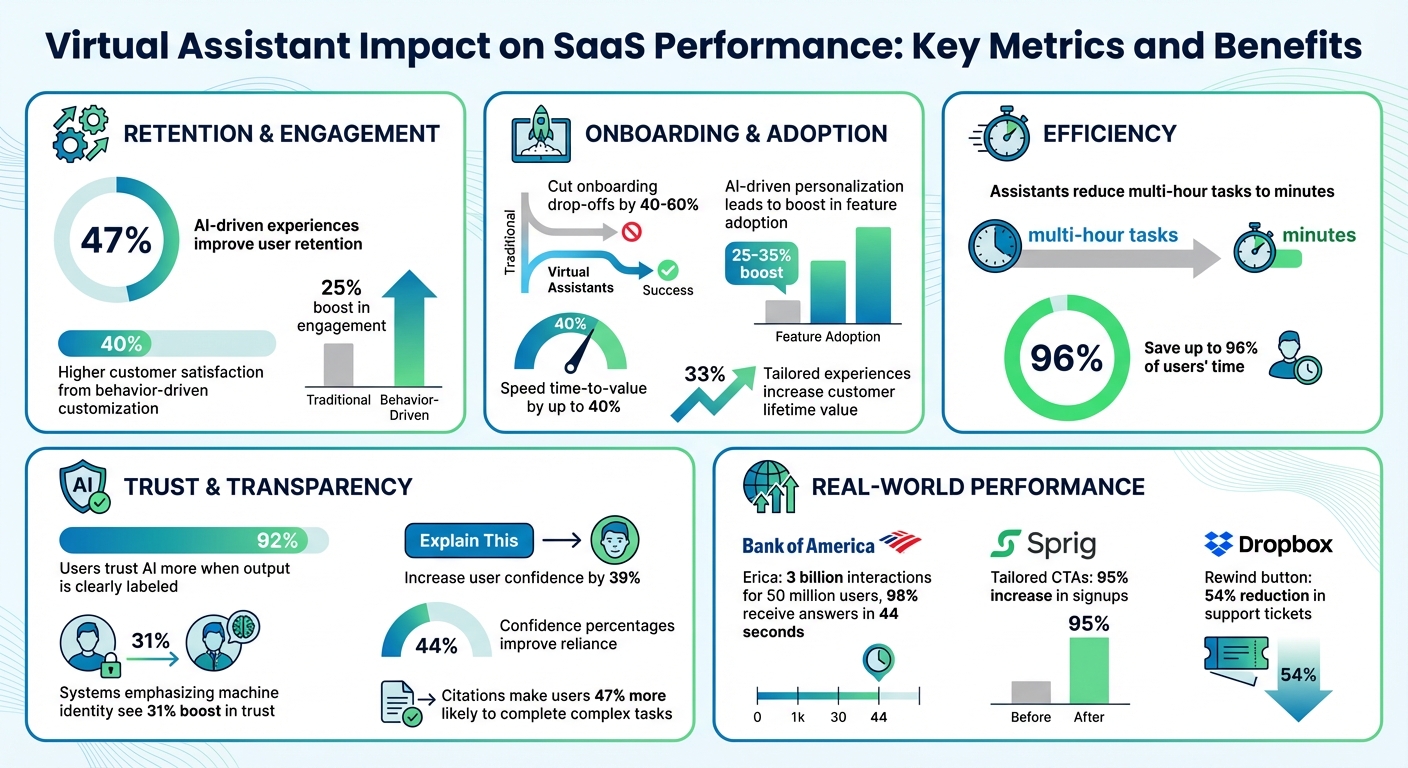
Virtual Assistant Impact on SaaS Performance: Key Metrics and Benefits
How to Integrate AI into SaaS: A Practical Guide
sbb-itb-e3aed85
Personalizing User Interactions with AI
Personalization turns virtual assistants into more than just helpers - they become guides that align with individual user goals. And the numbers back this up: AI-driven personalization can lead to a 25–35% boost in feature adoption, while tailored experiences increase customer lifetime value by 33%. Emilia Korczynska, Head of Marketing at Userpilot, sums it up perfectly:
"Personalization in SaaS is important because it can help your users hit their goals faster. And that will make them happier and more willing to pay."
But personalization isn't just about adding a user's first name to an email. It goes deeper, leveraging firmographic data (like job roles, company size, and industry), behavioral insights (such as login habits, feature usage, and navigation patterns), and intent-based feedback collected through microsurveys. Some systems even take it further by tracking sentiment indicators - like typing speed or "rage clicks" - to detect frustration and intervene before users give up. These strategies lay the groundwork for role-specific and behavior-driven improvements that we’ll explore next.
Role-Based Personalization
Customizing experiences based on user roles ensures virtual assistants meet the specific needs of different SaaS users. For example, an admin configuring system settings requires access to technical documentation and advanced controls, while an end user benefits from simple, step-by-step guidance for everyday tasks. By setting role-based defaults, companies reduce cognitive overload and highlight the tools most relevant to each user type.
Salesforce’s Einstein AI is a great example. It tailors dashboard layouts to user roles - sales managers see pipeline metrics front and center, while individual sales reps get activity tracking prioritized. This role-specific approach helps users focus on what matters most, minimizing setup hurdles and speeding up the time it takes to achieve results.
Behavior-Driven Customization
A user’s past behavior can reveal exactly what they need next. With predictive intent recognition, AI analyzes previous actions to anticipate future ones, offering relevant tools before users even search for them. This proactive approach significantly enhances the user experience, leading to 40% higher customer satisfaction and a 25% boost in engagement.
Take Sprig as an example. They tailored calls-to-action based on company size - showing startups a "Get started free" option, while larger enterprises saw a contact form. This adjustment led to a 95% increase in signups. Shopify uses a similar tactic by incorporating geolocation data into its app store, adding tags like "Popular with businesses in [country]" to create localized social proof that drives conversions.
Designing for Conversational Clarity and Context Awareness
An assistant that forgets previous interactions quickly becomes frustrating. What separates an ineffective chatbot from a truly helpful tool often boils down to two things: understanding user intent and remembering past conversations. For example, when Bank of America revamped its virtual assistant, Erica, they moved from a floating chat button to a search-style interface. This change catered to older users who were more familiar with search-based interactions. As of the latest data, Erica has managed 3 billion interactions for 50 million users, with 98% receiving answers in just 44 seconds.
This success is rooted in strong state management - tracking recent exchanges, session data, and user history. Effective systems rely on short-term, session-based, and long-term memory. Without these, users are forced to repeat themselves, which can quickly lead to disengagement.
Clear and personalized interactions further enhance engagement. Robust state management lays the groundwork for advanced language processing, ensuring smoother, more intuitive conversations.
Natural Language Processing (NLP) Basics
NLP allows virtual assistants to handle requests like "I need help with finances" without forcing users to navigate endless menus. But understanding intent isn’t enough. The assistant must also extract details like dates, names, or amounts to provide precise responses. If a query lacks clarity, the system should ask follow-up questions rather than making flawed assumptions. As Yinjian Huang, Founding Designer at Praisidio, explains:
"The key to effective query formulation is balancing elicitation and assumption. Overly aggressive questioning can frustrate users, and making too many assumptions can lead to inaccurate results."
Advanced systems also use behavioral cues, such as typing speed or frequent errors, to detect frustration. If the system senses a user struggling, it might adjust its tone or offer a "Talk to a person" option before the user gives up. These sentiment-aware features contribute to SaaS products with AI-driven user experiences achieving 47% higher retention rates compared to static interfaces.
Speed is another critical factor. Users expect text-based chat responses within 1.5 seconds; anything slower can feel broken. For voice interfaces, latency should stay under 800ms to maintain a natural flow. Techniques like response streaming (showing text as it’s generated) and parallel processing for intent detection help meet these expectations.
Multi-Modal Inputs
Typing isn’t everyone’s preferred method of communication. By combining voice, text, and visual inputs, virtual assistants let users interact in ways that suit them best. Jakob Nielsen highlights this challenge:
"Articulating ideas in written prose is hard. Most likely, half the population can't do it. This is a usability problem for current prompt-based AI user interfaces."
Multi-modal systems address this by offering alternative ways to interact. For instance, a user might ask a question via voice and receive a visual chart they can tap for more details. The key is maintaining continuity - if a user switches from typing to interacting with a chart, the assistant must seamlessly follow the conversation.
Finshape, a financial technology company, tackled low AI engagement by embedding contextual prompts directly into its transaction history view. Instead of waiting for users to initiate a chat, prompts like "What’s an amount I can realistically save?" appeared while users reviewed their spending data. This approach bridges the gap between passive browsing and active assistance, engaging users at the right moment.
Together, these strategies create a smoother, more intuitive experience - essential for modern SaaS applications.
Ensuring Transparency and User Control
Users expect to understand the reasoning behind every action an assistant takes. A striking 92% of users report trusting an AI system more when it clearly labels its output. This trust is often the deciding factor in whether users stick with your SaaS product or move on to something else.
Start by making the assistant’s artificial identity unmistakable. Swap out human-like names (like "Sarah") for functional ones (such as "Digital Copilot"). Systems that emphasize their machine identity see a 31% boost in trust compared to those that use human-like phrasing. When offering recommendations, include an "Explain This" button that provides context. For instance, a message like "Suggested based on 12 similar past requests" can go a long way. Testing environments showed this approach increased user confidence by 39%.
Displaying confidence percentages, such as "75% certain", helps users assess reliability and encourages them to rely on the system appropriately - improving reliance by 44%. Additionally, providing citations or source links for AI claims makes users 47% more likely to complete complex tasks without hesitation. Instead of generic loading animations, use descriptive text to outline the steps being taken, such as "Querying CRM…" followed by "Analyzing history…" This transparency reassures users that the system is actively working on their behalf. Such practices set the stage for clearly labeled AI decisions.
Labeling AI Decisions
Every piece of AI-generated output - whether it’s text, images, or code - should be clearly labeled to avoid confusion and build trust. Include a "Sources & Context" drawer where users can see which records or documents the AI referenced. For factual claims, always provide verifiable citations so users can independently confirm the information.
Stick to objective language, like "This system suggests", rather than human-like expressions. If the assistant is uncertain, it should openly admit it with phrases like "I don't have enough information" instead of making guesses. This honesty is key to maintaining long-term credibility.
Victor Yocco, PhD and UX Researcher at Allelo Design, sums it up perfectly:
"Autonomy is an output of a technical system, but trustworthiness is an output of a design process."
By clearly labeling decisions, users gain a better understanding of the system’s logic and feel more in control.
Providing Override Options
Transparency is just the first step - giving users direct control over actions solidifies their trust. Rather than a simple on/off toggle, offer graded autonomy levels such as Off, Ask, Guarded, and Auto, along with undo options.
Before executing complex workflows, present an editable checklist that outlines each step. Use "diff" views to show "Before vs. After" changes, making the impact of proposed actions crystal clear. Add a recovery window, like a 10-second undo option, to allow users to reverse actions if needed. For example, Dropbox implemented a "rewind" button for mass-rename actions, reducing support tickets by 54%. Finally, provide one-click controls for "Pause" (to halt new actions), "Stop" (to cancel ongoing tasks), and "Safe Mode" (to switch to draft-only mode). These features replace user anxiety with confidence, ensuring they feel fully in control.
Optimizing Accessibility and Responsiveness
Virtual assistants need to work seamlessly across all devices - whether someone is using a smartphone on the go or a desktop for more detailed tasks. With mobile devices accounting for over 60% of web traffic, ensuring the assistant functions well on smaller screens is no longer optional. The challenge is to adapt the interface for mobile without sacrificing usability.
Mobile-First and Responsive Design
Mobile devices come with unique challenges. For example, when users tap on a chat input field, the virtual keyboard can take up 40–50% of the screen. To address this, use dynamic viewport height units like 100dvh instead of the standard 100vh. This ensures the interface adjusts dynamically, keeping the input field visible.
Interactive elements also need to be designed for touch. Buttons and other touch targets should measure at least 44×44 points for Apple devices or 48×48 dp for Google devices to avoid accidental taps. For readability, message bubbles should use up to 85% of the screen width on mobile, while desktop layouts should limit them to 65–75% for better line lengths. Keep the chat input font size at a minimum of 16px to prevent iOS Safari from zooming in unnecessarily.
To avoid interface issues caused by notches or home indicators, use the CSS variable env(safe-area-inset-bottom) to add padding below chat inputs. Features like "swipe-to-reply" should have an 80-pixel threshold to ensure actions are intentional. Additionally, the visualViewport API can be used to detect keyboard height and adjust padding for the message list accordingly. These adjustments lay the groundwork for further enhancements, such as dark mode and voice accessibility.
Supporting Dark Mode and Voice Interfaces
Optimizing for dark mode and voice interactions takes the user experience to the next level. Dark mode isn't just about aesthetics - it can reduce eye strain in low-light settings and help conserve battery life on mobile devices. Offering dark mode as a standard option benefits users working late or in dim environments, while high-contrast modes improve visibility in bright outdoor conditions.
Voice interfaces require a different design approach. With 71% of users preferring voice search over typing, mobile devices might benefit from a voice-first experience, while desktops retain a text-first approach. Providing immediate visual feedback - like a glowing ring or waveform animation - lets users know the assistant is actively listening or processing commands. Voice responses should follow a progressive disclosure model, delivering key information first and offering more details only when requested.
Maryna S., UX Designer at Brights, highlights the importance of accessibility in design:
"An important, though often overlooked aspect during development, is the accessibility of the product for different user groups".
To ensure inclusivity, virtual assistants should support screen readers, provide text alternatives for voice interactions, and offer voice input for users with motor impairments or those unable to use a keyboard.
Leveraging Feedback Loops and Analytics
Virtual assistants can't improve without input from users. By creating systems that gather honest feedback seamlessly, you can identify what works and what frustrates users. Transparent, user-controlled designs combined with continuous feedback help refine these systems over time.
Feedback Mechanisms
The most effective feedback comes right after an interaction. Simple tools like thumbs up/down buttons or "Was this helpful?" prompts provide a steady stream of data without disrupting the user's experience. For more detailed insights, in-app surveys at key points can be highly effective.
Open-ended questions within the chat interface can uncover issues that simple ratings might miss. Instead of just asking for a rating, try something like, "What could have made this answer more helpful?" For even deeper insights, let users submit voice recordings, screenshots, or videos to highlight technical issues. Additionally, sentiment analysis powered by natural language processing (NLP) can automatically assess the emotional tone of user messages - positive, negative, or neutral - helping you focus on the most pressing problems.
Data-Driven Optimization
Once feedback is collected, analytics can pinpoint what’s working and what needs fixing. Metrics like containment (avoiding escalation to a human agent) and flow success (resolving the user's intent) are key indicators. For example, even if a user doesn’t escalate to a human, abandoning the conversation without a resolution is still a failure. As ASAPP Docs puts it:
"Every flow you build can be thought of as a hypothesis for how to effectively understand and respond to your customers in a given scenario".
Review conversation transcripts to spot "unrecognized customer responses", where the assistant failed to understand reasonable inputs. If your reversion rate - the percentage of times users undo an assistant's action - exceeds 5% for a specific task, it's a sign to pause automation for that task until the issue is resolved. To stay on track, set up a weekly review process to analyze failures, update your knowledge base, and refine prompts based on recent data. This iterative approach ensures your virtual assistant evolves based on actual user behavior, not assumptions.
Balancing Automation with Human Oversight
Finding the right balance between automation and human oversight is key to tailoring virtual assistant behavior to user needs. This balance ensures both effective performance and user control, reducing frustration caused by overly aggressive automation while building trust.
Tiered Automation Levels
Think of automation as a sliding scale. SaaS agents can operate at various levels of autonomy, ranging from Directed Assistance (Level 1), where the agent follows specific commands like "Format this text as a list", to Full Autonomy (Level 5), where the agent sets its own goals and self-corrects independently. Many SaaS platforms find Level 3 - where agents act but pause for user confirmation on high-stakes tasks - to be the sweet spot.
To give users control, consider implementing an "Autonomy Dial" in the settings. This feature allows users to adjust the agent's independence based on their comfort level. Options could range from "Observe & Suggest" (recommendations only) to "Act Autonomously" (no confirmation required). A phased rollout approach works well:
- Shadow Mode: The agent only makes suggestions.
- Assisted Mode: Users confirm actions before execution.
- Guarded Automation: The agent automatically handles low-risk tasks.
- Policy-based Automation: Trusted workflows are executed without user intervention.
Human-in-the-Loop Systems
While adjustable automation offers flexibility, some situations demand explicit human oversight. For critical decisions, human involvement is non-negotiable. Human-in-the-Loop (HITL) systems require user approval before the agent proceeds, making them ideal for irreversible actions like financial transactions or data deletion. On the other hand, Human-on-the-Loop (HOTL) systems allow agents to act independently, with human monitoring in place to step in if needed. HOTL works best for tasks that are high in volume but low in risk.
To ensure oversight is robust, integrate it into the system's core architecture - such as through a dispatcher or safety kernel - so it can't be bypassed through prompt manipulation. When the agent pauses for review, it should provide a detailed "Plan Summary", including completed steps, next actions, and the reason for the pause. This summary should require explicit user approval to proceed. Adding features like a clear "Undo" button in the Action Audit log can further enhance user confidence and control.
A good rule of thumb for escalation - when the agent seeks human assistance - is to aim for a frequency between 5% and 15%. Frame these hand-offs positively to maintain user confidence. For instance, instead of saying, "I failed", the agent could say, "This question needs a specialist; I'll connect you now". As Victor Yocco, PhD, from Allelo Design, aptly states:
"Autonomy is an output of a technical system. Trustworthiness is an output of a design process".
Focusing on Privacy and Security
Virtual assistants in SaaS deal with sensitive data every day, which makes privacy and security non-negotiable. The risks are significant: in 2024, 73% of AI agent implementations in European businesses showed GDPR compliance issues, and 62% of European consumers abandoned chatbots due to unclear data practices. With GDPR penalties reaching up to 4% of global annual revenue or £17 million for major violations, prioritizing privacy isn’t just about good user experience - it’s critical for business survival. By aligning privacy efforts with strong security measures, companies can establish trust while protecting their users.
Transparent Data Handling
People want clarity about how their data is managed. Start by collecting only the data you absolutely need - this is called data minimization. Instead of gathering every possible metric, focus on essential information and use short-lived telemetry to avoid storing unnecessary data. When you do collect data, explain it in straightforward terms. Use clear sections to outline what you’re storing, whether it’s account details, usage data, billing information, or user-generated content.
It also helps to show users what’s happening behind the scenes. For example, display real-time updates like “Querying CRM…” to make AI processes less mysterious. This kind of micro-transparency can reduce user anxiety by 34%. Be upfront about how long you retain data - define specific timelines for when data is deleted after account cancellation or when backups are permanently purged.
Here’s a breakdown of suggested data retention practices:
| Data Category | Retention Period | Action Type |
|---|---|---|
| Anonymous Conversations | 90 Days | Automated Hard Delete |
| Conversations with Email (No Account) | 30 Days | Automated Hard Delete |
| Support Conversations (with Ticket) | 365 Days or Resolution + 90 Days | Soft Delete then Hard Delete |
| Sensitive Data (Health/Finance) | Per Sectoral Regulation (HIPAA/PCI) | Encrypted Archive/Purge |
If customer data is used to train AI models or if third-party AI providers like OpenAI or Anthropic are involved, make this clear. Keep a public sub-processor list that names every service (e.g., AWS, Stripe) handling user data, and notify users when changes occur. As Cryptospace.Cloud advises:
"Design for proof, not trust: Users and auditors need verifiable evidence of what the assistant saw and did."
Opt-Out Features
Transparency alone isn’t enough - users also need control over their data. Offering opt-out options builds trust. Use granular consent scopes (e.g., tokens like transactions:read:30d) to limit access and duration, sticking to the principle of least privilege.
A centralized privacy dashboard can make managing data simpler. This dashboard should allow users to view their data, revoke access tokens instantly, and delete their information with a clear “forget my data” button. For those who want personalization without permanent tracking, include memory management controls so they can review, edit, or disable specific stored information. Additionally, provide a "Stable Mode" toggle for users who prefer consistent experiences without AI-driven changes.
Privacy should always be the default setting. Keep data sharing and long-term memory off unless users explicitly opt in. For high-risk actions like bulk deletions or payments, add an undo option to prevent accidental mistakes. And for basic tasks, offer non-authenticated alternatives for users who don’t want to sign in.
Testing with Real Users
Internal reviews are helpful, but they can't replace the insights gained from testing with real users. A study shows that over 60% of American SaaS teams struggle with usability tests because of unclear user goals, leading to wasted time and resources. To avoid this, set clear research objectives, recruit participants who genuinely represent your target audience, and observe how they naturally interact with your virtual assistant. These real-world tests not only validate your strategies but also reveal subtle details essential for improving the user experience of SaaS virtual assistants.
Conducting Usability Testing
Start by pinpointing friction points - like confusing workflows or unclear intents. When recruiting participants, ensure they reflect your user base in terms of technical expertise and professional roles. Interestingly, testing with just five participants can uncover most usability issues.
For early-stage testing, try the "Wizard of Oz" method, where a human simulates the assistant's responses via a text interface before any coding begins. This lets you experiment with conversation flows and understand how users naturally phrase their questions. IT Consultant Anders Krogsager emphasizes:
"Build prototypes with the users - because without the user there is no product".
During tests, use "think-aloud" protocols to have participants verbalize their thoughts as they engage with the assistant. Facilitators should remain neutral, avoiding any guidance that might influence the user's actions. As Krogsager notes:
"When a test participant points out flaws or is struggling with your design, it is convenient to dismiss a broken user, rather than a broken design".
Make the testing environment as realistic as possible by using a genuine open-source chatbot interface on the target devices - whether mobile or desktop. Afterward, group your findings into themes like critical usability issues, points of confusion, and unexpected user behaviors. If your virtual assistant is replacing an older solution, compare its performance metrics to the previous system. Then, run additional tests with a fresh set of participants to validate improvements and refine the assistant further.
Incorporating User Feedback
Once testing identifies problem areas, focus on refining the assistant by thoroughly analyzing user feedback and conversation quality. Evaluating AI assistants is more complex than traditional usability testing. Sean Treiser, Staff Product Strategist at UserTesting, explains:
"Testing AI isn't just about task completion or button clicks. You're testing something far more complex: a conversation".
Users assess aspects like tone, phrasing, credibility, and emotional resonance - not just whether the assistant completes a task.
Because generative AI responses can vary, design goal-based tasks rather than rigid success criteria. This flexibility reflects how users naturally interact with conversational systems. Also, segment your participants based on their attitudes toward AI - whether they’re skeptics, enthusiasts, or neutral - since these perspectives can heavily influence trust and engagement.
To get a complete picture, combine quantitative data (like task completion rates, error rates, and time spent on tasks) with qualitative insights from session replays and "think-aloud" feedback. Use real-time feedback surveys to capture user reactions during moments of friction, such as rage clicks or obvious errors. Instead of just measuring "containment" (preventing escalation to a human agent), focus on "flow success", which tracks whether the user’s intent is fully resolved.
Adopt a continuous improvement cycle: identify underperforming areas, diagnose the root causes (e.g., unrecognized responses or excessive friction), implement changes, and monitor their impact. Before rolling out major updates, run a small pilot test to ensure your metrics are accurately capturing the right insights.
Exploring Tools in the All SaaS Software Directory
Once you've refined your virtual assistant through user testing, the next step is selecting the right platform to bring your vision to life. The All SaaS Software Directory, curated by John Rush, provides an extensive list of AI-powered virtual assistant platforms tailored for SaaS applications. This resource makes it easier to integrate best practices and enhance the user experience of your virtual assistant.
Take Agenthost, for example. It offers a no-code platform with customizable UI branding and in-depth analytics. Pricing starts at $29.99/month for the Pro plan, which includes 5 bots, 5,000 credits, and a custom domain. If you're focused on improving user activation, Locusive (SaaS Copilot) might be a better fit. It uses an autonomous agent framework to guide users through conversational onboarding. John Mantia, Founder of PARCO, shared his experience: "Locusive was like having a super teammate on our side who knows all the information about our business." Similarly, Ryan Alcorn from GrantExec reported, "Locusive improved our response times & reduced costs by 85%".
For customer support, ConvoCore (Vairflow) is an excellent choice. It can deflect around 65% of tier-1 support tickets, such as password resets and billing inquiries, across channels like the web, WhatsApp, and SMS. Meanwhile, ChatSa excels in functionality, with agents that can book appointments, handle Stripe payments, and integrate with Google Maps. Impressively, it maintains a 98.9% customer satisfaction rate across over 5 million daily messages.
If security is a top priority, consider LoomX, which acts as a "machine-in-the-loop" layer. It verifies agent actions against original tasks during live sessions to prevent errors or task drift. For teams looking to unify resources, MatrixFlows combines conversational AI with a searchable knowledge base and video library. This integration has been shown to boost prospect engagement by 60–70% compared to using separate systems. Additionally, the directory features Forescribe Agent, an internal assistant designed to help employees manage SaaS expenses and renewals directly within Microsoft Teams.
Most of these platforms offer free trials, allowing you to explore and test their capabilities before making a commitment. These tools provide the foundation for creating effective virtual assistant experiences that align with your strategic goals.
Conclusion
Creating a virtual assistant that users trust and appreciate hinges on blending intelligence with clarity. As Payan Design explains:
"Intelligence without clarity slows adoption. AI in UX design is not about adding automation to interfaces. It is about structuring experiences that make intelligence understandable, usable, and credible".
Orbix Studio emphasizes that your assistant should feel like a helpful colleague offering suggestions, rather than a system making decisions on behalf of the user.
The data supports this approach. Transparent AI decisions, user-friendly design, and continuous feedback loops are essential for building trust and ensuring your assistant evolves over time. These principles help create a system that’s both effective and approachable.
It’s also important to account for system limitations. AI isn’t perfect, so design for failure by providing clear recovery options like "retry" buttons or editable AI-generated drafts. Respect user preferences - if a user dismisses a suggestion multiple times, stop showing it. For workflows with high stakes, maintain human oversight to prevent errors or hallucinations from causing critical issues.
The best virtual assistants strike a thoughtful balance between automation and user control. Use AI to anticipate next steps and offer tools proactively, but always give users the final say. Track key metrics, such as how often suggestions are accepted or dismissed, to measure the assistant’s effectiveness and ensure it delivers real value.
FAQs
What should my assistant remember vs. forget?
Your assistant should focus on understanding and addressing key customer problems, identifying user intents, and refining workflows to deliver better outcomes. It’s important to filter out irrelevant details that don’t contribute to solving user needs or improving the experience. Prioritize what enhances efficiency and user satisfaction directly.
How do I set safe automation levels for users?
To establish safe automation levels in SaaS, prioritize transparency, control, and trust. Be upfront about what the automation does and where its boundaries lie. Give users the ability to adjust automation settings to suit their needs, and always include clear options for escalating issues to human support. These steps help automation improve efficiency without compromising user confidence or safety.
Which metrics best prove UX impact?
Metrics that show the impact of UX in a meaningful way include user retention, churn reduction, activation rates, and conversion rates. These numbers provide a direct window into user engagement and satisfaction, giving a clear picture of how effectively your virtual assistant improves the overall user experience.