Enterprise version control systems are no longer just tools for managing code - they are critical for protecting intellectual property, maintaining compliance, and preventing costly breaches. With risks like secrets exposure, lateral movement by attackers, and supply chain vulnerabilities on the rise, securing your version control system is essential. Here's how you can safeguard your repositories effectively:
- Access Controls: Use Role-Based Access Control (RBAC) to limit permissions and enforce the principle of least privilege. Ensure MFA is mandatory for all users, with hardware keys like YubiKeys providing the highest security.
- Branch Protection: Set strict rules for production branches - require multi-team reviews, block force pushes, and mandate successful automated tests before merging.
- Secrets Management: Avoid storing sensitive credentials in repositories. Use tools like HashiCorp Vault or AWS Secrets Manager for secure, dynamic secret handling.
- Automated Scanning: Integrate tools for vulnerability scanning, secret detection, and dependency checks into your CI/CD pipeline to catch issues early.
- Audit Trails: Maintain immutable logs of all changes and access to meet compliance standards like SOC 2, HIPAA, and GDPR.
- Disaster Recovery: Automate backups, store them securely (e.g., immutable storage), and test recovery plans regularly to ensure business continuity.
With breaches costing an average of $4.88 million in 2024 and incidents like the 2025 "s1ngularity" attack exposing thousands of secrets, these practices aren't optional - they're critical for protecting your organization. Implementing these measures ensures both security and regulatory compliance, while tools like GitHub, GitLab, and HashiCorp Vault provide the features needed to secure modern version control systems.
Version Control and Change Management - CompTIA Security+ SY0-501 - 3.6
sbb-itb-e3aed85
Setting Up Access Controls
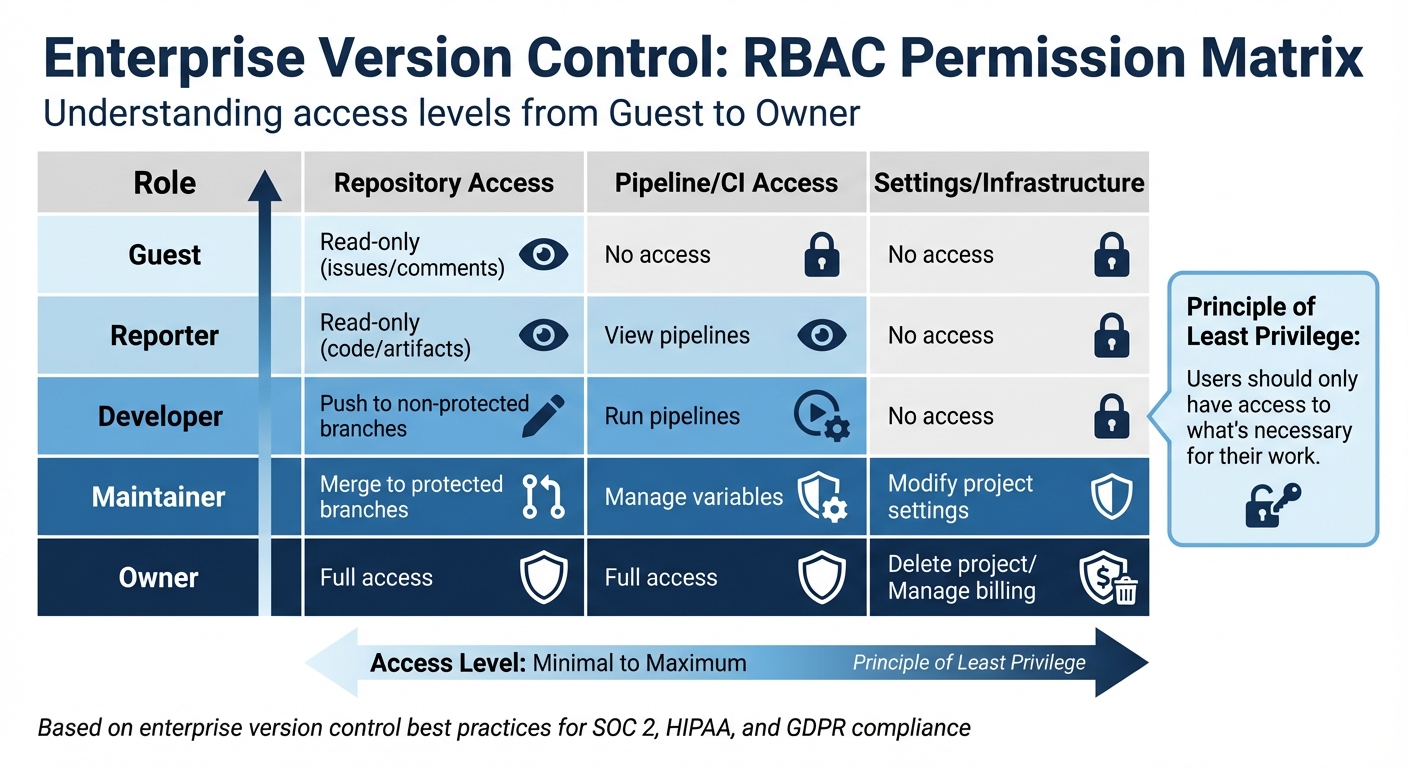
RBAC Permission Levels for Enterprise Version Control Systems
Access controls are your first line of defense against unauthorized access. Even the most advanced tools can't compensate for overly broad permissions. The goal is simple: ensure users have access to only what they need - nothing more.
Role-Based Access Control (RBAC)
RBAC works by assigning permissions to roles like Admin, Developer, or Viewer, instead of granting them to individual users. This setup follows the principle of least privilege, ensuring users only have access to what's necessary for their work. For example, when onboarding a new developer, assign them the appropriate role and adjust it if they switch teams or responsibilities.
The importance of tight role management can't be overstated. Take the 2019 Capital One breach, where data from over 100 million customers was exposed. The attacker exploited a role with permissions far beyond what was necessary. Aniket Singh, SDE II at Procedure, summed it up perfectly:
"Would you hand the keys of the vault to everyone in the company?"
Modern RBAC systems go beyond basic read/write access. They enable granular permissions for actions like merging, force-pushing, or creating tags. For example, Microsoft has implemented "Proof of Presence" policies, requiring verified individuals to authenticate pull requests with fresh multi-factor authentication (MFA). This approach supports over 100,000 engineers across 61,000 repositories while adhering to Zero Trust principles.
| Role | Repository Access | Pipeline/CI Access | Settings/Infrastructure |
|---|---|---|---|
| Guest | Read-only (issues/comments) | No access | No access |
| Reporter | Read-only (code/artifacts) | View pipelines | No access |
| Developer | Push to non-protected branches | Run pipelines | No access |
| Maintainer | Merge to protected branches | Manage variables | Modify project settings |
| Owner | Full access | Full access | Delete project/Manage billing |
To avoid permission escalation, be cautious when assigning roles at a top-level group. For instance, granting "Maintainer" at a high level could inadvertently give administrative rights across unrelated projects. Instead, define roles based on specific job functions and limit permissions to what's absolutely necessary. For automation, avoid using personal access tokens in CI/CD pipelines. Use bot-specific roles with limited scopes and rotate tokens regularly to maintain security.
Multi-Factor Authentication (MFA)
MFA is a crucial safeguard against threats like password reuse, phishing, and social engineering. Even if an attacker gets hold of a password, MFA acts as a barrier to unauthorized access. As GitHub explains:
"2FA makes it much more difficult for your accounts to be compromised, even if an attacker has your password"
Not all MFA methods offer the same level of security. Hardware-based MFA, such as WebAuthn or FIDO2 security keys (e.g., YubiKeys), is the most secure option. These protocols include domain scoping, which prevents credentials from being used on fake websites. Software-based TOTP (Time-Based One-Time Password) apps are moderately secure, while SMS or email codes are the weakest due to risks like interception or SIM-swapping.
In 2024, Microsoft introduced "Proof of Presence for Pull Requests" (PoP PR) across 61,000 repositories. This policy mandates that every merge to a protected branch requires identity verification through fresh MFA. It ensures no code enters production without proper authentication, aligning with SLSA Level 4 security standards, which require two strongly authenticated approvers for code changes.
To enhance MFA adoption, prioritize hardware-backed solutions like WebAuthn over SMS or one-time passwords. Require all team members to register at least two second-factor credentials and download recovery codes to avoid account lockouts. For enterprise-wide consistency, integrate your version control system with an Identity Provider (IdP) using SAML or OIDC protocols to enforce MFA policies.
Branch-Level Permissions
Branch-level permissions add another layer of protection, restricting actions like pushing, merging, or deleting on specific branches or patterns (e.g., main, release/*). These rules act as guardrails, preventing unauthorized or unreviewed changes from reaching production.
The results speak for themselves. Teams that enforce strict write rules on production branches report 65% fewer critical incidents. Additionally, requiring multi-team approvals for code reviews reduces vulnerabilities by 45%. Force pushes, which account for up to 12% of accidental code overwrites, can be eliminated by enforcing branch-level pipeline permissions, reducing unauthorized deployments by 87% in regulated environments.
"Branch protection is the single most important guardrail you can put around your source code. Without it, a single bad merge to main can take down production, leak secrets, or bypass every quality gate your team spent months building." - Grizzly Peak Software
For production branches like main, master, release/*, or hotfix/*, enforce strict protection policies. Require at least two independent reviewers for pull requests to catch both bugs and design flaws. Disable settings that allow requestors to approve their own changes, ensuring the integrity of peer reviews. Configure required status checks so that code cannot be merged unless all automated tests and security scans pass. Finally, block force pushes - even for administrators - to maintain an immutable audit trail and prevent accidental data loss.
Managing Secrets Securely
Hardcoding API keys and database passwords in version control is a major security risk. Once a secret is committed to a repository, it remains in the version history indefinitely, even if deleted later. In 2024, GitHub reported 39 million leaked secrets in public repositories, with new credentials exposed every 30 seconds on average.
The financial impact of poor secret management can be devastating. For instance, a cryptocurrency exchange suffered a breach that cost up to $400 million in customer funds. Even private repositories aren't immune. As Joseph Longo from GitLab explains:
"A leaked secret can result in a loss of confidentiality and potentially a data breach. These types of incidents can lead to significant financial losses and a loss of trust amongst an entity's customer base."
Keep Secrets Out of Repositories
Avoid embedding secrets directly in your code or configuration files. This includes API keys, database credentials, OAuth tokens, and private SSH keys. Even Base64 encoding doesn't provide security - it’s just a format that can be easily reversed.
A better approach is to use environment variables. Store sensitive data in files like .env.local and exclude these files from version control by adding them to .gitignore. For example, instead of hardcoding a database password, use an environment variable: DATABASE_PASSWORD=${DB_PASS}.
To further reduce risks, implement pre-commit hooks using tools like ggshield or git-secrets to scan for exposed secrets before committing changes. Additionally, enable push protection features in platforms like GitHub and GitLab to automatically block commits containing patterns that match known secrets. If a secret does get exposed, treat it as compromised - revoke it immediately, rotate it, and review activity logs for unauthorized access.
Using Secret Management Tools
For larger-scale operations, manual secret management might not be enough. Tools like HashiCorp Vault, AWS Secrets Manager, and Azure Key Vault offer more secure and centralized solutions. These tools encrypt secrets and often support dynamic secret generation, which creates short-lived credentials that automatically expire, minimizing the risk window if exposed.
Modern version control systems can integrate with these secret managers. Platforms like GitLab and GitHub use JSON Web Tokens (JWT) or OpenID Connect (OIDC) to authenticate CI/CD jobs with external secret management tools. This means secrets aren’t stored in the repository but are fetched dynamically during runtime. For example, HashiCorp Vault can sync secrets directly into GitHub as repository or environment secrets.
| Feature | Environment Variables | Secret Management Tools |
|---|---|---|
| Storage | Local system/OS level | Centralized, encrypted database |
| Access Control | Limited to system access | Granular RBAC and identity-based access |
| Rotation | Manual update required | Often supports automated rotation |
| Auditability | Low (depends on OS logs) | High (detailed access logs) |
When integrating Vault with GitHub, use a GitHub App instead of Personal Access Tokens (PATs). Apps aren’t tied to individual users and generally have longer lifespans. Limit access to read-only for CI jobs and restrict token scopes to the specific repositories they need to access, setting short expiration windows (seven days or less). To ensure security during runtime, mask any secrets fetched from external managers in CI/CD logs. For complex JSON strings, use manual masking commands like ::add-mask:: in GitHub Actions.
Code Reviews and Vulnerability Scanning
After establishing strong access controls and secret management, the next step toward securing your version control environment involves thorough code reviews and automated scanning. Why? Because unreviewed code can introduce vulnerabilities that are much easier - and cheaper - to address during development rather than in production. Fixing issues during coding takes minutes, while production fixes can be significantly more costly and time-consuming.
The numbers back this up: the global market for secure code review automation is expected to hit $5.05 billion by 2033. Tools like SonarQube, which is used by over 7 million developers to scan approximately 750 billion lines of code daily, emphasize the importance of early detection. This "Shift Left" methodology not only catches issues early but also helps avoid accumulating security-related technical debt. Beyond identifying flaws, these practices create audit trails that are essential for meeting compliance standards like PCI DSS, HIPAA, and GDPR.
Required Code Reviews Before Commits
The Supply chain Levels for Software Artifacts (SLSA) framework recommends two-person reviews as a Level 4 requirement for changes to critical branches. This ensures that no code enters the main branch without passing through rigorous security checks.
"By treating the PR as a 'gate,' organizations ensure that no code enters the main branch without passing security checks." – Sonar
To maintain a balance between security and development speed, enforce branch protection rules. These rules should require at least one reviewer’s approval and a successful continuous integration (CI) check before merging. Keep pull requests concise - ideally under 400 lines of changes - to help reviewers stay focused. For high-risk areas like authentication, payment systems, or core data models, involve senior developers or security experts for an extra layer of scrutiny. Using standardized checklists, such as those based on the OWASP Top 10, can also help reviewers systematically identify common vulnerabilities.
Automated Vulnerability Scanning
While manual reviews are great for catching design and logic flaws, automated tools excel at identifying low-level issues. This is especially true for vulnerabilities in dependencies or third-party libraries, which are harder to spot manually. Automated scanning can prevent up to 90% of known vulnerabilities before deployment. And here’s a staggering fact: fixing vulnerabilities in production can cost up to 30 times more than addressing them during development.
Set up your version control system to require successful security scans as a prerequisite for merging pull requests. Incremental scanning, which focuses on analyzing only the changed code, helps maintain development speed while identifying issues that manual reviews might miss.
| Tool Type | Primary Focus | Integration Point |
|---|---|---|
| SAST | Source code flaws (e.g., SQLi, XSS) | Pre-commit, Pull Request |
| SCA | Third-party dependency risks | Build time, Pull Request |
| Secret Detection | Hardcoded API keys and tokens | Pre-commit, Pull Request |
| IaC Scanning | Infrastructure misconfigurations | Pull Request, Deployment |
"Security issues discovered in production are exponentially harder to fix than those caught during development. When a scanner flags a vulnerability in a pull request, the developer still has full context." – Sonali Sood, Founding GTM, CodeAnt AI
To avoid overwhelming your team with false positives, customize scanning rules and filter alerts carefully. For mature codebases, consider setting a baseline for existing issues. This allows you to focus enforcement on preventing new vulnerabilities while managing older, legacy issues separately.
Auditing, Logging, and Tracking Changes
Keeping a permanent record of every version control change is crucial for compliance, security, and accountability. Immutable audit trails are required to meet standards like SOC2, HIPAA, GDPR, SOX, and ISO 27001/26262. These standards demand unalterable records of data access and changes, ensuring transparency and traceability for organizations. Think of these logs as your system's "black box", enabling teams to trace bugs or security issues back to their source - even years after the fact. By tying together access controls and review protocols, effective auditing ensures every change is fully accountable.
"The Audit Log is the black box flight recorder that keeps the entire system accountable." – TechZenFlow
GitHub's standard audit logs retain data for 90 days, but businesses with stricter compliance requirements can stream logs to centralized storage systems for up to 7 years. For example, PCI DSS Requirement 10.7 mandates a minimum of 12 months of audit history, while HIPAA extends that to six years. Organizations with large development teams or heightened compliance needs often integrate logs into Security Operations Centers (SOC) for real-time monitoring and long-term storage. This approach complements access controls and code reviews, ensuring every action is traceable.
Immutable Audit Trails
Immutable logs guarantee that records remain unaltered, even by administrators, supporting non-repudiation (irrefutable accountability). Cryptographically signed commits using GPG or SSH keys provide proof of identity, preventing tampering or "spoofing" within the audit trail.
For environments requiring heightened security, some organizations back up Git logs to write-once, read-only storage solutions like Amazon S3 Object Lock. This ensures logs remain intact even if the primary repository is compromised. Streaming audit logs to tools like Splunk or Datadog enables real-time monitoring, offering alerts on suspicious activities such as unauthorized permission changes or the exposure of private repositories.
Recording Authors and Reviewers
Tracking who made a change and who reviewed it is just as critical as understanding what was changed. Each audit log entry should answer five key questions: "who, what, when, where, and the outcome." Using standardized formats like JSON makes searching and correlating data easier. To ensure authenticity, enforce signed commits across the organization by configuring Git to require GPG or SSH signing. Additionally, integrating SAML SSO and SCIM ties version control access to corporate identities, ensuring all author and reviewer data matches active employees.
"While application logs tell you what the system is doing, audit logs tell you what users are doing to the system." – Sonar
Encourage concise commit messages that clearly explain the purpose of a change. Use CODEOWNERS files to specify which teams are responsible for reviewing specific parts of the codebase, automating accountability and meeting separation of duties requirements. For added security, implement post-receive Git hooks to log push details - such as user, timestamp, and branch - to a separate, secure file. These measures not only strengthen accountability but also enhance disaster recovery and compliance efforts.
Disaster Recovery and Compliance
No version control system is entirely immune to disasters - whether it's accidental deletions, ransomware attacks, or provider outages. While SaaS platforms handle infrastructure security, your data remains your responsibility. For example, GitHub retains deleted data for a maximum of 90 days for public repositories and 400 days for private ones. These limitations highlight the importance of having robust backup and recovery strategies to keep your operations running during unexpected events.
Backups and Failover Systems
A solid disaster recovery plan starts with defining two critical metrics: Recovery Time Objective (RTO) - the maximum acceptable downtime - and Recovery Point Objective (RPO) - the maximum tolerable data loss in terms of time. These guide how often backups should occur. Relying on manual backups is risky, so automate them to match your RPO, whether that's hourly or daily. Stick to the 3-2-1 rule: keep three copies of your data, store them on two different types of media, and ensure one copy is stored off-site or in a separate cloud region. This approach minimizes the risk of losing access to all copies during a single failure.
Your backups should include everything: code, pull requests, issues, wikis, labels, milestones, and LFS objects. To guard against ransomware attacks - which occur every 11 seconds globally - store backups in immutable storage (WORM), which prevents them from being altered or deleted. Regularly test your backups by conducting quarterly restore drills to confirm their integrity and ensure your recovery procedures work as intended.
"A backup you have never tested is a backup you cannot trust." – Sai Krishna, Gitbackups.com
The risks of not having a reliable backup system are evident from real-world examples. In January 2017, a GitLab administrator accidentally deleted 300GB of live production data, leading to hours of downtime and permanent loss of data not captured in recent snapshots. Similarly, a multi-hour GitHub outage in June 2020 disrupted pushes, pulls, and API access for millions of developers. Using mirror repositories can provide near-instantaneous failover during such failures, though they require additional resources and maintenance. By combining these measures, you can protect your data and ensure continuity even during unexpected disruptions.
Meeting Regulatory Requirements
Disaster recovery isn't just about operational resilience - it also plays a critical role in meeting regulatory obligations. Compliance frameworks like SOC 2, ISO 27001, HIPAA, and GDPR require secure backups and traceable recovery processes. For example, PCI DSS Requirement 10.7 mandates retaining at least 12 months of audit history, while HIPAA extends this requirement to six years.
To stay compliant, align your RTO and RPO with these standards. Automate compliance checks by integrating tools into your CI/CD pipelines to scan for vulnerabilities and hardcoded secrets before merging code. The SLSA Framework can also strengthen your supply chain security, with Level 2 requiring change history and immutable revisions, and Level 4 adding two-person reviews for critical changes.
It's also crucial to classify the data stored in your version control system - such as source code, Infrastructure as Code (IaC), or configuration files - to determine which regulations apply. For instance, HIPAA governs health data, while PCI DSS applies to payment information. By combining automated backups, immutable storage, and compliance-ready audit trails, you can meet regulatory demands while safeguarding your operations against disruptions.
Encryption and Threat Detection
Encryption and threat detection serve as a critical last line of defense, complementing access controls and audit systems. Even with these safeguards in place, your code remains at risk if it isn’t encrypted or if malicious activity goes unnoticed. These measures are essential for protecting repositories from threats like interception, breaches, and supply chain attacks.
Encrypting Data at Rest and in Transit
To secure data during transfer, all communications - including Git LFS objects - must use encrypted channels like HTTPS or SSH. For instance, in Perforce P4D servers, enabling SSL (by adding "ssl:" to connection strings) ensures secure transmissions. Similarly, managing SSH keys effectively is vital for safeguarding interactions.
Encryption at rest is equally important. This protects stored data from unauthorized access, whether it’s on physical devices or in the cloud. Enterprise platforms like Azure DevOps and GitHub Enterprise include built-in encryption for stored data, offering a reliable layer of protection. For backups, end-to-end encryption - covering both data in transit and at rest - ensures repository security even if the main platform is compromised. Using immutable storage for backups adds extra protection by preventing attackers from altering or deleting recovery data.
When specific files within a repository require encryption, tools like git-secret, git-crypt, and BlackBox allow developers to encrypt individual files using GPG or symmetric keys. For broader secret management, services such as HashiCorp Vault, Square's Keywhiz, and Pinterest's Knox provide centralized encryption. These tools decrypt sensitive data only when authorized requests are made, ensuring tight control over access.
The risks are substantial. Research indicates that approximately 1,800 public pushes to GitHub expose live API keys and passwords daily. In 2022 alone, GitHub identified over 1.7 million leaked secrets on its platform. By combining encryption with vigilant monitoring, organizations can significantly strengthen their version control security.
Real-Time Threat Monitoring
Continuous threat monitoring is crucial for identifying risks as they arise. Real-time scanning tools, like push protection, block commits containing sensitive data or unauthorized code before they’re added to the repository. For example, GitHub Advanced Security can reject pushes with high-confidence secrets, stopping leaks at their source.
Tools such as TruffleHog, GitHub Secret Scanning, and git-secrets scan both incoming commits and historical data for exposed API keys, tokens, or certificates. Advanced scanners go a step further by verifying identified secrets against SaaS provider APIs, reducing false positives.
"Real-time threat monitoring augments existing protections with continuous visibility and contextual intelligence, keeping you steps ahead of attacks." – Guardsquare
Streamlining audit logs and security events into a centralized system like Splunk enhances monitoring and correlation. Webhooks can trigger immediate alerts to security teams via tools like Slack, Microsoft Teams, or email whenever a threat or leaked secret is detected. Behavioral analytics add another layer of protection by establishing baselines for developer activity, such as typical commit times, locations, or change volumes. Unusual patterns - like bulk repository downloads, sudden permission changes, or unauthorized access attempts - can signal potential account compromises.
For large-scale environments, automating responses is essential. Leaked secrets can be revoked instantly, or investigation issues can be opened as soon as a threat is identified. Backup solutions equipped with ransomware detection can also spot anomalies and initiate rapid recovery, minimizing potential damage.
Finding Secure Version Control Tools on All SaaS Software Directory
With growing demands for security and compliance, it's crucial to pick a version control platform that meets enterprise-level standards. The All SaaS Software Directory, curated by John Rush, serves as a one-stop resource for exploring secure, enterprise-grade version control tools. Within its Software Development category, you'll find a mix of well-established platforms and newer solutions tailored for organizations with strict security needs. This directory simplifies the process of finding tools that align with your compliance and security goals.
When exploring the directory, focus on tools that offer SAML 2.0 SSO for seamless corporate authentication across developer interfaces. Features such as secret scanning and static application security testing (SAST) are essential for safeguarding your codebase. Some platforms even provide advanced security add-ons, like enterprise-level secret protection, with clear pricing models. For example, Google Secure Source Manager offers single-tenant instances for up to hundreds of users and repositories at a flat rate of $1,000 per month.
It's also important to check for current compliance certifications like SOC 2 Type II, FedRAMP High, or HIPAA. A standout example is GitKraken, trusted by over 100,000 organizations and 40 million developers worldwide. GitKraken undergoes annual independent audits to maintain SOC 2 Type II certification, ensuring robust data security and system access controls. The platform's impact is evident: Johnson Controls reported a 55% faster merge resolution and a 10x increase in team size after adopting GitKraken's enterprise features, while Lansweeper cut pull request review times by more than 50%.
For organizations operating in high-security environments, consider tools that offer Customer-Managed Encryption Keys (CMEK) to maintain control over intellectual property. Platforms like AuditGIT stand out with their zero-persistence model, where code is cloned on-demand and deleted immediately after scanning. AuditGIT supports over 13 technology stacks, including Rust, Go, and SAP ABAP. As AI becomes more integrated into development workflows, look for tools that provide granular control over AI providers and models, along with organization-wide API key enforcement.
The directory also includes filtering options to help you find solutions that meet specific regulatory requirements. You can compare features like branch protection rules, immutable audit logs, and integrations with IAM systems such as Azure Entra ID or Okta. This centralized resource streamlines vendor evaluation, making it easier to choose tools that align with your organization's security framework and compliance standards.
Conclusion
Source code repositories are the backbone of your organization’s critical operations, housing everything from proprietary algorithms to infrastructure definitions. Mismanagement in version control can lead to costly consequences, as past incidents have shown. Without proper security measures, these repositories become vulnerable to supply chain attacks.
This highlights the importance of securing every layer of your development process. Implementing best practices - like Role-Based Access Control (RBAC), Multi-Factor Authentication (MFA), automated vulnerability scanning, secret management, and maintaining immutable audit trails - helps protect your codebase. These measures not only shield your organization from threats but also ensure compliance with regulations such as SOC 2, HIPAA, PCI DSS, and GDPR. Together, they uphold the integrity of your operations.
"Version control security has become a critical defense layer that extends far beyond simple access controls." – Kusari
Take proactive steps to secure your repositories. Require pull request reviews and enforce branch protection rules to ensure code is thoroughly vetted before production. Integrate tools like Static Application Security Testing (SAST) and secret scanning into your CI/CD pipeline to catch vulnerabilities early. Avoid storing sensitive credentials in repositories by using tools such as HashiCorp Vault or AWS Secrets Manager. Additionally, enforce least privilege principles through RBAC, granting developers access only to what’s necessary.
For organizations seeking robust version control tools, the All SaaS Software Directory is a valuable resource. It offers a curated list of enterprise-grade solutions tailored to meet stringent security and compliance standards. Whether you need SOC 2 Type II certification, SAML 2.0 SSO, or customer-managed encryption keys, the directory simplifies the vendor selection process, ensuring your tools align with your security and compliance needs.
FAQs
How do I choose the right RBAC roles for my teams?
To get started, take a close look at the roles and permissions available in your system and match them to your team's responsibilities and security requirements. Stick to the principle of least privilege, which means granting only the access that's absolutely necessary - nothing more. This approach reduces potential risks.
Consider creating specific, granular roles like read-only, write, or admin. These allow for better control and clarity over who can do what. Make it a habit to review and audit these roles regularly to ensure they're still appropriate and aligned with current needs. If possible, automate role management processes. This can help you avoid errors and keep your system secure.
What should I do if a secret gets committed to Git?
If a secret ends up in Git, you should assume it's compromised. The first step is to revoke or rotate the secret immediately. After that, remove the secret from Git history using tools like git filter-repo. Since this process affects the repository's history, coordinate with your team - everyone will need to re-clone the repository to avoid issues.
To avoid similar mistakes in the future, consider these precautions:
- Use secret scanning tools to detect sensitive information in your codebase.
- Set up pre-commit hooks to block secrets before they are committed.
- Store secrets securely, outside of version control, using tools like environment variables or dedicated secret management systems.
These steps can help protect your sensitive data and prevent accidental exposure.
How often should we test repository backups and restores?
Regularly testing repository backups and restores is essential for maintaining data integrity and ensuring you're prepared for recovery when needed. Experts suggest conducting these tests at least every quarter or after any major changes, like infrastructure updates or workflow adjustments. Routine testing helps catch potential problems early, keeping your version control system secure and dependable.