Medical services require help desk solutions that prioritize HIPAA compliance, data security, and patient tracking. With over 700 healthcare data breaches from 2024–2025 exposing 275+ million patient records, choosing the right tool is critical. Here’s a quick rundown of the top options:
- Zendesk: Best for large systems with multi-channel messaging. HIPAA compliance starts at $115/agent/month.
- HappyFox: Affordable for mid-sized clinics. HIPAA features start at $69/agent/month.
- JitBit: Ideal for self-hosted setups. One-time fee of $1,699 for nine agents.
- Freshdesk: Budget-friendly at $23/agent/month for HIPAA compliance.
- Freshservice: Focuses on IT and asset management. Starts at $115/agent/month.
- HelpSpot: Self-hosted option for $1,699/year. Great for small practices needing data control.
- TOPdesk: Tailored for complex workflows in large hospitals. Pricing is custom.
- Help Scout: Patient-focused communication tool. HIPAA compliance at $75/agent/month.
- ServiceNow: Enterprise-grade solution for hospitals. Pricing is custom.
- All SaaS Software Directory: A resource to compare HIPAA-compliant tools with BAAs.
Quick Comparison
| Solution | HIPAA Plan Price | Best For | Key Features |
|---|---|---|---|
| Zendesk | $115/agent/month | Large systems needing customization | Multi-channel support, audit logs |
| HappyFox | $69/agent/month | Mid-sized clinics | Unified inbox, role-based permissions |
| JitBit | $1,699 one-time | Practices needing self-hosted options | Email-first tickets, asset management |
| Freshdesk | $23/agent/month | Small to mid-sized practices | Patient tagging, AI chatbots |
| Freshservice | $115/agent/month | IT and medical equipment management | Asset tracking, ITSM tools |
| HelpSpot | $1,699/year | Small practices needing data control | Custom fields, self-hosted deployment |
| TOPdesk | Custom pricing | Large hospitals with complex workflows | Integrated records, asset tracking |
| Help Scout | $75/agent/month | Patient-focused practices | Shared inbox, AI tools, collision detection |
| ServiceNow | Custom pricing | Enterprise hospitals | EHR integration, advanced workflows |
When choosing, consider compliance, ease of use, integration with EHR systems, and pricing. Many platforms offer trials, so test them to ensure they meet your needs.
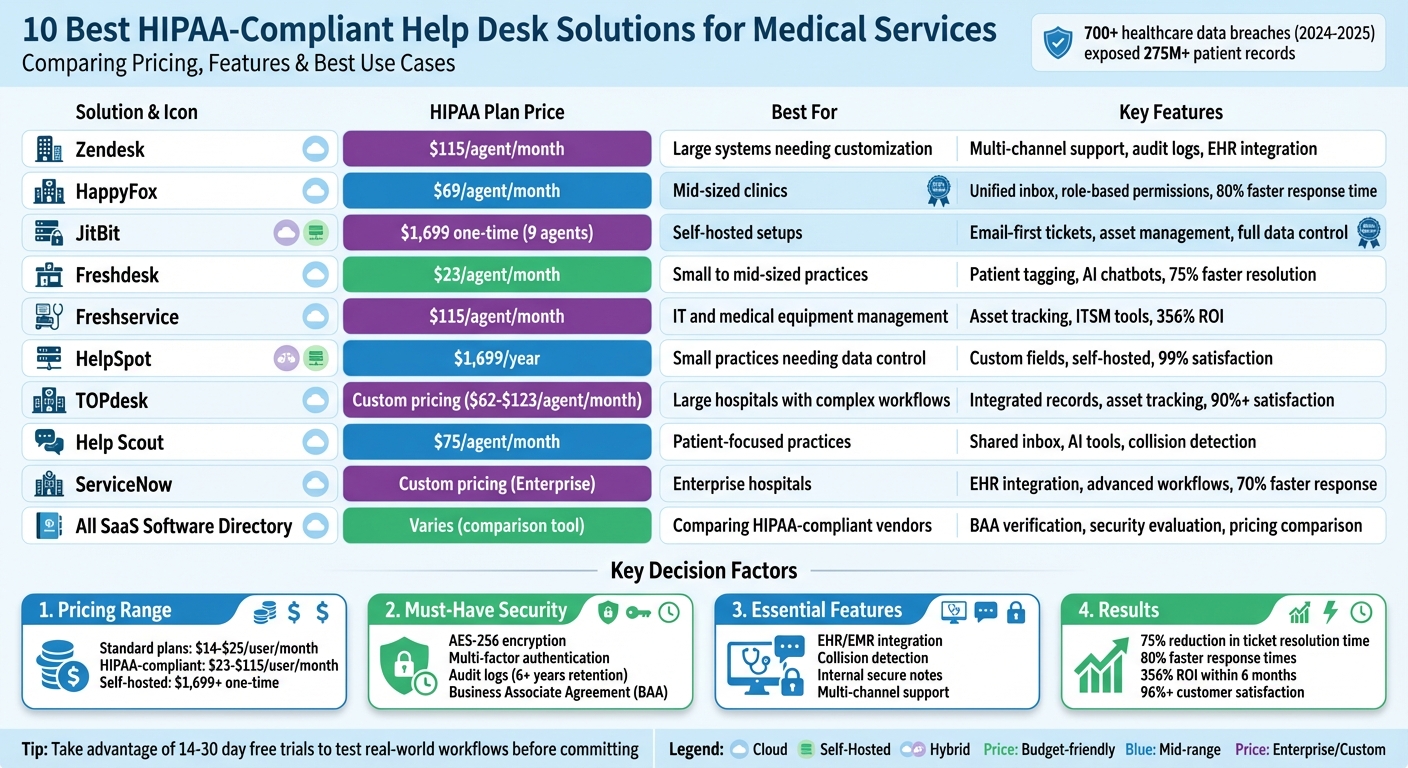
HIPAA-Compliant Help Desk Solutions for Medical Services: Pricing and Features Comparison
Freshdesk vs Help Scout: Choose a HIPAA Compliant Ticketing System
sbb-itb-e3aed85
1. Zendesk
Zendesk offers HIPAA-compliant solutions starting with its Suite Professional plan at $115 per agent/month. However, the entry-level plans, priced at $19 per agent/month, do not include the necessary security features for handling Protected Health Information (PHI). To use Zendesk for patient data, you’ll need to sign a Business Associate Agreement (BAA) and configure specific security settings.
HIPAA Compliance
To comply with federal standards, Zendesk requires several critical security configurations. SSL encryption must always be enabled, and agents must use either built-in Two-Factor Authentication (2FA) or Single Sign-On (SSO) with 2FA. Additionally, ticket comments in email notifications should be disabled to prevent PHI from being transmitted through unsecured email channels. Another key setting, “require authentication for download,” ensures that attachments cannot be accessed via public URLs.
Zendesk also provides detailed audit logs to track when and by whom PHI is accessed. However, it does not store PHI in designated record sets, leaving healthcare providers responsible for managing patient requests for medical records. With these security measures in place, Zendesk simplifies the management of sensitive patient data.
Patient Tracking Capabilities
Zendesk combines data from electronic health records (EHRs), medical devices, and appointment histories into a single workspace. For instance, New Hope Fertility Center reduced 27 monthly labor hours and eliminated 400 duplicate responses by leveraging internal notes and duplicate ticket alerts. Similarly, Inovalon implemented Zendesk messaging in 2023, saving over 700 labor hours while maintaining HIPAA compliance. These features make Zendesk a flexible solution for healthcare organizations aiming to optimize operations.
Best Use Cases
Zendesk is well-suited for large healthcare systems and telehealth providers that need secure, multi-channel messaging and strong IT support. It’s also an excellent choice for insurance companies handling complex billing and claims, thanks to its ability to integrate with financial systems.
Zendesk allows us to integrate with our other systems to drive efficiency. It's one system that meets the needs of multiple groups. - Bill Dougherty, Vice President of IT and Security at Omada Health
Zendesk effectively addresses the security and operational challenges faced by modern healthcare support teams.
2. Happy Fox
HappyFox offers a starting price of $21 per agent per month when billed annually. However, if you need HIPAA compliance features, you'll have to opt for the Enterprise plan, which typically begins at $69 per agent per month. For organizations looking to scale without worrying about per-user costs, the "Unlimited Agent" plan provides a solution that simplifies cost management.
HIPAA Compliance
HappyFox meets HIPAA requirements with features like enterprise-grade encryption, detailed audit logs, and strong access controls. To handle Protected Health Information (PHI) legally, the platform requires a Business Associate Agreement (BAA). It also supports role-based permissions, allowing healthcare teams to assign access levels based on roles - ensuring that sensitive medical data stays secure and is only accessible to the right people. Beyond compliance, the platform is designed to streamline patient communications effectively.
Patient Tracking Capabilities
HappyFox consolidates patient interactions from multiple sources - email, phone, chat, and web forms - into a single inbox. This unified approach has led to impressive results, such as an 80% faster response time for patient inquiries and claims. One hospital reported a 60% improvement in resolving patient feedback and a 45% decrease in equipment downtime. The platform also makes care coordination easier by allowing doctors, labs, and specialists to share private notes within tickets, ensuring no information is lost during patient handovers.
Best Use Cases
With its comprehensive features, HappyFox is a strong fit for various healthcare needs. It's especially useful for managing patient support, medical billing, insurance claims, and even internal IT support in hospital settings. Its mobile access ensures that clinicians can handle urgent notifications and coordinate care on the go. Additionally, healthcare organizations can build patient-facing knowledge bases to address common questions about doctor availability or insurance coverage. This reduces the volume of incoming tickets and improves efficiency.
"We could craft our experiences around each of our departments so that the platform worked for them. Our ability to grow and change within our pricing tier was also something that was better than most of the other platforms out there." – William Hammond, Systems Analyst, North Country Healthcare
3. JitBit
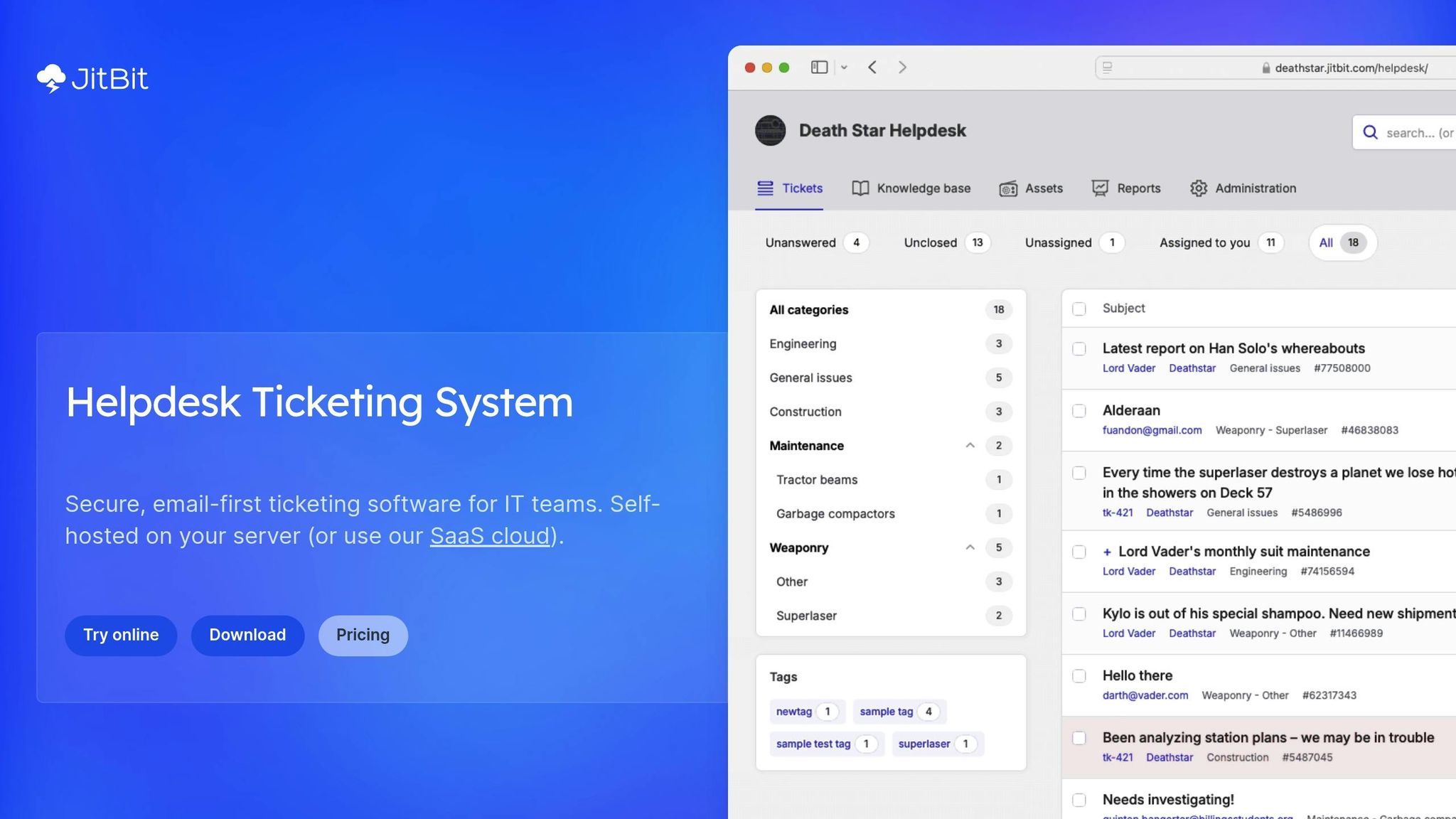
JitBit offers pricing that starts at $29 per month with its Freelancer plan. For healthcare organizations requiring HIPAA compliance, the Enterprise plan is necessary, priced at $249 per month. This plan includes a signed BAA and covers nine agents, with an option to add more agents at $29 each. For a nine-agent team, this pricing structure can lead to considerable savings. Currently, more than 155 healthcare organizations rely on JitBit to manage patient and staff support needs.
These rates are paired with strong security measures, making it a dependable choice for healthcare providers.
HIPAA Compliance
HIPAA compliance is available exclusively through JitBit's Enterprise SaaS plan. This plan includes a signed BAA and is hosted on AWS servers located in U.S.-based data centers. Security features include AES-256 encryption for data at rest, TLS 1.2+ for data in transit, role-based access control, two-factor authentication, SAML 2.0 integration, and detailed audit logs. To ensure compliance, healthcare teams are encouraged to customize email templates to exclude sensitive patient information and to disable file attachments in notifications.
Patient Tracking Capabilities
JitBit enhances its HIPAA-compliant framework with tools designed for efficient patient tracking. Its email-first approach converts incoming support emails into organized tickets, seamlessly integrating with platforms like Office 365 or Exchange. Additionally, the system includes asset management features, enabling healthcare facilities to link tickets to specific medical equipment or patient-related assets. Many teams report resolving tickets within an hour of signing up, and unlike some competitors, JitBit allows unlimited ticket submissions from both patients and staff without charging per user.
Best Use Cases
JitBit is particularly well-suited for healthcare environments, simplifying both patient support and internal IT operations. It excels in managing patient support tickets, tracking medical equipment, and handling internal IT help desk needs. For organizations seeking more control, a self-hosted option is available for a one-time fee starting at $2,199. This option allows full data control behind the organization’s own firewall, though it requires the organization to manage its own HIPAA-compliant infrastructure. Additionally, JitBit integrates ChatGPT-powered summarization and response generation, which operates securely under its BAA with OpenAI.
These features make JitBit a reliable and budget-friendly option for healthcare support teams.
As Alex, Founder of JitBit, shares, "Both me and my co-founder have years of tech-support background. We see new customers switching from Zendesk and Freshdesk every day because they need a tool that just works."
4. Freshdesk
Freshdesk provides a free plan for up to 2 agents, featuring basic ticketing and a knowledge base. For healthcare organizations, the Growth plan starts at $19 per agent per month (billed annually) and includes automation tools and a customer portal. The Pro plan is priced at $55 per agent per month, while the Enterprise plan costs $89 per agent per month. The Enterprise plan offers advanced features such as HIPAA compliance support, audit logs, and skill-based routing.
HIPAA Compliance
To meet HIPAA requirements, Freshdesk mandates a Business Associate Agreement (BAA) and specific security configurations. Healthcare organizations must sign a BAA with Freshworks and adjust settings such as disabling the Freshconnect feature, enabling SAML Single Sign-On (SSO), implementing IP whitelisting, and setting up custom SSL certificates for custom domains. Additionally, all Protected Health Information (PHI) must be stored in encrypted custom fields. These HIPAA compliance features are generally available only with the Enterprise plan.
"Freshdesk has helped us install more efficient workflows and processes while still maintaining HIPAA compliance. It has been a game-changer for agents and members." - Mahmoud Shehadeh, Director of Member Support, Hinge Health
With these measures in place, Freshdesk not only protects sensitive patient data but also enhances communication efficiency.
Patient Tracking Capabilities
Freshdesk goes beyond compliance by improving patient engagement through its tracking features. It creates a centralized workspace that integrates patient interactions from multiple channels, including email, chat, phone, and social media. Healthcare providers can view past conversations, appointments, medical records, and treatment notes all in one place. AI-powered chatbots further enhance the experience by enabling patients to book or reschedule appointments, complete forms, and make payments. Proactive reminders help reduce no-shows, and automation tools have led to a 75% reduction in ticket resolution time, saving an average of 54 hours per agent annually.
Best Use Cases
Freshdesk shines in managing multi-channel patient communications and optimizing internal IT operations, such as resolving medical equipment issues. It supports real-time collaboration among doctors, specialists, labs, and vendors. Administrators can use drag-and-drop tools to manage staff schedules while automating tasks related to billing, insurance, and patient transfers. Research teams also benefit from integrated communication tools and internal knowledge bases for organizing lab data. Many healthcare organizations report a payback period of less than three months and an average customer satisfaction (CSAT) score of 96%.
5. Freshservice
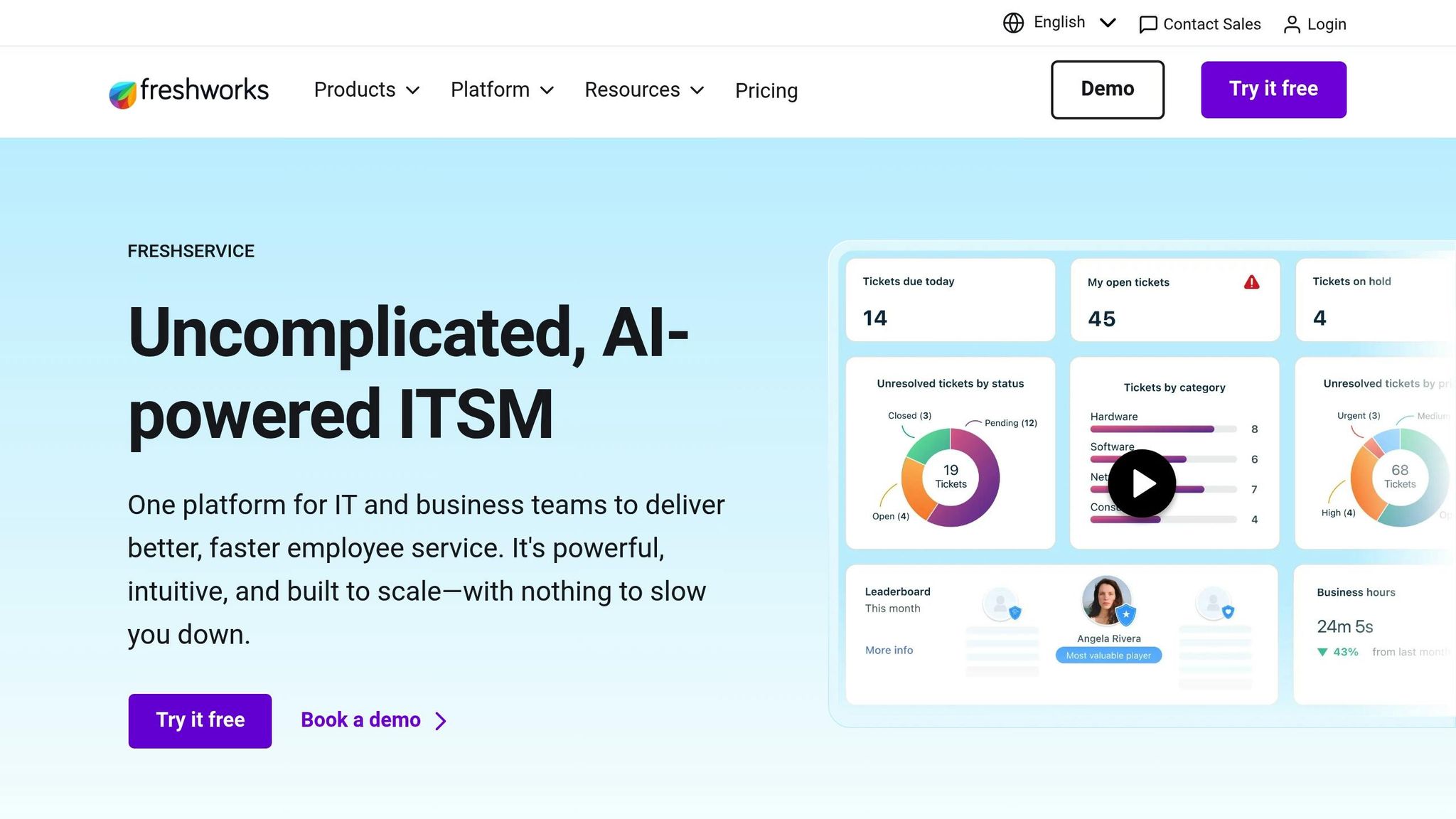
Freshservice focuses on IT Service and Asset Management, which plays a crucial role in maintaining the backbone of medical IT systems, often utilizing a variety of SaaS solutions to ensure seamless integration. While platforms like Zendesk and Freshdesk prioritize patient data security and workflow efficiency, Freshservice ensures the technical infrastructure supporting these systems operates flawlessly. This is essential in healthcare, where medical staff depend on tools like scheduling systems, electronic health records, and hospital networks to deliver uninterrupted care. By excelling in ITSM (IT Service Management), Freshservice helps healthcare organizations avoid disruptions and maintain smooth operations.
Pricing Starting Points
Freshservice offers pricing tiers starting at $19 per agent/month for the Starter plan. The Growth plan is priced at $49, while the Pro plan costs $99 per agent/month. For Enterprise-level needs, custom quotes are available. The platform has earned a 4.6/5 rating on G2, praised for its intuitive interface and strong automation capabilities.
HIPAA Compliance
Freshservice is fully compliant with HIPAA regulations, offering features like data encryption (at rest and in transit), role-based access controls, multi-factor authentication (MFA), and tamper-proof audit logs under a signed Business Associate Agreement (BAA). These audit logs provide a detailed record of who accessed Protected Health Information (PHI), what actions were performed, and when - essential details for passing HIPAA audits.
Best Use Cases
Although Freshservice isn't designed for direct communication with patients, it ensures the IT infrastructure that supports healthcare operations remains reliable. Frontline staff can easily submit tickets via mobile-friendly channels like MS Teams, Slack, and email without interrupting their workflow. Additionally, the platform's Freddy AI agent automates tasks such as routine maintenance, asset tracking, and ticket categorization, allowing clinicians to dedicate more time to patient care.
Healthcare organizations using Freshservice have reported impressive results, including:
- 356% ROI within six months
- 35% reduction in average ticket resolution time
- 97% employee satisfaction score
The system also keeps a close eye on medical hardware, software licenses, and system updates, ensuring that critical care equipment stays operational and meets compliance standards. These capabilities make Freshservice a dependable choice for healthcare IT management.
6. HelpSpot
HelpSpot offers a unique advantage for healthcare organizations by providing an on-premise deployment option, allowing complete control over where patient data is stored. Instead of relying on third-party cloud servers, medical facilities can host HelpSpot on private servers, either online or offline, behind their own firewalls. This flexibility plays a key role in reducing security risks.
HIPAA Compliance
HelpSpot strengthens its security features with customizable tools designed to meet HIPAA compliance requirements. The self-hosted version allows healthcare teams to tailor their setup to align with regulatory standards without needing third-party vendors.
As Ian Landsman, Founder of HelpSpot, explains, "Self-hosted help desk software gives healthcare companies the option to run their help desk on private servers behind their own firewall, both online or offline".
The platform includes SAML-based Single Sign-On (SSO) and permission groups to control access to sensitive data [6,45]. On top of that, it offers automatic detection and redaction of sensitive information, such as Social Security numbers, from tickets. With HIPAA penalties being so strict, these features are essential safeguards.
Pricing Starting Points
HelpSpot's pricing starts at $1,699 per year, calculated on a named-user (agent) basis. This means only active staff members who need login access are counted. Unlike many competitors that require expensive upgrades for HIPAA features, HelpSpot includes automation, reporting, and unlimited tickets/mailboxes at a single price point. The pricing structure applies equally to both cloud and on-premise versions, and non-profits can benefit from a 15% discount. Additionally, a 21-day free trial is available, and no credit card is needed to get started.
Patient Tracking Capabilities
HelpSpot uses custom fields to organize patient data by location or department, ensuring agents only see requests relevant to their roles. Its Live Lookup feature integrates with existing patient data systems like MedTrainer, PracticeSuite, and Relias, pulling real-time information through an open-source API - eliminating the need for manual data entry [6,44]. The platform also supports multi-brand operations, allowing healthcare teams to separate internal communications (e.g., HR or IT) from patient-facing inquiries. Some organizations manage over 500 departments and mailboxes without incurring extra costs. To avoid confusion, HelpSpot includes a collision detection tool that prevents multiple staff members from responding to the same patient inquiry at the same time [6,44]. These features work together to streamline patient support processes.
Best Use Cases
HelpSpot is particularly well-suited for healthcare organizations that prioritize strict data control and cannot store sensitive information on external servers. It supports patient-facing self-service portals, reducing the workload of support staff by answering common billing or insurance-related questions. Internal notes enable smoother collaboration between departments like Billing and Medical, without exposing private discussions. Automation rules further enhance efficiency, allowing the system to flag keywords like "HIPAA" or "compliance" in emails and route them to the appropriate staff.
With a 99% customer satisfaction rating and over 20 years of experience, HelpSpot has proven to be a dependable solution for managing everything from routine IT support to complex patient communications. Its combination of security, flexibility, and robust features makes it a strong choice for healthcare providers.
7. TOPdesk
TOPdesk supports over 450 healthcare institutions worldwide, including hospitals and care homes, by providing an integrated healthcare service management platform. It combines IT, HR, and facilities requests into a single, user-friendly self-service portal. This eliminates the need for multiple phone numbers and paper forms, streamlining operations and improving efficiency.
Patient Tracking Capabilities
TOPdesk’s self-service portal is a game-changer for healthcare staff. It allows them to easily report issues like errors in patient files or malfunctioning equipment - think broken blood pressure monitors - directly through the platform. Its asset management feature ensures that critical medical equipment, from laptops to monitoring machines, is properly tracked, reducing the risk of loss when staff members leave.
The system also automates the prioritization and routing of service requests to the appropriate teams. Additional tools, like visitor registration and key management, enhance physical security in healthcare facilities [49,50].
Since 2016, Kent Community Health NHS Foundation Trust has relied on TOPdesk to support about 5,300 users. They later expanded its use to manage services for an additional 2,500 users at the Surrey and Borders Partnership.
"People really love the portal for its ease of use – and it looks great! It's not over-fiddly, and it only takes a few clicks to find what you're looking for." - Richard Lawrence, Kent Community Health
The platform helped the organization achieve a customer satisfaction rating of over 90%.
Pricing Starting Points
TOPdesk uses a per-agent pricing model, where charges apply only to staff actively managing tickets. Light agents with view-only access and end users are unlimited and free.
- Essential Plan: $62/month per agent, includes Incident & Asset Management, a self-service portal, a knowledge base, and 100GB of storage.
- Engaged Plan: $88/month per agent, adds advanced management tools.
- Excellent Plan: $123/month per agent, includes premium support and additional features.
These pricing options are designed to help healthcare organizations operate efficiently across multiple departments.
Best Use Cases
TOPdesk’s robust tracking capabilities make it an excellent choice for healthcare organizations aiming to centralize service requests across departments. The platform is ready to use within weeks, thanks to its setup based on proven best practices - no coding required.
It integrates with over 500 tools via API, including WhatsApp, Power BI, and Azure DevOps, ensuring seamless connectivity. Security is a top priority, with data centers in North America, the UK, and Australia, and compliance with SOC2, ISAE 3000, and GDPR standards [49,52].
8. Help Scout
Help Scout is a help desk platform designed for medical practices, offering HIPAA compliance to ensure patient data is handled securely. Available on the Pro plan, the platform adheres to HIPAA regulations and provides a signed Business Associate Agreement (BAA) for covered entities.
HIPAA Compliance
Help Scout employs advanced security measures, including 256-bit SSL encryption for all web communications, and encrypts data both at rest and in transit. Patient information is hosted on Amazon Web Services (AWS), a trusted provider known for its strong security protocols. Additionally, staff can manually edit thread content to remove Protected Health Information (PHI), ensuring sensitive data isn't included in future replies.
In February 2026, New Hope Fertility Center implemented Help Scout to manage over 2,000 patient emails weekly. By utilizing shared inboxes and collision alerts, they avoided more than 400 duplicate responses each month. Internal notes saved the team 27 hours monthly, leading to fewer patient complaints and doubling their support efficiency.
"We've seen a huge uptick in staff efficiency and a significant drop in patient complaints." - Jennifer Nguyen, Operations Associate, New Hope Fertility Center
However, it's worth noting that while the shared inbox and chat features meet HIPAA standards, the Docs knowledge base does not comply for storing PHI. Despite this limitation, the platform excels in simplifying patient communication.
Patient Tracking Capabilities
Help Scout's tracking features help medical teams stay organized and efficient. The platform consolidates emails and chats into a single shared inbox, eliminating the scattered communication issues of traditional email systems. A sidebar displays patient details and message history, giving staff immediate context for each interaction.
The Beacon widget, embedded on practice websites, acts as both a contact form and a searchable knowledge base. Collision detection ensures no two staff members respond to the same inquiry, while AI tools like AI Summarize, AI Assist, and AI Drafts speed up administrative tasks. Separate inboxes can be assigned to different departments, such as billing, scheduling, or patient care. However, using AI features in a HIPAA-compliant manner requires an additional agreement.
Pricing Starting Points
Help Scout offers several pricing tiers, billed per user:
- Standard plan: $25/month - includes 2 inboxes, 2 knowledge bases, 150 workflows, and an AI inbox assistant.
- Plus plan: $45/month - provides 5 inboxes and advanced integrations with tools like Salesforce and HubSpot.
- Pro plan: $75/month - designed for HIPAA compliance, featuring 10 inboxes, 5 knowledge bases, and unlimited workflows.
- Free plan: Supports up to 5 users with 1 inbox but does not include HIPAA support.
All paid plans come with a 15-day free trial.
Best Use Cases
Help Scout is ideal for healthcare providers and medical offices that manage high volumes of patient inquiries while needing secure, collaborative tools. It's particularly effective for practices juggling multiple departments, such as billing and scheduling. With 96% of patient complaints stemming from poor customer service rather than clinical care, streamlined communication is critical.
The platform also integrates with over 90 tools and boasts reliable uptime between 99.9% and 99.99%. By focusing on improving patient experiences, healthcare facilities using Help Scout can gain up to 50% higher profit margins compared to competitors. This combination of compliance, efficiency, and patient-focused features positions Help Scout as a strong option for medical help desk solutions.
9. ServiceNow
ServiceNow brings together IT, HR, and clinical workflows, making it a go-to platform for large hospitals and health systems. Its Healthcare and Life Sciences Service Management solution centralizes shared services while ensuring compliance with regulations to protect sensitive patient data.
HIPAA Compliance
ServiceNow includes built-in HIPAA controls and holds certifications like HITRUST, SOC 2, and FedRAMP authorization. The platform’s AI tools bolster security measures, helping organizations maintain a strong defense against data breaches. Its Consent Management module digitizes patient consent forms and securely manages HIPAA authorizations.
"Security lives at the center of all we do. Data security is critical to your business." - ServiceNow
This focus on security pairs seamlessly with its advanced patient tracking capabilities.
Patient Tracking Capabilities
ServiceNow doesn't just stop at compliance - it helps consolidate patient data for better decision-making. Its HL7 FHIR Data Model is designed to manage data related to patients, practitioners, insurance, and revenue cycles. The Patient 360 feature pulls data from EHRs, medical devices, and insurance systems into a single, comprehensive view, enabling more personalized care. Additionally, the EMR Help feature allows clinicians to report IT or operational issues directly within the electronic medical record system, automatically including patient-specific details.
Real-world results back up these features. For instance, in February 2026, Omnicare, a pharmacy-services company, boosted its first-contact resolution rate from 85% to 90.1% by unifying its IT environment on ServiceNow. Another example comes from a hospital pilot using the OrbitaASSIST voice-integrated solution on the Now Platform, which reduced nurse response times from 11 minutes to just 3 minutes - a 70% improvement.
Pricing Starting Points
ServiceNow doesn’t share pricing publicly. Instead, organizations need to contact their sales team for a tailored quote based on specific requirements. Positioned as an enterprise-level solution, some competitors note that it can be pricier than mid-market options. The base Standard package for IT service management includes features like Incident, Problem, Change, Cost, Asset, and Request Management, along with tools like Walk-up Experience and Universal Request.
Best Use Cases
ServiceNow is ideal for large hospitals and health systems that need enterprise-wide automation, seamless EMR integration, and a unified platform to streamline operations. It’s particularly effective at consolidating outdated tools into one system. For example, Spectrum Health saw 97% of its 31,000 employees adopt the ServiceNow portal for IT and HR services. Similarly, VITAS Healthcare saved $70,000 in a single month by automating mobile-device management through the platform. Its ability to integrate IT, HR, and clinical data also eliminates the need for manual data entry across multiple software systems, making it a powerful tool for improving efficiency and maintaining compliance.
10. All SaaS Software Directory
The All SaaS Software Directory, put together by John Rush, serves as a go-to resource for healthcare providers looking to find help desk solutions that meet HIPAA compliance standards. Instead of spending hours evaluating vendors, medical practices can use this directory to filter tools based on essential compliance needs. It even pinpoints which vendors offer a Business Associate Agreement (BAA) - a legally required contract for any software dealing with Protected Health Information (PHI). By addressing these regulatory requirements, the directory helps healthcare organizations avoid potential compliance pitfalls when adopting new software.
HIPAA Compliance
The directory evaluates tools based on critical security measures like AES-256 encryption (for both data at rest and in transit), multi-factor authentication (MFA), and role-based access controls to ensure that sensitive information is only accessible to authorized staff. This makes it an essential resource for managing compliance risks. It also differentiates between tools that are ready for HIPAA compliance straight out of the box, such as Giva, and those that might require more extensive customization, like Zendesk. Additionally, it provides guidance on which healthcare environments are best suited for these compliance features.
Best Use Cases
This directory is especially useful for healthcare organizations comparing deployment models, checking BAA availability, and evaluating features like collision detection and EHR/EMR integrations. It highlights deployment flexibility, showcasing options like on-premise or self-hosted solutions such as Jitbit, which offers a one-time license starting at around $1,699, or OneDesk. For busy medical offices, the directory emphasizes tools with collision detection to avoid multiple staff members responding to the same patient inquiry. Moreover, it identifies software that integrates with EHR/EMR systems, supports appointment scheduling, and includes secure internal notes - features that streamline collaboration between billing teams and clinical staff.
Pricing Starting Points
The directory offers a clear comparison of HIPAA-compliant pricing tiers tailored to practices of different sizes. Entry-level options include Zoho Desk at $23 per user per month (Professional plan) and Help Scout at $75 per user per month (Pro plan). For white-label healthcare software, pricing starts between $2,250 and $3,000. Total costs depend on the practice size, with small practices (1–5 providers) typically spending between $8,000 and $25,000, while larger hospitals (20+ providers) may invest anywhere from $75,000 to over $200,000. These pricing details help healthcare providers weigh their options, balancing cost with the need for compliance.
Feature Comparison Table
This table outlines key features of several solutions, focusing on HIPAA compliance, patient tracking capabilities, pricing, and ideal use cases. It's important to note that HIPAA-compliant versions often come with higher-tier plans. Standard plans typically range from $14–$25/user/month, while HIPAA-compliant plans cost between $23–$115/user/month. The higher cost reflects additional security measures like AES-256 encryption, multi-factor authentication, and tamper-proof audit logs, which must be retained for at least six years. Below is a concise comparison to help healthcare organizations quickly assess their options.
| Solution | HIPAA Compliance | Patient Tracking Features | Starting Price | Best For |
|---|---|---|---|---|
| Zendesk | Available with Suite Professional + BAA | Customizable patient fields, collision detection, secure notes | $115/user/month (Suite Professional) | Large hospitals needing extensive customization |
| Happy Fox | Available with Enterprise + BAA | Patient history tracking, appointment reminders | $64/user/month (Enterprise) | Mid-sized clinics with high ticket volumes |
| JitBit | Self-hosted option available | Customizable patient fields and secure internal notes | $1,699 one-time fee (self-hosted) | Practices requiring on-premise data control |
| Freshdesk | Available with Growth plan + BAA | Patient tagging, collision detection | $23/user/month (Growth) | Small to mid-sized practices on a budget |
| Freshservice | Available with Enterprise + BAA | Asset tracking for medical equipment | $115/user/month (Enterprise) | Facilities managing IT and medical equipment |
| HelpSpot | Self-hosted option available | Customizable patient databases, secure messaging | $599 one-time fee (self-hosted) | Small practices prioritizing data sovereignty |
| TOPdesk | Available with custom enterprise plan + BAA | Integrated patient records, appointment scheduling | Custom pricing | Large healthcare systems with complex workflows |
| Help Scout | Available with Pro plan + BAA | Patient conversation history, collision detection | $75/user/month (Pro) | Patient-focused practices emphasizing communication |
| ServiceNow | Available with Healthcare Service Management + BAA | EHR/EMR integration, advanced patient workflows | Custom pricing (typically $100+/user/month) | Enterprise hospitals with existing ServiceNow infrastructure |
| All SaaS Software Directory | Curates HIPAA‐compliant options with BAA info | Identifies tools with collision detection, EHR integration | Varies by listed solution | Healthcare organizations comparing multiple vendors |
Conclusion
When choosing a HIPAA-compliant help desk, start by ensuring your vendor signs a Business Associate Agreement (BAA). Security is critical - recent breach data highlights the risks, with HIPAA violations carrying penalties of up to $2.19 million annually.
Additionally, check that the help desk integrates smoothly with your EHR, billing software, and practice management tools. Decide whether a cloud-based solution - offering convenience and quicker updates - or an on-premise system with full data control better suits your needs.
Take advantage of free 14- to 30-day trials to test how the system handles real-world workflows like patient intake and internal handoffs. During this period, verify that audit logs meet HIPAA standards by securely recording and retaining access to Protected Health Information (PHI) for at least six years. These trials help you make an informed decision before committing to full implementation.
Cost is another factor to consider. HIPAA-compliant plans generally range from $69 to $115 per user per month, though self-hosted solutions like JitBit can eliminate recurring fees entirely.
Beyond pricing, focus on usability for your team. With medical staff already managing heavy workloads, a user-friendly interface is essential to encourage adoption and maintain efficiency. Look for features like internal notes, @mentions, and omnichannel support (email, live chat, SMS) to align with patient communication preferences. Healthcare providers using specialized help desks have reported up to a 75% reduction in ticket resolution times, improving both staff productivity and patient satisfaction.
FAQs
What’s the minimum I need for a help desk to be HIPAA-compliant?
To ensure HIPAA compliance, a help desk must have the following in place:
- A signed Business Associate Agreement (BAA) to establish the responsibilities and safeguards for protecting PHI.
- Strong security measures such as data encryption, access controls to limit who can view sensitive information, and audit controls to monitor system activity.
- Proper system configuration to secure and protect protected health information (PHI) in accordance with HIPAA standards.
These steps are essential to maintain the privacy and security of health information while adhering to regulatory requirements.
Should my clinic choose cloud or self-hosted help desk software?
Choosing between cloud-based and self-hosted help desk software comes down to your clinic’s specific needs for security, compliance, and daily operations.
Cloud-based solutions are known for their quick setup, automatic updates, and dependable infrastructure, making them a convenient choice. On the other hand, self-hosted options give you complete control over your data and security measures, which can be especially important for meeting requirements like HIPAA or ensuring data residency.
The decision ultimately hinges on your priorities: do you value data control and compliance more, or is ease of use and rapid deployment a bigger concern? Weigh these factors carefully to choose the right fit for your clinic.
How can a help desk connect with our EHR/EMR without risking PHI?
To ensure a secure connection between a help desk and an EHR/EMR system while safeguarding Protected Health Information (PHI), it's crucial to use HIPAA-compliant platforms. These platforms should include features like encryption, access controls, and audit logs to protect sensitive data. Tools such as Keragon and Keona Health provide secure integration options designed to prevent any exposure of PHI.
Additionally, make sure your help desk software is built to support HIPAA compliance. It's equally important to establish Business Associate Agreements (BAAs) with all relevant parties to uphold patient privacy during both communication and data exchanges. These steps are essential for maintaining the integrity and security of patient information.