Nonprofits are under pressure. By 2026, 85% expect a rise in service demand, but tight budgets and small teams make managing inquiries a challenge. Help desk software can solve this by centralizing communication, automating tasks, and improving response times. With 67% of nonprofits already using these tools, the right platform can handle routine tasks like donation queries, freeing staff to focus on their mission.
Here’s a quick breakdown of the best options:
- Free Tools: Hiver (unlimited users, live chat, WhatsApp integration), Spiceworks (ad-supported, no limits on agents), Zoho Desk (free for 3 agents), Freshdesk (free for 2 agents), and open-source options like osTicket.
- Low-Cost Plans: BoldDesk ($7–$19/user/month, 10 free licenses for small nonprofits), Zoho Desk ($14/user/month with advanced reporting), Freshdesk ($15/user/month with AI tools).
- Mid-Range Options: Help Scout ($25/month for email-based support), HappyFox ($19/user/month, donor management tools), Zendesk ($19/agent/month, 1,200+ integrations).
- Enterprise Solutions: Atlassian JSM (free for 25 users, 50% off Enterprise plans), Zendesk Suite ($169/agent/month, nonprofit discounts), Zoho Desk ($40/user/month, $5,000 credit for nonprofits).
Key Features to Look For:
- Multichannel support (email, chat, social media, phone)
- Automation and AI tools to handle routine tasks
- Integration with donor databases and CRMs
- Affordable nonprofit pricing or free tiers
Selecting the right software depends on your team size, budget, and technical needs. Test platforms with real workflows to ensure they meet your requirements. Discounts and free plans make these tools accessible, even for small organizations.
Free and Low-Cost Help Desk Software
Free Help Desk Tools for Nonprofits
Nonprofits often operate on tight budgets, so finding cost-effective tools is essential. Thankfully, several platforms offer free plans tailored to these needs. Hiver is a standout option, providing a free plan with unlimited users - perfect for volunteer-heavy organizations. This plan includes live chat, WhatsApp integration, and a knowledge base, all without per-user fees. Emma Minnis, Interim Manager of Student Success, shared how Hiver’s features “have helped us save over 500 hours every month”.
Another excellent option is Spiceworks Cloud Help Desk, which is entirely free and ad-supported. It imposes no limits on agents, users, or tickets, making it ideal for teams needing inventory management and automated ticket routing at no cost. For nonprofits already using Google Workspace, Hiver integrates seamlessly with Gmail, turning it into a fully functional help desk without requiring staff to learn a new system.
Zoho Desk offers a free plan for up to three agents, which includes a private knowledge base and mobile app access. Similarly, Freshdesk provides a free tier for up to two agents, complete with social media ticketing capabilities. For tech-savvy organizations, open-source tools like osTicket or FreeScout are worth considering. These platforms offer unlimited scalability but require IT expertise for hosting and maintenance.
For nonprofits ready to invest a little more, low-cost options can provide enhanced features and additional support.
Low-Cost Options with Extra Features
When nonprofits outgrow free tools, affordable paid plans can provide advanced features like automation and multichannel support. For $7–$19 per user per month, these plans help streamline operations for growing organizations. BoldDesk offers a nonprofit-focused program for organizations earning under $1 million annually. This program provides 10 free agent licenses on its Momentum plan, which supports unlimited tickets and integrates with WhatsApp, SMS, and Facebook.
Zoho Desk’s paid plans start at $14 per agent per month, adding features such as macros and advanced reporting to its free tier. Meanwhile, Freshdesk begins at $15 per agent per month and includes tools like Team Huddle for internal collaboration and parent-child ticketing for handling complex inquiries. These entry-level plans now incorporate AI capabilities, significantly automating ticket resolution. This means one staff member can manage the workload of three. As Hannah Owen from Lorikeet explains, “A helpdesk with 200 features but a 15% automation rate is worse than one with 50 features and a 60% resolution rate”.
Low-cost help desk software can bridge the gap between free tools and the growing demands of nonprofits, offering valuable enhancements without breaking the bank.
sbb-itb-e3aed85
Mid-Range Help Desk Software ($19–$50 per User)
Features of Mid-Range Tools
As nonprofits expand, mid-range help desk tools step up with advanced automation and open-source communication integrations to handle growing demands effectively. These platforms go beyond basic ticket routing by incorporating sophisticated AI capabilities. For example, Zoho Desk's "Zia" AI can autonomously manage intricate inquiries, while Freshdesk's "Freddy AI" performs sentiment analysis and drafts context-aware replies. Zoho Desk also includes a "Blueprint" feature that ensures process compliance without requiring custom coding.
Another key differentiator at this level is the strength of integrations. Tools in this category often support a wide range of apps to streamline operations. Zendesk, for instance, integrates with over 1,200 apps and handles multi-queue operations seamlessly across various regions, making it a great fit for nonprofits with distributed teams. Hiver embeds AI across all its plans and boasts a quick setup time of under 15 minutes, currently serving over 10,000 teams worldwide. Zoho Desk offers bi-directional syncing with Zoho CRM, Books, and Projects, giving agents a full view of donor interactions with every ticket. These advanced features provide nonprofits with the tools they need to scale their support systems efficiently.
Best Platforms for Growing Nonprofits
Several platforms in this range stand out for their tailored solutions, catering specifically to nonprofits ready to scale. Help Scout, for example, offers contact-based pricing at $25 per month for 100 contacts, with unlimited volunteer access. This makes it an excellent choice for organizations focused on email-based support. Macedona, an independent reviewer, describes it as:
"Help Scout is the 'Goldilocks' help desk - not too simple, not too complex. If your support strategy centers on email... Help Scout delivers".
HappyFox is another strong contender, offering features designed for volunteer recruitment, donor receipt management, and grant tracking. Pricing starts at $19 per staff member per month, with discounts for NGOs. The platform claims to improve fundraising efficiency by 60% and triple the effectiveness of volunteer coordination. Kavin Stopforth, Facilities Administrator at Planned Parenthood, uses HappyFox's smart rules and tags to streamline operations.
OneDesk provides a unique combination of help desk and project management tools, offering a 30% discount for nonprofits. It also includes separate portals for volunteers and donors to track their requests, adding an extra layer of functionality.
For nonprofits needing enterprise-level scalability without breaking the bank, Zendesk is a strong option. Starting at $19 per agent per month, Zendesk supports over 130,000 global brands in more than 30 languages. SaaS CRM Review highlights its strengths:
"Zendesk is a safe shortlist pick for teams that need mature routing, SLAs, and queue hygiene at scale".
Enterprise Help Desk Software with Nonprofit Discounts
Enterprise Features for Nonprofits
Nonprofits often juggle complex operations, and enterprise platforms are designed to simplify these challenges. With advanced AI automation and omnichannel support, these tools centralize communication across email, live chat, social media, and voice channels. This ensures donors and volunteers receive consistent, seamless support no matter how they choose to connect. AI assistants like Zoho's Zia and Zendesk AI take care of repetitive tasks - sending thank-you emails, updating records, or sending reminders to volunteers - so staff can focus on higher-priority work.
Analytics tools add another layer of efficiency by enabling nonprofits to track outcomes, gain donor insights, and share dashboards with stakeholders. As Karine McGraw, Deputy Director at La Maison des parents, shared:
"Zoho Flow has streamlined our data management. We no longer have to worry about handwritten notes, transcription errors and data loss".
Custom workflows are another game-changer, especially for nonprofits managing unique tasks like grant tracking or multi-country programs. Low-code tools make it possible to create tailored apps without needing a developer. Michelle Qualls, Medical Coordinator at Golden Retriever Rescue of North Texas, highlighted this benefit:
"Zoho Creator has allowed us to track applicants, fosters, and our dogs, all from a central place. We're now able to access the information whenever we need it!".
Data security is also a top priority. Features like HIPAA compliance, data encryption, and audit logs ensure sensitive donor information stays protected. For large nonprofits managing multiple brands or regional programs, Zendesk Suite Enterprise supports up to 300 help centers under one account. Additionally, platforms like Zendesk and Zoho Desk offer sandbox environments, so teams can safely test workflows or integrations before going live.
Now that we've covered the features, let's dive into how these tools are priced for nonprofits.
Nonprofit Pricing and Discounts
Enterprise software providers often offer sizable discounts to make their platforms accessible to nonprofits. Atlassian's Jira Service Management stands out with its pricing structure: nonprofits get 100% off Standard or Premium plans for up to 25 seats when billed annually. For 26 or more seats, the discount shifts to 75%, while Enterprise Cloud plans are available at 50% off. Even better, nonprofits in low-income or lower-middle-income countries, as defined by the World Bank, qualify for an 85% discount instead of the usual 75%.
Zendesk also supports nonprofits through grants and special pricing via the Zendesk Foundation, with Suite Enterprise starting at $169 per agent per month before nonprofit discounts. Zoho, on the other hand, provides a one-time $5,000 credit for registered nonprofits, valid for five years. After the credit is used, Zoho covers 50% of all purchases or renewals. Help Scout offers one of the most generous discounts, with eligible nonprofits receiving 70% off their pricing.
To access these discounts, vendors typically verify nonprofit status through platforms like Goodstack or TechSoup. Having your tax exemption letter or governing documents ready can speed up the verification process, which usually takes 2–3 business days. It’s also worth noting that pricing can change as your team grows. For example, if your team expands from 25 to 26 users on Atlassian, the discount for all users adjusts from 100% to 75%. Using pricing calculators can help you plan for these changes.
| Software | Enterprise List Price (Annual) | Nonprofit Discount | Key Enterprise Feature |
|---|---|---|---|
| Atlassian JSM | Varies by user count | 50% off Enterprise; 100% off first 25 seats (Standard/Premium) | AI automation |
| Zendesk Suite | $169/agent/month | Grants & special pricing | AI agents & up to 300 help centers |
| Zoho Desk | $40/user/month | $5,000 credit + 50% ongoing discount | Multi-brand portals & Zia AI |
| Help Scout | $25/month (base) | 70% off | Collaborative email support |
| Salesforce Service Cloud | $165/user/month | 10 free licenses + discounted tiers | 360-degree customer view |
Feature Comparison Table
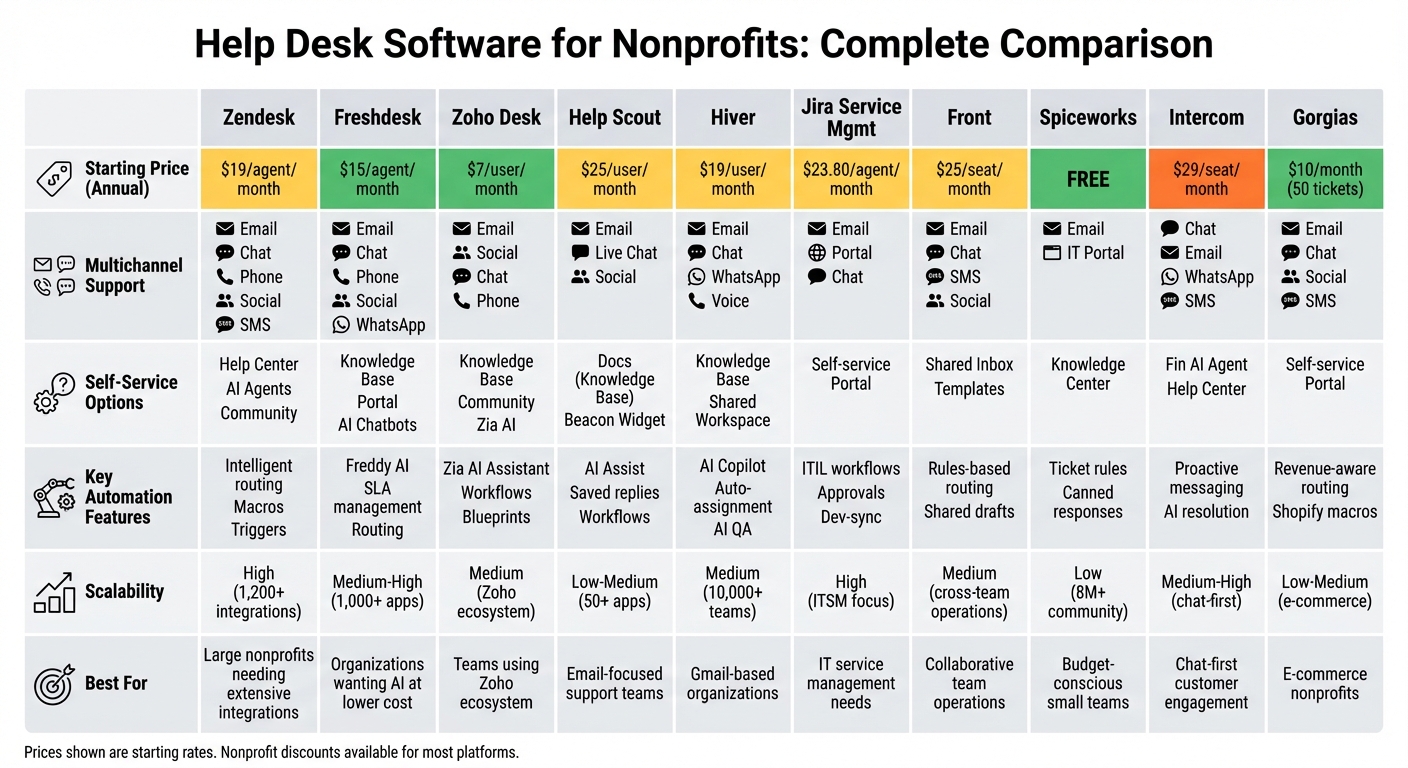
Help Desk Software Comparison for Nonprofits: Features and Pricing Guide 2026
Picking the right help desk platform involves balancing several factors - cost, multichannel capabilities, automation tools, and how well it scales with your team. The table below highlights essential features of 10 top platforms to help you make an informed choice.
Zendesk stands out with its extensive integration options, offering compatibility with over 1,200 apps, making it ideal for teams relying on multiple tools. Freshdesk delivers omnichannel support at a lower price point, with its Freddy AI resolving up to 80% of routine queries. For those already using Zoho products, Zoho Desk brings Zia AI for workflow automation. Both Help Scout and Hiver focus on email-first interfaces, offering simplicity and ease of adoption.
For more specialized needs, Jira Service Management provides ITIL-compliant workflows and seamless integration with development teams. Front excels in collaborative features like shared drafts and rules-based routing, though its costs can rise as your team grows. Spiceworks remains the top free option, supported by a community of over 8 million IT professionals. Meanwhile, Intercom and Gorgias cater to chat-first and e-commerce needs, respectively, with Gorgias offering revenue-aware routing and Shopify-specific features.
Here’s a quick side-by-side comparison of the platforms to help you identify the best fit for your needs:
| Platform | Starting Price (Annual) | Multichannel Support | Self-Service Options | Key Automation Features | Scalability |
|---|---|---|---|---|---|
| Zendesk | $19/agent/month | Email, Chat, Phone, Social, SMS | Help Center, AI Agents, Community | Intelligent routing, Macros, Triggers | High (1,200+ integrations) |
| Freshdesk | $15/agent/month | Email, Chat, Phone, Social, WhatsApp | Knowledge Base, Portal, AI Chatbots | Freddy AI, SLA management, Routing | Medium-High (1,000+ apps) |
| Zoho Desk | $7/user/month | Email, Social, Chat, Phone | Knowledge Base, Community, Zia AI | Zia AI Assistant, Workflows, Blueprints | Medium (Zoho ecosystem) |
| Help Scout | $25/user/month | Email, Live Chat, Social | Docs (Knowledge Base), Beacon Widget | AI Assist, Saved replies, Workflows | Low-Medium (50+ apps) |
| Hiver | $19/user/month | Email, Chat, WhatsApp, Voice | Knowledge Base, Shared Workspace | AI Copilot, Auto-assignment, AI QA | Medium (10,000+ teams) |
| Jira Service Mgmt | $23.80/agent/month | Email, Portal, Chat | Self-service Portal | ITIL workflows, Approvals, Dev-sync | High (ITSM focus) |
| Front | $25/seat/month | Email, Chat, SMS, Social | Shared Inbox, Templates | Rules-based routing, Shared drafts | Medium (cross-team operations) |
| Spiceworks | $0 (Free) | Email, IT Portal | Knowledge Center | Ticket rules, Canned responses | Low (8M+ community) |
| Intercom | $29/seat/month | Chat, Email, WhatsApp, SMS | Fin AI Agent, Help Center | Proactive messaging, AI resolution | Medium-High (chat-first) |
| Gorgias | $10/month (50 tickets) | Email, Chat, Social, SMS | Self-service Portal | Revenue-aware routing, Shopify macros | Low-Medium (e-commerce) |
Several vendors, including Zendesk and Salesforce, offer discounts for nonprofits, which can make these platforms more affordable. To truly evaluate how a platform handles complex workflows, test it with real-world ticket scenarios rather than relying on clean demo environments.
How to Choose Help Desk Software for Your Nonprofit
Selecting the right help desk software means finding a solution that aligns with your budget, team size, and technical needs while also being able to grow with your organization. Nonprofits face unique hurdles, such as high volunteer turnover, limited IT resources, and the need to integrate with donor databases and fundraising platforms. Choosing poorly can lead to wasted time, frustrated staff, and missed opportunities to connect with donors.
Start by assembling an evaluation team that includes a mix of perspectives - junior staff, experienced users, and senior leadership. Test the software using actual donor and volunteer data rather than relying on idealized demo scenarios. This ensures the platform can handle real-world demands.
For nonprofits that rely on rotating volunteers, quick onboarding features are a must. Tools that integrate with familiar platforms like Gmail, Outlook, or Slack can help reduce the learning curve and make transitions smoother.
Be cautious of hidden costs. Some platforms charge extra for AI features, usage limits, or per-resolution fees, which can quickly turn an affordable option into a financial strain. Check for nonprofit discounts (offered by companies like Zendesk, Salesforce, or HappyFox) and confirm they apply to your specific needs, not just the basic plan.
Finally, assess how easily your team - especially volunteers - can adopt the system.
Ease of Use and Volunteer Access
Since nonprofits often depend on volunteers with varying levels of technical expertise, ease of use is critical. Platforms like Hiver and Help Scout offer a shared inbox experience that feels familiar, reducing the need for extensive training. This is especially helpful for remote volunteers or during events where quick access to donor information is crucial.
Self-service features can also lighten the load on your team. For instance, a built-in knowledge base or help center allows donors and volunteers to find answers on their own, cutting down on repetitive questions. Help Scout’s "Beacon" widget, for example, lets users search for answers before submitting a ticket, while some platforms use AI to handle routine inquiries automatically.
For teams with many volunteers, features like agent collision prevention - which shows when someone is already working on a ticket - help avoid duplicate responses and improve coordination. Mobile accessibility is another important factor. A strong mobile app with full ticket management and real-time notifications ensures staff can respond to urgent donor inquiries, even when they’re on the go.
Additionally, integrating the software with your existing tools can significantly boost efficiency.
Integration and Growth Considerations
Your help desk software should work seamlessly with the tools your nonprofit already uses, especially your CRM or donor database. Platforms like HubSpot Service Hub and Salesforce Service Cloud offer native CRM integrations that provide support agents with a full view of donor history, past donations, and other interactions - all within the ticket itself. This eliminates the need to juggle multiple systems and equips your team with the context needed for personalized support.
For internal communication, integration with tools like Slack or Microsoft Teams is invaluable. Instant alerts for new tickets or mentions can streamline cross-department collaboration without interrupting workflows.
As your nonprofit grows, look for features like rule-based assignment, automated triage, and AI-powered assistance to manage repetitive tasks without requiring additional staff. Emma Minnis, Interim Manager of Student Success, highlights this benefit:
"Hiver's automated triage and routing features have helped us save over 500 hours every month. Hiver ensures things run smoothly."
Scalability is also key. For example, Zendesk’s marketplace offers over 1,800 apps and integrations, making it easier to connect with niche nonprofit tools and automate workflows. Smaller teams might find Zoho Desk appealing for its deep integration within the Zoho ecosystem, while Jira Service Management is ideal for aligning support with IT and development needs. Opt for software with robust APIs or a rich app marketplace to ensure it can grow alongside your expanding donor base and volunteer network.
Implementation Tips for Nonprofits
Switching help desk systems isn’t something you can rush. A smooth transition requires careful planning to avoid losing valuable donor data, confusing your team, or disrupting services. When done right, the payoff is worth it - faster response times, better communication with donors, and efficient coordination with volunteers.
Planning Your Transition
Start by defining what you want to achieve. Are you looking to speed up responses, ensure no tickets get lost, or improve donor communication? Once you’ve set your goal, map out your current workflows, from the first point of contact to resolution. Documenting these steps will help you configure the new system to align with your existing processes, making it easier for your team to adapt.
Bring together a team of support agents, managers, and IT leads to address potential concerns early. Assign a project owner to oversee timelines, clean up data, and manage communication throughout the process. This person will serve as the main point of contact for any questions or issues.
One of the trickiest parts of the transition is data migration. Start by identifying where your data currently lives - this could include your CRM, volunteer management tools, email platforms, or even spreadsheets. Before transferring anything, clean up your data. Remove duplicates, fix formatting inconsistencies (like dates or phone numbers), and ensure unique identifiers are in place for all records. As Giveffect puts it:
"Preparing your data before switching CRMs reduces risk, shortens onboarding timelines, and protects data integrity during a nonprofit data migration".
Test migrations with small datasets first to catch any problems, like formatting errors or broken workflows. Some platforms even offer free expert migration services for nonprofits. When it’s time for the final migration, schedule it during off-peak hours or a weekend to reduce disruptions. Keep your old system in read-only mode for a couple of weeks as a backup.
Here’s a quick breakdown of the migration process:
| Migration Phase | Actions |
|---|---|
| 1. Internal Audit | Define goals, map workflows, and involve key stakeholders. |
| 2. Data Prep | Clean up data, remove duplicates, and back everything up. |
| 3. Mapping | Match old system fields to new ones; create custom fields if necessary. |
| 4. Testing | Test with a small dataset to ensure accuracy and functionality. |
| 5. Execution | Schedule the migration during low-traffic times; update all support touchpoints. |
| 6. Validation | Check ticket history, workflows, and SLAs; gather feedback from agents. |
Training Your Team
Once your system is up and running, it’s time to get your team on board. For nonprofits, where volunteers often rotate, quick adoption is key. Configure the software to reflect your current processes so it feels familiar from the start. As Dakotah Shore, IT Manager, explains:
"We didn't want our team to spend time on training. Hiver is easy to use, yet powerful".
User-friendly tools can often be mastered in just a couple of hours. To make things even smoother, define clear roles and permissions - like Admin, Agent, or Viewer - so everyone only sees what they need. This is especially helpful for volunteers who may only work a few shifts each month.
Prepare resources to ensure consistency, like canned responses for common donor questions and an internal knowledge base filled with helpful articles. Run a pilot program with a small group to gather feedback and fix any usability issues. Test everything, from ticket routing to automation rules, to ensure the system works as expected. Consider setting up a dedicated Slack channel or daily check-ins during the transition to address questions in real-time. Patrick Hagerty, User Support Manager at American Bible Society, shares:
"With ServiceDesk Plus, I like the option that it's integratable with other applications... I have already recommended ServiceDesk Plus... to fellow techies out there who they are for a all-in-one solution".
Even after launch, training shouldn’t stop. Update documentation regularly and offer refresher sessions as the software evolves or new volunteers join. If you have field volunteers, make sure the platform includes mobile apps so they can handle urgent donor inquiries from anywhere.
Conclusion
The right help desk software can completely reshape how your nonprofit handles support workflows. The key is finding a platform that aligns with your current needs while being flexible enough to evolve with your mission. Whether your focus is on fundraising, managing volunteers, or improving board communication, the right software should streamline your processes without piling on extra administrative work. As demand for nonprofit services grows, building a solid support system now can set your organization up for long-term success.
Instead of relying solely on vendor promises, test each platform using real-world scenarios. Use messy donor data, simulate complex ticket routing, and apply actual volunteer workflows to see how the software performs under pressure. Be mindful of the total cost of ownership - hidden fees can quickly push the price beyond the advertised starting point.
Look into nonprofit discounts and confirm that the software integrates seamlessly with your current CRM and accounting tools. It’s also essential to choose a platform with an intuitive interface so volunteers can get up to speed without extensive training. Resources like the All SaaS Software Directory offer unbiased comparisons, clear pricing details, and tools to map software to your nonprofit’s specific needs. By selecting a tool that fits your organization today and grows with it tomorrow, you’ll be better equipped to meet rising demands with confidence.
FAQs
Which help desk works for a volunteer-run nonprofit?
Help desk software offering a free Business plan specifically designed for nonprofits can be a game-changer for volunteer-driven organizations. Prioritize tools that include ticket management and advanced communication features to simplify workflows and improve how you support your mission.
What hidden costs should we watch for?
When using free software, it's essential to keep an eye out for hidden costs that might catch you off guard. For instance, as your needs expand, you might face charges for scaling up, like paid upgrades or unlocking extra features.
Additionally, there are other potential expenses to consider, such as integration fees, support services, or customization costs - none of which are typically covered in the initial offering. Taking the time to assess these factors upfront can help you avoid surprises down the line.
How do we test a help desk before switching?
Trying out a help desk solution before committing is a smart move. Start by taking advantage of free trials or demos to get a feel for its features. Pay close attention to critical aspects like ticket routing, team collaboration tools, SLA management, automation capabilities, and reporting functions.
Also, evaluate how user-friendly the interface is and whether it integrates well with your existing tools. Take note of how the system performs over time to gauge its reliability and the quality of vendor support. This hands-on testing will give you a clear picture of the system's strengths and any potential drawbacks, helping you make an informed decision.